

The SteelSeries Arctis Nova Pro Omni is a premium wireless gaming headset designed for people who use multiple gaming systems. Its GameDAC hub can connect and mix several USB-C, line-in, and Bluetooth sources, while the headset adds Hi-Res audio, ANC, a retractable ClearCast Pro microphone, deep EQ customization, and two hot-swappable batteries.
It is excellent for multi-console households and competitive players who want easy source switching, strong spatial imaging, and effectively continuous battery life. Its $399.99 price is difficult to justify for one-platform users, and the plastic-heavy build, warm faux-leather cushions, merely good ANC, bright default treble, and potential OLED burn-in concern keep it from being flawless.
The Arctis Nova Pro Omni is SteelSeries’ lower-priced alternative to the $600 Arctis Nova Elite. It carries over much of the Elite’s connectivity concept while using more conventional materials and drivers. The headline feature is OmniPlay: one wireless hub can connect a PC, PlayStation, Xbox, Switch, line-in source, and Bluetooth device, allowing game audio from one or more systems to be mixed and managed from a single headset.
The GameDAC is the reason this headset exists. It has three USB-C inputs, line-in and line-out, a control wheel, a display, and direct access to headset settings. One USB-C port supports Xbox, while the other ports support PC, PlayStation, Switch, and other compatible devices. Digital Foundry found the system substantially more convenient than ordinary wireless headsets for a room containing several consoles and computers.
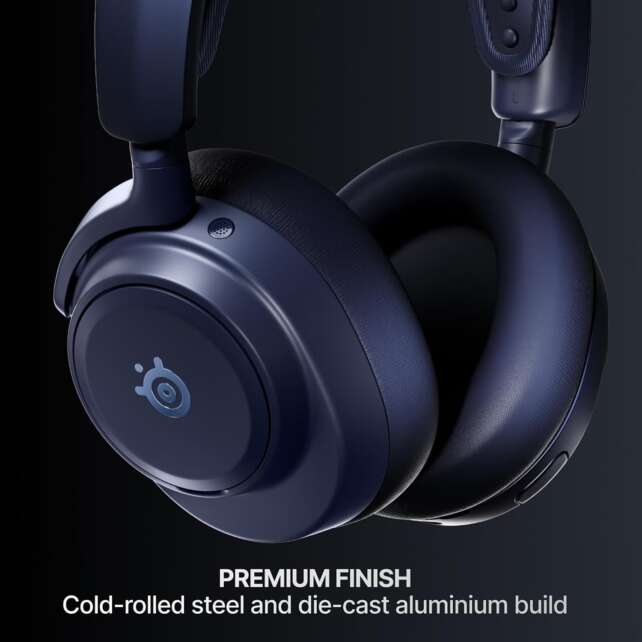
Description
The SteelSeries Arctis Nova Pro Omni is a premium wireless gaming headset designed for people who use multiple gaming systems. Its GameDAC hub can connect and mix several USB-C, line-in, and Bluetooth sources, while the headset adds Hi-Res audio, ANC, a retractable ClearCast Pro microphone, deep EQ customization, and two hot-swappable batteries.It is excellent for multi-console households and competitive players who want easy source switching, strong spatial imaging, and effectively continuous battery life. Its $399.99 price is difficult to justify for one-platform users, and the plastic-heavy build, warm faux-leather cushions, merely good ANC, bright default treble, and potential OLED burn-in concern keep it from being flawless.
Positives
- Exceptional multi-system connectivity through the GameDAC hub.
- Three USB-C inputs plus line-in and line-out.
- Xbox, PC, PlayStation, Switch, Bluetooth, and mobile compatibility.
- Simultaneous hub and Bluetooth audio.
- Dual hot-swappable batteries provide effectively continuous use.
- Very low latency through wired and 2.4 GHz connections.
- Strong competitive gaming imaging and spatial depth.
- Detailed sound with broad EQ and game-specific presets.
- ClearCast Pro microphone with effective AI noise rejection.
- Adjustable ANC and useful passive isolation.
- Retractable microphone is convenient for travel and automatically mutes.
- Mobile app provides game-specific EQ for console users.
- GameDAC offers hands-on controls without requiring desktop software.
- USB-C direct charging and 3.5 mm support through the headset/hub.
- More affordable than the Nova Elite while retaining its central connectivity advantages.
Negatives
- Expensive at $399.99.
- Overkill for users with only one gaming system.
- Plastic-heavy build is less premium than the Nova Elite.
- Faux-leather cushions become warm during long sessions.
- Default V-shaped tuning can make treble and sibilance fatiguing.
- Dialogue and bright action-game effects may sound unnatural before EQ.
- ANC is good but not class-leading for travel.
- Headset is not stable during exercise and has no IP rating.
- Bluetooth is limited to one device at a time.
- Analog cable is not included.
- Battery swapping briefly powers the headset off and on.
- GameDAC OLED display may be susceptible to burn-in over time.
- Desktop software is powerful but complex.
- Ear-cup sliders and hub wheel feel less refined than the Elite.
- 40 mm drivers do not sound as rich as the Elite’s more advanced drivers.
Battery life is also unusually practical. The headset includes two removable batteries, with one in use and the other charging in the hub. SteelSeries calls this the Infinite Power System. Independent testing produced roughly 27 to nearly 33 hours per battery, and swapping packs allows practically continuous play as long as the spare is charged.
Audio is detailed and effective for gaming, especially competitive shooters. Footsteps, gunfire, and positional cues are easy to locate because the headset creates strong spatial width and depth. However, RTINGS and SoundGuys describe a V-shaped default profile with boosted bass and treble. This can emphasize gaming cues but may make sibilant dialogue or bright sound effects tiring. The extensive EQ system is therefore an important part of the product rather than an optional extra.
The microphone is a strength. The retractable ClearCast Pro boom produces natural and balanced voice reproduction, while built-in AI Noise Rejection handles busy environments well. It is not as rich as a dedicated desktop microphone, but it is clear enough for competitive voice chat, calls, and streaming.
Comfort is good for seated use, helped by the flexible ski-goggle-style suspension band and thick ear cushions. The pleather pads can become warm after extended wear, and RTINGS found the headset unstable during exercise. The plastic-heavy construction also feels less luxurious than the Nova Elite, although it remains solid in ordinary use.
Specifications
- Product: SteelSeries Arctis Nova Pro Omni Wireless Gaming Headset
- Official price: $399.99
- Design: Closed-back over-ear wireless gaming headset
- Wireless hub: Dedicated SteelSeries GameDAC/Wireless Hub with source mixing and controls
- Wireless audio: Low-latency 2.4 GHz wireless
- Bluetooth: Bluetooth 5.3 with simultaneous use alongside hub audio
- Bluetooth features: LE Audio and LC3+ support; aptX and LDAC are not supported according to SoundGuys
- Hi-Res support: Hi-Res Wireless Certified, up to 96 kHz/24-bit audio
- Drivers: 40 mm neodymium drivers reported by Digital Foundry and RTINGS
- Noise control: Active Noise Cancellation with adjustable strength
- Microphone: Retractable ClearCast Pro boom microphone with built-in AI Noise Rejection
- Battery: Two hot-swappable rechargeable batteries
- Battery rating: SteelSeries describes the system as effectively unlimited; independent results ranged from roughly 27 to nearly 33 hours per battery
- Hub inputs: Three USB-C ports, 3.5 mm line-in, 3.5 mm line-out, and Bluetooth
- Source capacity: Up to four audio sources through the hub and connected wireless systems
- Simultaneous audio: Game audio can be mixed with Bluetooth/mobile audio
- Software: SteelSeries GG/Sonar desktop software and Arctis mobile app
- Customization: Parametric EQ, graphic EQ, game-specific presets, microphone EQ, sidetone, ANC, noise reduction, and audio routing
- Compatibility: PC, macOS, Xbox, PlayStation, Nintendo Switch, mobile, and other compatible devices, subject to port and platform configuration
- Headband: Ski-goggle-style adjustable suspension headband
- Earcups: Thick faux-leather memory-foam cushions with rotating ear cups
- Analog support: 3.5 mm capability through the headset/hub; an analog cable is not included according to independent reviews
- Available colors: Black, White, and Midnight Blue
Design and Build Quality
The Nova Pro Omni has a restrained appearance that suits both gaming desks and office environments. The headband uses a flexible suspension strap rather than a thick fixed cushion, and the ear cups rotate flat for easier storage. The retractable boom microphone disappears into the left cup and mutes when stored.
SteelSeries uses more plastic than it does on the Nova Elite. That cost-saving decision is visible in the yokes, ear-cup controls, and hub details, but the headset still feels solid for normal use. SoundGuys praised the metal headband and overall construction while criticizing the rougher ear-cup sliders.
The GameDAC hub is the central design feature. It has a large control wheel, a display, a secondary control, USB-C inputs, line-in and line-out, and a dedicated battery-charging slot. Users can change volume, EQ, microphone settings, ANC, sidetone, and other options without opening the desktop application.
The hub’s display is useful, but SoundGuys raised a long-term OLED burn-in concern. The same volume and battery elements can remain static for long periods, and the base station is likely to stay powered on at a desk. This is not proof that burn-in will occur, but it is a reasonable durability caveat for a $399.99 product.
The ear-cup controls are easy to identify by touch. They include power, Bluetooth pairing and playback, ANC, volume, microphone mute, and other functions. The controls are more intuitive than the software interface, and Digital Foundry particularly liked the tactile feel of the hub wheel.
Comfort and Fit
The suspension headband automatically distributes pressure and makes the headset comfortable for many users. RTINGS rated the fit comfortable for long sessions, while Digital Foundry described it as a comfortable option for home, office, travel, and occasional outdoor use.
The faux-leather memory-foam cushions create a dependable seal, which helps both bass delivery and passive isolation. The drawback is heat. SoundGuys noticed warmth after roughly an hour, although it did not become intolerable until much later in the session. This headset is better suited to cool rooms than hot environments.
The headset is not intended for exercise. RTINGS found it unstable during light movement and noted the lack of an IP rating. It is comfortable for a chair, desk, commute, or flight, but it can shift during vigorous activity.
Glasses and hair can change the seal. RTINGS found decent rather than perfect frequency-response consistency because fit can affect bass and midrange transmission. Users should adjust the suspension band carefully and ensure the cushions fully surround the ears before evaluating sound.
Audio Quality
The Nova Pro Omni uses 40 mm neodymium drivers rather than the more exotic carbon-fiber drivers in the Nova Elite. Digital Foundry found the Omni less rich and full than the Elite but still detailed and enjoyable for music, games, and general media.
The default profile is not neutral. RTINGS and SoundGuys describe a V-shaped response that boosts bass and treble, while Digital Foundry heard a cleaner and more controlled presentation that emphasizes useful gaming frequencies. These descriptions are not necessarily contradictory: the headset can sound balanced in practical gaming use while still measuring or presenting a distinctly shaped response.
Competitive gaming is where the tuning works best. Footsteps and gunfire are easy to locate, and the strong spatial width and depth make it possible to follow opponents across a large sound field. SoundGuys found that separating multiple simultaneous sounds can require some effort, but localization remained excellent.
Dialogue-heavy games and bright effects are more problematic. SoundGuys found some voices and sibilant sounds fatiguing, while RTINGS identified treble peaks that can make sharp content harsh. A lower-treble or game-specific EQ preset improves the experience considerably.
Music playback is good rather than class-leading. Bass is controlled, mids are slightly restrained, and treble remains detailed. The headset handles most genres well, but tracks with heavy sub-bass or already-bright mastering may not sound as natural as they do on a more neutral headphone.
The 96 kHz/24-bit capability is technically impressive, but Digital Foundry did not hear a decisive difference compared with 16-bit/48 kHz streaming. The practical value lies more in the drivers, DSP, EQ, and connectivity than in the resolution specification alone.
Gaming Performance and Spatial Audio
The Nova Pro Omni is one of the strongest headsets for competitive players who want precise localization. In Counter-Strike 2, Battlefield 6, Marathon, and similar games, footsteps and gunfire are easy to place, especially with an appropriate game-specific preset.
The headset produces a broad spatial field with convincing depth transitions. SoundGuys described the effect as unusually easy for tracking enemy movement, while Digital Foundry also found footsteps clear in busy competitive situations.
The default sound is less universally successful in cinematic action games. Dialogue, hacking effects, and sibilant content can become too bright or unnaturally clean. The parametric EQ and large library of game profiles are therefore worth using rather than leaving the headset in its factory profile.
Latency is excellent through the hub and wired connections. RTINGS found very low latency for wired and non-Bluetooth wireless use, and SoundGuys reported that Bluetooth latency was noticeable in principle but difficult to detect in ordinary use. Competitive gaming should use the hub rather than Bluetooth.
The GameDAC can mix sources, route audio, and provide hands-on control while the headset is in use. This is more useful than a conventional charging dock for users who change systems frequently.
Active Noise Cancellation and Isolation
The Nova Pro Omni’s ANC is effective against common low-frequency noise. RTINGS found that maximum ANC attenuates a useful amount of rumble, while SoundGuys reduced air-conditioner, traffic, and other environmental sounds successfully.
The system is not at the level of the best dedicated travel headphones. Voices still come through to a degree, and ANC performance depends on the ear-pad seal. The passive seal itself is good, and the combination is enough to make gaming in a noisy room more comfortable.
Sound leakage is low, so people nearby are unlikely to hear much of the game or music. This makes the headset more practical for offices, shared rooms, and travel.
ANC control is available through the ear-cup controls, the GameDAC, and the SteelSeries software. The ability to tune ANC and transparency without changing the physical fit is convenient, though some users may prefer a simpler control scheme.
Microphone Quality
The retractable ClearCast Pro microphone is one of the Nova Pro Omni’s most convincing features. RTINGS found natural, balanced voice reproduction, and Digital Foundry described the microphone as clear even if not as full-bodied as a dedicated desktop unit.
The built-in AI Noise Rejection is especially useful in noisy rooms. RTINGS found it capable of separating speech from busy backgrounds, and Digital Foundry noted that the processing works directly on the headset across platforms rather than being limited to PC software.
The SteelSeries software allows users to adjust microphone EQ, noise gate, compression, sidetone, and noise reduction. RTINGS notes that AI calibration may take several seconds, but the resulting noise handling is strong.
The retractable design is better for travel than a permanently protruding microphone. It also automatically mutes when retracted and provides a visible mute indicator.
Wireless Connectivity and GameDAC
Connectivity is the Nova Pro Omni’s main competitive advantage. The GameDAC supports three USB-C sources, line-in, line-out, and Bluetooth. It can be connected to a PC, PS5, Xbox, Switch, and other devices simultaneously, with audio routing and mixing available from the hub.
The Xbox USB port is specialized, so buyers with an Xbox should connect it to the correct input. The remaining ports support PC, PlayStation, Switch, and compatible systems. Digital Foundry found that the arrangement worked smoothly and that the line-out could automatically route sound to desktop speakers when the headset was turned off.
The headset can mix a hub source with Bluetooth. This is useful for answering phone calls, listening to mobile audio, or monitoring another device while gaming. SoundGuys found no obvious quality drop while mixing the two connections.
Bluetooth is not a replacement for the 2.4 GHz connection in competitive gaming, but it adds flexibility for mobile use. RTINGS notes that only one Bluetooth device can be connected at a time.
The mobile application is a major improvement over older SteelSeries headsets. Digital Foundry found it particularly useful for console players because it provides game-specific EQ changes without requiring a PC. The desktop GG/Sonar environment remains more powerful, but it is also more complex.
Battery Life and Charging
The two-battery system is effectively the headset’s defining convenience feature. One battery remains in the headset while the spare charges in the hub. When the active battery is depleted, users swap in the charged pack and place the empty one in the dock.
Independent battery results vary by test conditions. RTINGS reports roughly 27 hours with ANC enabled, SoundGuys measured 32 hours and 51 minutes using 2.4 GHz, and SteelSeries advertises effectively unlimited use through the dual-battery system. The variation reflects ANC, volume, connection, and power settings.
Swapping the battery turns the headset off and back on, unlike the more expensive Nova Elite’s system. The interruption is brief, but it is not completely seamless. SteelSeries claims approximately four hours of playback from a 15-minute charge if both batteries become depleted.
For desk use, the hub means users rarely need to connect a charging cable. The headset also supports direct USB-C charging, which is useful when traveling or when the hub is not available.
Software and Controls
SteelSeries GG/Sonar offers deep control over the headset. Users can change headset and microphone EQ, use parametric bands, apply hundreds of game-specific profiles, adjust ANC and sidetone, route audio, set noise reduction, and save distinct profiles for different connection types.
The PC application is powerful but can feel complex. Digital Foundry found the extra audio devices and routing options somewhat annoying, although the system worked reliably once configured. SoundGuys praised the granularity and considered the EQ tools among the strongest available in a gaming headset application.
The mobile Arctis application is less capable than the desktop program but easier to understand. It provides presets and remote control, and it allows console users to change EQ while the headset remains connected to a console through the hub.
The GameDAC reduces the need to open the app for everyday changes. Its wheel and display provide direct adjustment of volume, EQ, source routing, ANC, microphone settings, and other features.
Value for Money
At $399.99, the Nova Pro Omni is expensive. Its value is strongest for people with multiple gaming systems, a shared gaming room, several computers, or a need to combine work and mobile audio with console sound. The GameDAC can replace several separate adapters and makes one headset usable across a complex setup.
The value is much weaker for a single-platform player. Less expensive headsets can provide excellent game audio and microphone performance without the hub, source switching, or dual-battery system. Digital Foundry specifically warns that the Omni is overkill for one PC or console.
Compared with the Nova Elite, the Omni makes sensible compromises: more plastic, less exotic drivers, and weaker ANC, but nearly the same practical connectivity concept at $200 less. Compared with the Audeze Maxwell 2, the Omni offers better ANC, comfort, source switching, and software flexibility, while the Audeze provides a more natural sound profile and longer single-battery operation.
Who Should Buy the Arctis Nova Pro Omni?
The Nova Pro Omni is for players who genuinely need one headset across several systems. It is particularly well suited to households with a PC, Xbox, PlayStation, and Switch connected in the same room, as well as streamers or office users who need to combine computer, console, and mobile audio.
Competitive players will also appreciate the low latency, strong spatial localization, retractable microphone, and detailed EQ. The headset is less compelling for users who play on one platform, dislike warm ear cushions, prefer neutral sound without tuning, or need a lighter headset for movement and exercise.
Frequently Asked Questions
Is the SteelSeries Arctis Nova Pro Omni worth buying?
Yes, for multi-system users who will use the GameDAC, source mixing, dual batteries, and broad compatibility. It is much harder to justify for someone who owns only one PC or console because less expensive headsets can deliver similarly strong gaming audio.
What is the main advantage of the Nova Pro Omni?
Its main advantage is the GameDAC connectivity system. It can connect several PCs, consoles, line-in sources, and Bluetooth devices, mix audio, and provide direct control from one hub.
How many devices can the hub connect?
The hub has three USB-C ports, line-in, and line-out, while Bluetooth adds another wireless source. SteelSeries and independent reviewers describe a system capable of handling up to four sources through the hub and wireless connections, depending on how the devices are connected.
Does the Nova Pro Omni work with Xbox?
Yes, but Xbox should be connected to the GameDAC’s designated Xbox-compatible USB-C input. The other USB-C ports support PC, PlayStation, Switch, and compatible devices.
Does it work with PS5 and Nintendo Switch?
Yes. Official and independent sources list PlayStation and Switch compatibility, along with PC, Xbox, mobile, and other supported systems.
Can it mix game audio and Bluetooth?
Yes. You can hear audio from the wireless hub and Bluetooth simultaneously. This is useful for phone calls or mobile audio while gaming.
How long does each battery last?
Independent tests measured about 27 to nearly 33 hours per battery, depending on ANC, volume, and connection settings. The second battery charges in the hub, allowing effectively continuous use.
Does swapping batteries interrupt audio?
Yes. Unlike the Nova Elite, swapping the Omni’s battery briefly turns the headset off and back on. The interruption is short, but it is not completely seamless.
Does the headset have ANC?
Yes. The ANC is adjustable and effective against low-frequency rumble such as air-conditioning, traffic, and aircraft noise. It is useful but not as powerful as the best dedicated ANC headphones.
Is the microphone good?
Yes. The retractable ClearCast Pro microphone sounds natural and clear, and AI Noise Rejection works well in busy rooms. It is not as rich as a dedicated desktop microphone, but it is very good for gaming, calls, and streaming.
Does the microphone work on console?
Yes. Digital Foundry found that AI noise cancellation is built into the headset and works across platforms rather than being limited to PC software.
Is the Nova Pro Omni good for competitive FPS games?
Yes. RTINGS, Digital Foundry, and SoundGuys found low latency, wide spatial presentation, strong depth, and very good footstep and gunfire localization.
Is the default sound neutral?
Not exactly. RTINGS and SoundGuys describe a V-shaped profile with boosted bass and treble. This can benefit competitive cues but may make sibilance or bright dialogue tiring. EQ or game-specific presets are recommended for general use.
Does it support Hi-Res audio?
Yes. SteelSeries lists Hi-Res Wireless certification and up to 96 kHz/24-bit audio. Digital Foundry did not hear a decisive difference from ordinary 16-bit/48 kHz streaming, so the practical benefit depends on the source and listener.
Does the hub include an analog cable?
No analog cable is included according to independent reviews, although the headset and hub support 3.5 mm connections.
Is the Nova Pro Omni comfortable?
Generally yes for seated use. The suspension headband and memory-foam cushions distribute pressure well, but faux-leather pads can become warm and the headset is not stable during exercise.
Is the build quality good?
The headset feels solid, but it uses more plastic than the Nova Elite. The metal headband helps, while the rougher sliders and plastic-heavy construction make it feel less luxurious than the higher-priced model.
Is the SteelSeries software good?
It is exceptionally deep but somewhat complex. GG/Sonar provides parametric EQ, game profiles, microphone controls, routing, ANC, and noise reduction. The mobile app is easier to use and particularly valuable for console EQ changes.
Can the headset be used without the GameDAC?
Yes. It can be used through Bluetooth, direct USB-C connections, wired connections, and compatible wireless configurations. However, the GameDAC is the feature that justifies much of the price, so users who do not need it should consider a less expensive headset.
Is the Nova Pro Omni better than the Audeze Maxwell 2?
It depends on priorities. The Nova Pro Omni offers ANC, a much more capable multi-source hub, dual batteries, and more extensive software. The Audeze Maxwell 2 has a less exaggerated sound profile and strong Bluetooth flexibility but lacks dedicated ANC.
Is the Nova Pro Omni better than the Nova Elite?
The Nova Elite offers more premium materials and drivers, while the Omni keeps much of the practical connectivity at $200 less. The Omni is the better value for many multi-system users, but the Elite remains superior if build and audio refinement matter more than price.
Verdict
The SteelSeries Arctis Nova Pro Omni earns 4.5 out of 5 stars. It is an outstanding multi-system gaming headset whose GameDAC hub, four-source connectivity, dual batteries, low latency, strong microphone, ANC, mobile app, and extensive EQ make it unusually versatile. For players moving between several consoles and PCs, it is one of the most convenient wireless audio systems available.
The headset is less universal than its price suggests. The plastic-heavy construction is not as premium as the Nova Elite, the faux-leather cushions can become hot, the default treble is occasionally fatiguing, ANC is good rather than exceptional, and the OLED display raises a reasonable burn-in question. Single-platform players should save money with a simpler headset.
Buy it if you need a single headset for multiple consoles, PC, mobile audio, source mixing, and effectively continuous wireless use. Look elsewhere if you want the best possible ANC, a lighter exercise-friendly design, a perfectly neutral sound out of the box, or a budget-friendly one-platform headset.
