

The original 8BitDo Wireless Arcade Stick is a remarkably feature-rich entry-level fight stick. It combines a classic eight-way joystick and arcade buttons with Bluetooth, 2.4 GHz wireless, USB-C wired operation, a 1000 mAh battery, two dedicated macro buttons, turbo, joystick reassignment, dynamic button labels, and 8BitDo Ultimate Software. Its retro-inspired body is heavy enough to stay planted on a lap or table, and the approximately $89.99 launch price made it one of the more accessible wireless arcade sticks.
The compromises are equally clear. It is officially a Switch/PC product with no native PlayStation or Xbox support, the stock joystick is noisier and less premium than higher-end parts, Bluetooth is slower and more variable than wired or 2.4 GHz in Gamepadla’s test, and the “ultra-moddable” label overstates how easy the joystick is to replace. This is an excellent casual and beginner fight stick, but not a tournament-grade or all-console solution.
Overall rating: 4/5 stars. It remains an appealing budget choice when wireless play, Switch compatibility, macros, and approachable customization matter more than premium Sanwa parts or native PS5/Xbox support.
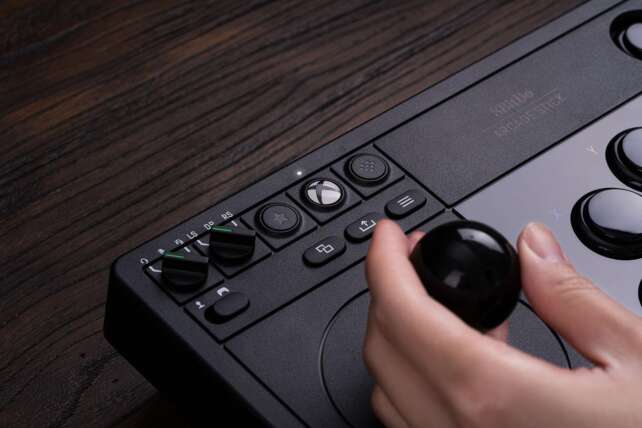
8BitDo’s original Arcade Stick is designed around a traditional joystick-and-button layout, but it adds the convenience features that were unusual at its roughly $90 launch price. The stick can connect over Bluetooth, 2.4 GHz through an included receiver, or USB-C, and the receiver stores in a compartment inside the chassis. Ultimate Software supports remapping, profiles, and macros, while P1/P2 provide two dedicated macro buttons.
Description
The original 8BitDo Wireless Arcade Stick is a remarkably feature-rich entry-level fight stick. It combines a classic eight-way joystick and arcade buttons with Bluetooth, 2.4 GHz wireless, USB-C wired operation, a 1000 mAh battery, two dedicated macro buttons, turbo, joystick reassignment, dynamic button labels, and 8BitDo Ultimate Software. Its retro-inspired body is heavy enough to stay planted on a lap or table, and the approximately $89.99 launch price made it one of the more accessible wireless arcade sticks.The compromises are equally clear. It is officially a Switch/PC product with no native PlayStation or Xbox support, the stock joystick is noisier and less premium than higher-end parts, Bluetooth is slower and more variable than wired or 2.4 GHz in Gamepadla’s test, and the “ultra-moddable” label overstates how easy the joystick is to replace. This is an excellent casual and beginner fight stick, but not a tournament-grade or all-console solution.
**Overall rating: 4/5 stars.** It remains an appealing budget choice when wireless play, Switch compatibility, macros, and approachable customization matter more than premium Sanwa parts or native PS5/Xbox support.
Positives
- Three connection modes: Bluetooth, 2.4 GHz, and USB-C wired.
- Native Nintendo Switch and Windows/Steam focus with broad utility.
- 1000 mAh rechargeable battery with strong stated endurance.
- Included 2.4 GHz receiver stores inside the chassis.
- Ultimate Software supports remapping, profiles, and macros.
- Two dedicated P1/P2 macro buttons and turbo functionality.
- Joystick can act as D-pad, left analog stick, or right analog stick.
- Dynamic mode-specific LED button labels.
- Heavy, bottom-weighted body stays planted on a lap or table.
- 24 mm and 30 mm button replacement support.
- Advertised universal joystick mounting plate and a practical upgrade path.
- Low launch price made it one of the most approachable wireless fight sticks.
- Suitable for fighting games, retro games, and general arcade titles.
Negatives
- No native PlayStation 4/5 or Xbox support.
- PS4 use requires a third-party converter and is not guaranteed.
- Bluetooth latency is higher and more variable than wired or 2.4 GHz in Gamepadla’s test.
- Gamepadla’s results are marked not verified and reflect one firmware/configuration.
- Stock joystick is noisier and less premium than high-end arcade parts.
- Buttons may produce a slight whining noise and menu labels are hard to read.
- “Ultra-moddable” marketing understates the difficulty of joystick replacement.
- A thin Torx T-10 tool and possible soldering may be needed for deeper modifications.
- Snap-in button support may disappoint users who prefer screw-in buttons.
- Palm rest is cramped compared with larger tournament sticks.
- Heavy 2.1 kg chassis is stable but not especially light for travel.
- Current retailer availability is uneven; one opened retailer no longer stocks it.
- Current marketplace pricing and warranty conditions vary.
The controller is also flexible within a gamepad ecosystem. A switch can assign the joystick as a D-pad, left analog stick, or right analog stick, making it useful for arcade games and some non-fighting titles. Dynamic lighting changes the visible button layout between Switch and PC/XInput mode.
The hardware is solid for the class. Independent reviewers praise its bottom-heavy construction and stable feel, while the chassis is reported at approximately 303 × 203 × 111.5 mm and about 2.1 kg when the joystick assembly is included. The stock controls are serviceable rather than luxurious: MonsterVine describes a noisy joystick and slight button whine, and the stock components are not Sanwa.
Modding is possible and worthwhile, but it is not entirely beginner-friendly. The buttons support common 24 mm and 30 mm arcade sizes, and the official/retailer material describes a universal joystick mounting plate. However, opening the case requires a thin Torx T-10 tool, the joystick microswitch wires are soldered, and joystick replacement can require more work than the marketing implies.
The platform boundary is the largest purchasing decision. Native support is for Nintendo Switch and Windows PC/Steam. Inverse made the stick work on PS4 with a Brook Wingman XE converter, but that is an unofficial adapter setup, not native support. The Xbox version is a separate model with its own wireless and console licensing, and the later Retro Wireless Arcade Fight Stick is also separate.
Specifications
- Model: Original 8BitDo Arcade Stick for Nintendo Switch and Windows PC.
- Common name: 8BitDo Wireless Arcade Stick.
- Type: Wireless and wired joystick arcade controller.
- Official primary platforms: Nintendo Switch and Windows PC/Steam.
- Native PlayStation support: None stated; PS4 use requires an unofficial third-party converter, and PS5 compatibility is not native.
- Native Xbox support: None for the original model; use the separate Xbox-licensed Arcade Stick for Xbox if Xbox console support is required.
- Connection modes: Bluetooth, 2.4 GHz wireless via included receiver, and wired USB-C.
- Battery: 1000 mAh rechargeable lithium-ion battery.
- Stated battery life: 40 hours on 2.4 GHz and 30 hours on Bluetooth, with approximately four hours to charge.
- Joystick: Eight-way arcade joystick with selectable D-pad, left-stick, or right-stick function.
- Buttons: Arcade buttons supporting 24 mm and 30 mm replacement sizes.
- Macro controls: Two dedicated P1/P2 macro buttons, configurable through Ultimate Software on PC.
- Turbo: Included turbo functionality.
- Software: 8BitDo Ultimate Software for button mapping, profiles, and macros.
- Mode feedback: Dynamic LED button layout changes between Switch and PC/XInput mode.
- Receiver storage: Dedicated hidden compartment for the 2.4 GHz receiver.
- Approximate dimensions: Approximately 303 × 203 × 111.5 mm, with reported height including the joystick.
- Approximate weight: Approximately 2100 g / 2.1 kg.
- Modding: Universal joystick mounting plate is advertised; buttons are replaceable, but joystick replacement may require a thin Torx tool and soldering.
- Included accessories: 2.4 GHz receiver, USB-C cable, and instruction manual.
- Launch-era price: Approximately $89.99–$90 US.
- Current availability: Official product page remains online, but at least one opened retailer reports that it no longer stocks the product; regional stock and resale prices vary.
Detailed Product-Specific Analysis
A strong budget introduction to traditional fight sticks
The original 8BitDo Arcade Stick is aimed at players who want a conventional arcade control layout without spending the $150–$300 often associated with higher-end sticks. MonsterVine and Inverse both describe a launch-era price around $90, which made the device unusually accessible for a wireless model.
The joystick sits on the left and the action buttons on the right in the familiar arcade arrangement. That makes the controller immediately recognizable to anyone who has used an arcade cabinet, while the ability to assign the joystick as a D-pad or analog input expands its usefulness beyond traditional fighting games.
This is not a device that automatically makes a player better. Inverse correctly notes that an arcade stick still requires practice, but it can make quarter-circle, half-circle, and dragon-punch motions feel more deliberate once the player learns the gate and button spacing. It is best approached as a different input instrument rather than a shortcut.
Three connection modes are the central feature
The original model supports Bluetooth, 2.4 GHz wireless through a dedicated USB receiver, and wired USB-C. This is more flexible than many budget arcade sticks, and the receiver’s storage compartment helps prevent it from being misplaced when the controller is packed away.
The 2.4 GHz mode is the best wireless option for latency-sensitive play. MonsterVine and Inverse report no obvious lag in casual use, while Inverse recommends 2.4 GHz in theory for a more stable connection. Gamepadla’s hardware test supplies a more nuanced picture: average button latency was 7.09 ms over the dongle compared with 4.82 ms by cable and 16.19 ms over Bluetooth, and Bluetooth showed substantially higher jitter.
Bluetooth is convenient for compatible Switch and mobile-style setups, but it should not be chosen solely because the word “wireless” sounds equivalent across modes. For competitive play, wired is the conservative choice; for normal living-room use, 2.4 GHz is the best balance.
Battery life is generous on paper
Pimoroni lists a 1000 mAh rechargeable lithium-ion battery, with 40 hours of stated play time over 2.4 GHz and 30 hours over Bluetooth, plus a four-hour charge time. Those are manufacturer/retailer figures and not a standardized independent endurance test, but they are strong numbers for a full-size arcade controller.
A battery also makes the stick practical for moving between a Switch dock, PC, and another compatible setup. The trade-off is that the controller eventually needs charging and may be less attractive to tournament players who prefer a permanently wired device. The USB-C wired connection remains available when the battery is low or the player wants the lowest-latency path.
Controls are good for the price, not premium out of the box
The stock joystick and buttons are serviceable. MonsterVine found the joystick noisier than preferred and noted a slight whining sound from the buttons, although it still considered the overall feel decent for the price. Inverse says the stick has a solid heft and that the buttons are comparable to Sanwa buttons in its personal use, but it also confirms that Sanwa parts are not included.
The approximately 2.1 kg body is a strength. Its bottom-heavy construction helps it stay stable on a lap or table rather than sliding during play. That weight is helpful for fighting games, although it reduces the appeal for users who want a very light travel controller.
The menu buttons are less polished. MonsterVine says their engraved icons are difficult to see, and TouchArcade’s related coverage indicates that the original’s feature layout differs from the later Xbox edition. These are small issues during a match, but they reinforce the controller’s budget heritage.
Ultimate Software, macros, and turbo
8BitDo’s Ultimate Software is one of the original model’s best features. The official page says users can remap the buttons, create profiles, and create long-sequence macros for P1/P2. Turbo is also included. These functions make the controller useful for arcade titles and retro games as well as fighting games.
The two dedicated macro buttons are not equivalent to four modern rear paddles. They are useful extra controls, but their placement and macro rules may not be accepted at every tournament. A buyer should also distinguish convenience macros from legitimate in-game remapping and consult event rules before competing.
The joystick assignment switch is particularly practical. The player can select D-pad, left analog, or right analog behavior, which lets one physical arcade stick work with games that expect different controller input types. This flexibility is a real advantage over a basic D-input-only fight stick.
Dynamic button labels are useful on Switch and PC
The controller’s LEDs change the visible button layout when it switches between Nintendo Switch and PC/XInput mode. This is a thoughtful feature because the face-button labels differ between the two ecosystems, and the lighting reduces the need to remember which physical button corresponds to which prompt.
It is a convenience feature rather than a substitute for learning the layout. The LEDs can also be less visible in a bright room, and the physical menu-button markings remain subdued according to MonsterVine.
Modding: approachable for buttons, harder for the joystick
8BitDo and Pimoroni describe the device as “ultra-moddable,” with support for 24 mm and 30 mm arcade buttons and a universal joystick mounting plate that accommodates many Sanwa, Seimitsu, Happ, and IL-style parts. This creates a useful upgrade path: a player can begin with the stock controls and later install preferred buttons or a different gate.
The qualification is that the process is not uniformly easy. MonsterVine needed a very thin Torx T-10 screwdriver to open the case, found the joystick microswitch wires soldered, and found the quick-disconnect button leads somewhat difficult to remove. The case accepts snap-in buttons rather than all screw-in designs. Inverse similarly describes button replacement as relatively manageable while joystick replacement may require soldering.
For most buyers, replacing the buttons or gate is enough. Players who want a full Sanwa joystick conversion should be comfortable with tools, wiring, and possibly soldering, or should budget for professional modification. The stick is moddable, but “ultra-moddable” should not be read as “tool-free.”
Native platform support is narrower than the name suggests
The original model is officially designed for Nintendo Switch and Windows PC. TouchArcade also reports use with Steam and Steam Deck, but the reliable core boundary remains Switch/PC.
There is no native PlayStation or Xbox support. Inverse used a Brook Wingman XE converter to make the stick work with PS4, but the article says the 8BitDo device was not officially listed by Brook and that firmware/connection troubleshooting was required. This workaround should not be presented as guaranteed compatibility, and it adds the cost and complexity of another accessory.
The later Xbox-licensed Arcade Stick for Xbox is a separate model. TouchArcade says it supports Xbox consoles and Windows through 2.4 GHz and wired operation but lacks Bluetooth, while the original offers three modes and more flexible platform coverage outside Xbox. Buyers who need Xbox should choose by the exact model name rather than assuming all 8BitDo Arcade Sticks are interchangeable.
Casual play versus tournament use
For casual home play, the original is easy to recommend. MonsterVine and Inverse both report that games recognized it quickly and that wireless lag was not noticeable in ordinary play. The substantial body, approachable price, macros, and three connection modes give it a lot of utility.
Tournament players may reasonably prefer a more spacious, premium stick with known arcade components and a direct wired path. Inverse says the palm rest is cramped compared with larger sticks such as the Hori RAP 4 and explicitly says the device is not tournament-grade in size. The lack of native PS4/PS5/Xbox support also matters for venue hardware.
The controller can still be used for practice and local events where the platform permits it. Its limitations are about consistency, component prestige, platform licensing, and ergonomics—not the impossibility of playing serious fighting games on it.
Price and value
The original launched at roughly $90, and TouchArcade lists $89.99 in its 2023 comparison. At that price, its wireless operation, battery, software, macros, and modding path are unusually generous.
Current pricing is less certain. The official page remains available and points to Amazon, while Pimoroni’s opened page says it no longer stocks the item. Marketplace listings may appear around or below the old $89.99 price, but stock, color, seller, and warranty can vary. Buyers should not treat an old launch MSRP or an isolated used listing as a universal current price.
If the original is available near its historic $89.99 price, it is strong value. If scarcity pushes it above the price of newer or better-supported sticks, its advantages become less compelling, especially for buyers who need PS5, Xbox, or tournament-grade parts.
Frequently Asked Questions
Which 8BitDo Arcade Stick does this review cover?
It covers the original Switch/PC 8BitDo Arcade Stick, commonly called the 8BitDo Wireless Arcade Stick. It is the model with Bluetooth, 2.4 GHz, USB-C, a 1000 mAh battery, two dedicated macro buttons, and Switch/PC mode labeling. It is not the later Xbox-licensed stick and not the Retro Wireless Arcade Fight Stick.
What platforms does the original 8BitDo Arcade Stick support?
Its official primary platforms are Nintendo Switch and Windows PC. TouchArcade also reports use with Steam and Steam Deck.
Does it work on PlayStation?
There is no native official PlayStation support. Inverse made it work on PS4 with a Brook Wingman XE converter, but the adapter setup was not officially listed as supported for the 8BitDo stick and required troubleshooting. Do not treat PS4 or PS5 support as guaranteed.
Does it work on Xbox?
Not natively. The 8BitDo Arcade Stick for Xbox is a separate licensed model with different platform support and hardware details.
Is it wireless?
Yes. It supports Bluetooth and 2.4 GHz wireless through the included receiver, as well as wired USB-C. The receiver stores in a compartment on the stick.
How long does the battery last?
Pimoroni lists 40 hours on 2.4 GHz and 30 hours over Bluetooth from the 1000 mAh rechargeable battery, with approximately four hours to charge. These are stated figures rather than a standardized independent endurance result.
Which wireless mode has the lowest latency?
Wired is the safest lowest-latency choice. In Gamepadla’s test, average button latency was 7.09 ms over the 2.4 GHz dongle and 16.19 ms over Bluetooth, compared with 4.82 ms by cable. Bluetooth also had higher jitter.
Does it include Sanwa parts?
No. The stock controller does not include Sanwa parts. Independent reviewers found the stock parts playable, but users can replace buttons and other components if they are comfortable with the modification process.
Can I replace the buttons?
Yes. The device supports 24 mm and 30 mm arcade buttons, and independent coverage says button replacement is relatively approachable. The case is intended for snap-in buttons, so not every screw-in design will fit.
Can I replace the joystick?
Yes in principle, but it is more difficult than changing the buttons. The mounting plate is advertised as universal, while independent reviewers report that opening the case requires a thin Torx T-10 tool and the stock joystick wiring is soldered.
Does it support macros?
Yes. The two dedicated P1/P2 buttons can be assigned long-sequence macros through 8BitDo Ultimate Software on PC. Tournament organizers may restrict macro use, so check event rules.
Can the joystick act like an analog stick?
Yes. The controller can assign the joystick as a D-pad, left analog stick, or right analog stick.
Does it have turbo?
Yes. Turbo functionality is listed by 8BitDo and retailers.
Is it good for beginners?
Yes, especially for a beginner who uses Nintendo Switch or PC and wants a wireless, reasonably priced entry point. It is less suitable as a first purchase if the player needs PS5/Xbox support or is not sure that a traditional joystick layout is the right fit.
Is it tournament legal?
It can be used for practice and some events, but platform rules, macro rules, wireless rules, and venue hardware vary. Its cramped palm rest, stock components, and lack of native PlayStation support make it less universally tournament-ready than premium competition-focused sticks.
Is the original model still available?
The official 8BitDo page remains online and points to an Amazon purchase route, but the opened Pimoroni listing says it no longer stocks the product. Availability, color, price, warranty, and seller reputation should be verified in the buyer’s region.
How does it compare with the 8BitDo Arcade Stick for Xbox?
The original Switch/PC model has Bluetooth, 2.4 GHz, and wired modes, plus dedicated macro buttons. TouchArcade says the Xbox model is officially for Xbox and Windows, uses 2.4 GHz and wired connections, lacks Bluetooth, and has different top-right controls. Choose the exact model according to the console you own.
How does it compare with the 8BitDo Retro Wireless Arcade Fight Stick?
They are separate products. The Retro Wireless model has its own retro design, component, and platform specifications; this review does not use those specifications. Do not merge the two models because both include “wireless” and “arcade” in their names.
Is it worth about $90?
Near its historic $89.99 price, yes. The three connection modes, battery, Ultimate Software, macros, joystick reassignment, and modding path make it unusually capable for a first stick. It becomes less attractive if scarce stock pushes it above newer products or if the buyer needs native PS5/Xbox support.
Important Caveats
The product name is easy to confuse with later 8BitDo arcade sticks. This review is for the original Switch/PC model. Verify the exact platform wording, mode switch, receiver, and product photos before buying from a marketplace.
The official platform boundary is Nintendo Switch and Windows PC. PS4/PS5 and Xbox operation should not be described as native. A converter can sometimes add compatibility, but that introduces another device, possible firmware problems, and no guarantee of support.
Gamepadla’s latency page marks its test status as not verified. Its values are still useful evidence: cable was fastest, 2.4 GHz was next, and Bluetooth was slower and more variable in the tested firmware. Do not treat the numbers as a universal guarantee for every unit, OS, or firmware revision.
Battery-life figures are stated 8BitDo/retailer figures, not independent standardized endurance measurements. Brightness, connection mode, firmware, battery age, and play conditions can change the result.
The stock controls are not Sanwa, and the controller is not a tournament-grade premium stick out of the box. Independent reviewers liked the value but noted joystick noise, button noise, limited palm-rest space, and the need for tools or soldering for deeper modifications.
“Ultra-moddable” should be interpreted as “more modifiable than many budget sticks,” not “every part is plug-and-play.” Buttons and gates are more approachable than the joystick, and the case’s snap-in-button limitations matter when choosing replacements.
Macro use may violate tournament rules even though it is supported by Ultimate Software. The same applies to wireless play at venues that require wired controllers. Check the event’s current hardware policy.
The 2.1 kg approximate weight helps stability but makes the unit less convenient for lightweight travel. The opened sources do not establish a definitive cable length, so buyers should check the exact package listing rather than assuming a particular measurement.
The launch-era price was approximately $89.99–$90. Current pricing is not fully stable: the official page remains active, one opened retailer no longer stocks it, and marketplace prices vary by color, condition, region, and seller. Verify warranty and return terms before purchase.
Verdict
The original 8BitDo Wireless Arcade Stick is one of the best value-focused arcade controllers for Nintendo Switch and PC users who want traditional joystick play without giving up wireless convenience. Bluetooth, 2.4 GHz, and USB-C cover most compatible setups; the 1000 mAh battery is generous on paper; Ultimate Software adds profiles, remapping, and macros; and the joystick reassignment switch makes the device more versatile than a basic fighting stick.
Its limitations are understandable at the price. The stock joystick and buttons are not premium Sanwa parts, deeper modding needs tools and perhaps soldering, the palm rest is not especially spacious, and the platform boundary excludes native PlayStation and Xbox support. Bluetooth is also the least responsive mode in the available Gamepadla test, while current stock is less certain than it was at launch.
Final recommendation: Buy it if you play on Switch or PC, want a traditional arcade layout, and can find it near the historic $89.99 price. It is an excellent beginner and casual-home stick and a capable base for selective upgrades. Look elsewhere if you need native PS5/Xbox support, a large tournament chassis, premium out-of-box arcade parts, or a current product with more certain retailer availability. It earns 4/5 stars overall.
