

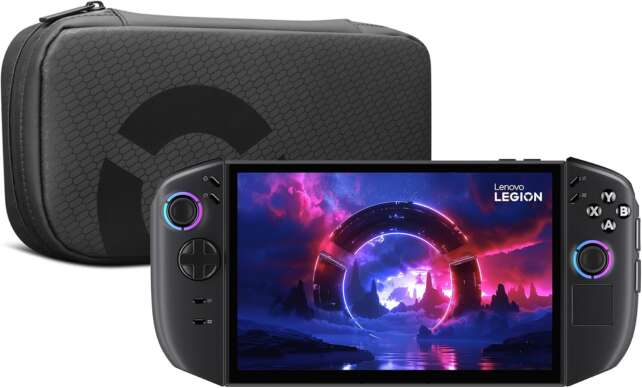
The Lenovo Legion Go 2 is a large-format Windows handheld built around an 8.8-inch OLED screen, detachable Legion TrueStrike controllers, a 74 Wh battery, and an integrated kickstand. Lenovo offers the family with AMD Ryzen Z2 or Ryzen Z2 Extreme processors, with configurations reaching 32 GB of LPDDR5X memory and 2 TB of storage. The premium Z2 Extreme model is a powerful and visually impressive handheld, while the lower-priced Z2/16 GB model is a different performance proposition and should not inherit the premium review unit’s benchmark expectations.
Its 1920 × 1200 OLED display is the star: it combines deep blacks, 100% DCI-P3 coverage, DisplayHDR True Black 1000 certification, and a 30–144 Hz variable refresh range. The detachable controllers, touchpad, FPS mouse mode, and excellent kickstand add unusual flexibility, but the device is heavy, the fan can become loud, the bottom ports are awkward in some positions, and Legion Space remains less seamless than SteamOS.
At $1,099 starting in the U.S. and £1,350 starting in the U.K. at the time of research, the Legion Go 2 is a premium purchase rather than a value handheld. It is most compelling for buyers who want the largest high-quality display and detachable-control flexibility in a Windows PC. It is less compelling for buyers who prioritize light weight, quiet operation, a simple console interface, or the highest frames per dollar.
The Legion Go 2 is Lenovo’s second-generation 8.8-inch Legion Go, officially titled Legion Go Gen 2 (8.8″). It retains the original family’s tablet-with-detachable-controllers concept but replaces the first generation’s 1600p IPS panel with a 1920 × 1200 OLED display, adopts revised ergonomics, adds a fingerprint reader on Windows models, and uses AMD Ryzen Z2-family processors.
Description
The Lenovo Legion Go 2 is a large-format Windows handheld built around an 8.8-inch OLED screen, detachable Legion TrueStrike controllers, a 74 Wh battery, and an integrated kickstand. Lenovo offers the family with AMD Ryzen Z2 or Ryzen Z2 Extreme processors, with configurations reaching 32 GB of LPDDR5X memory and 2 TB of storage. The premium Z2 Extreme model is a powerful and visually impressive handheld, while the lower-priced Z2/16 GB model is a different performance proposition and should not inherit the premium review unit’s benchmark expectations.Its 1920 × 1200 OLED display is the star: it combines deep blacks, 100% DCI-P3 coverage, DisplayHDR True Black 1000 certification, and a 30–144 Hz variable refresh range. The detachable controllers, touchpad, FPS mouse mode, and excellent kickstand add unusual flexibility, but the device is heavy, the fan can become loud, the bottom ports are awkward in some positions, and Legion Space remains less seamless than SteamOS.
At $1,099 starting in the U.S. and £1,350 starting in the U.K. at the time of research, the Legion Go 2 is a premium purchase rather than a value handheld. It is most compelling for buyers who want the largest high-quality display and detachable-control flexibility in a Windows PC. It is less compelling for buyers who prioritize light weight, quiet operation, a simple console interface, or the highest frames per dollar.
Positives
- Excellent 8.8-inch OLED display: 1920 × 1200, 144 Hz VRR, deep blacks, DCI-P3 color, and HDR capability make it one of the most visually impressive PC handheld screens.
- Detachable-controller flexibility: handheld, console, and FPS mouse modes are meaningful rather than purely cosmetic features.
- Hall-effect joysticks: magnetic sensing reduces the traditional stick-drift mechanism associated with contact-based controls.
- Strong kickstand: sturdy and adjustable for tabletop gaming, detached-controller use, FPS mode, or docked play.
- Large 74 Wh battery: a substantial capacity for the class, even though demanding gaming can still drain it quickly.
- Two USB4 ports: 40 Gbps data, DisplayPort, and Power Delivery support improve docked flexibility.
- High-end Z2 Extreme performance: premium configurations can deliver strong 1080p/1200p handheld results in well-tuned games.
- Useful Windows controls: right-controller touchpad, fingerprint reader on Windows models, shortcut buttons, and programmable rear controls help with desktop tasks.
- Expandable storage: user-upgradeable SSD references and microSD expansion are valuable for a large PC library.
Negatives
- Large and heavy: approximately 2.03 pounds and over 11 inches long, making long handheld sessions tiring for some users.
- High price: $1,099 starting and up to $1,479 reported in the U.S. put it near gaming-laptop territory.
- Variant confusion: Ryzen Z2/16 GB, Z2 Extreme/32 GB, 1 TB/2 TB, and Windows/SteamOS models are not performance-equivalent.
- Fan noise under load: independent reviews report loud performance modes, frequent fan activity, and heat near the exhaust.
- Legion Space trails SteamOS: the software is improved but still does not deliver the same console-like simplicity.
- Detaching controllers is awkward: the mechanism is useful but not as effortless as it should be.
- FPS mode is niche: clever for shooters and Windows navigation, but not everyone finds the vertical mouse arrangement natural.
- Port placement compromises: the bottom USB-C port and bottom headphone jack can be inconvenient in tabletop or flat-surface use.
- Battery remains workload dependent: even the 74 Wh pack delivered only a little over two hours in IGN’s high-settings Cyberpunk test.
- Speakers can lose clarity under fan noise: a headset is preferable for serious play.
The model name hides important configuration differences. The entry configuration uses Ryzen Z2 and 16 GB of LPDDR5X memory, while the premium versions use Ryzen Z2 Extreme and 32 GB. Storage references include 1 TB and 2 TB PCIe SSDs, and Lenovo says SteamOS is available only on selected models. A $1,099 Ryzen Z2/16 GB machine is not equivalent to a $1,349 or $1,479 Ryzen Z2 Extreme/32 GB model.
The hardware is distinctive. The controllers detach like a Nintendo Switch, the right half has a touchpad and can be placed in the included controller base for a vertical FPS mouse mode, and the wide kickstand makes tabletop or monitor-connected play practical. Hall-effect joysticks reduce the usual physical-contact wear associated with stick drift. In practice, reviewers disagree on how natural the controller separation and FPS configuration feel: the features are flexible, but some users may prefer a conventional controller.
The OLED display delivers the strongest argument for the premium configuration. At 8.8 inches, 1920 × 1200, 16:10, 144 Hz, and VRR, it offers more screen area than most handheld PCs while avoiding the original Go’s problem of frequently asking integrated graphics to drive a demanding 1600p target. The OLED panel brings much better blacks and color than the original LCD, although demanding games may still need upscaling or lower settings.
The premium Z2 Extreme model performs well, but it is not a universal generational revolution. Thurrott recorded approximately 55–75 fps in Call of Duty: Black Ops 6 at native resolution with Normal/High settings and Balanced power/thermal modes, while IGN found 39 fps in a demanding Call of Duty: Black Ops 7 test at 1200p/Extreme/FSR Quality and 65 fps in Forza Horizon 5. PCMag found performance-focused modes noticeably loud and judged the improvement over a well-tuned last-generation ROG Ally X narrower than the price implies.
Specifications
- Product family: Lenovo Legion Go Gen 2 (8.8″), commonly called Legion Go 2.
- Processors: AMD Ryzen Z2 or up to Ryzen Z2 Extreme, depending on SKU. Lenovo describes the Extreme model as up to 8 Zen 5 cores/16 threads with RDNA 3.5-based Radeon 890M graphics.
- Operating systems: Windows 11 Home on Windows configurations; SteamOS on selected models only.
- Memory: 16 GB LPDDR5X-7500-class on some Ryzen Z2 models; up to 32 GB LPDDR5X-8000-class on premium Ryzen Z2 Extreme models. Memory is soldered.
- Storage: 1 TB or 2 TB PCIe 4.0 NVMe SSD configurations are reported, with user-upgradeable SSD storage and microSD expansion.
- Display: 8.8-inch 1920 × 1200 OLED touchscreen, 16:10 aspect ratio, 144 Hz refresh, 30–144 Hz VRR, 500 nits typical brightness, up to 1100 nits HDR peak in independent coverage, 100% DCI-P3, and VESA DisplayHDR True Black 1000.
- Controllers: Detachable Legion TrueStrike controllers with Hall-effect joysticks, pivot D-pad, rear buttons, front shortcut controls, vibration, and configurable mappings.
- FPS mode: Right controller docks into the included controller base and operates as a vertical mouse with two click buttons and an assignable rear button.
- Kickstand: Integrated wide adjustable kickstand.
- Battery: 74 Wh with Lenovo Super Rapid Charge.
- USB: Two USB4 Type-C ports with 40 Gbps data, DisplayPort, and Power Delivery support.
- Wireless: Wi-Fi 6E 2×2 and Bluetooth 5.3.
- Audio: Dual 2 W speakers with Nahimic and Spatial Audio on Windows configurations; 3.5 mm headset jack.
- Expansion: microSD card support, with Lenovo advertising up to 2 TB microSD expansion.
- Security: Fingerprint reader integrated into the power button on Windows models; fingerprint functionality is disabled on SteamOS configurations.
- U.S. price context: $1,099 starting; $1,349 for the PCMag Z2 Extreme/32 GB/1 TB test configuration; up to $1,479 reported by IGN for the highest-end model.
- U.K. price context: Lenovo UK displayed a £1,350 starting price during research.
Detailed Product Analysis
Exact model and variant boundaries
This review covers the second-generation 8.8-inch Legion Go family. Lenovo’s official consumer page calls it Legion Go Gen 2 (8.8″), while independent coverage generally calls it Legion Go 2. Those labels refer to the same generation only when the screen size, detachable-controller design, and configuration match.
The family is not one fixed specification. Lenovo offers up to Ryzen Z2 Extreme, but PCMag identifies a $1,099 entry model with Ryzen Z2 and 16 GB memory and a $1,349 Z2 Extreme/32 GB test model. IGN reports a range from $1,099 to $1,479, while Thurrott discusses a high-end 32 GB/2 TB configuration. The reviewer must therefore state the exact processor, RAM, SSD, and operating system rather than using “Legion Go 2” as though it represented one performance level.
The Go 2 is also distinct from the original Legion Go, which used an 8.8-inch 2560 × 1600 IPS panel and older Ryzen Z1-family processors, and from the smaller Legion Go S. The Go 2’s OLED panel, 74 Wh battery, and revised controller/chassis package are not specifications to transfer backward to either earlier model.
Ryzen Z2 Extreme performance
The premium Go 2 is one of the first handhelds to use AMD Ryzen Z2 Extreme. Lenovo describes the chip as having up to eight Zen 5 CPU cores/16 threads and RDNA 3.5 Radeon 890M graphics, and PCMag describes the Extreme model as using 16 graphics cores. The Z2 Extreme is the performance configuration that most independent reviews tested; the entry Ryzen Z2/16 GB model should be judged separately.
Thurrott’s results were strong in a well-tuned configuration. Call of Duty: Black Ops 6 ran at approximately 55–75 fps at native resolution, 144 Hz, Normal/High settings, and Balanced power and thermal management. The same reviewer later reported frame rates above 80 fps and sometimes over 100 fps after installing Full Screen Experience software, although the software change did not isolate a single causal factor.
IGN found a more measured advantage against last-generation hardware. In Call of Duty: Black Ops 7, the Go 2 reached 39 fps at 1200p with the Extreme preset and FSR Quality, compared with 32 fps on a 2024 ROG Ally X at 1080p; in Forza Horizon 5, both the Go 2 and that Ally X reached 65 fps under the compared test conditions. IGN’s 3DMark Time Spy results favored the Go 2 over the original Legion Go and Ally X, but the gap was not always large enough to justify the Go 2’s premium by performance alone.
PCMag’s conclusion is similar: the Z2 Extreme is capable and generally ahead of the handhelds in its comparison, but it does not produce the hoped-for sea change. A $1,099 Go 2 with Ryzen Z2 and 16 GB is especially difficult to justify for buyers focused on raw local performance, because it does not represent the premium review-unit behavior while still carrying a high starting price.
OLED display
The 8.8-inch OLED is the strongest Go 2 upgrade. It runs at 1920 × 1200 in a 16:10 aspect ratio and supports 30–144 Hz VRR. Lenovo lists 500 nits typical brightness and VESA DisplayHDR True Black 1000, while Thurrott and PCMag describe up to 1100 nits peak brightness for HDR content. The panel covers 100% of DCI-P3 in Lenovo’s product material and independent specifications.
The lower 1200p target is sensible for integrated graphics. The original Go’s 1600p LCD could look excellent in desktop and light-game use but often asked too much of an integrated GPU in demanding games. The Go 2’s OLED resolution is still sharp on an 8.8-inch panel, while the higher contrast, vivid color, and 144 Hz refresh improve both cinematic and competitive play. IGN described the display as the device’s real star, and Thurrott praised its radiant colors and deep blacks.
The screen does not eliminate the performance trade-off. Current AAA games may still need FSR, lower presets, frame-rate limits, or reduced render resolution, especially on the Ryzen Z2/16 GB model. OLED also adds no benefit if a buyer’s priority is the lowest possible price and the device is used mostly docked to an external display.
Detachable controllers and FPS mode
Lenovo’s detachable controllers create three intended modes. In handheld mode, both sides remain attached. In console mode, they detach and join with a charging connector to function as a standalone gamepad. In FPS mode, the right half sits in the included controller base and becomes a vertical mouse with two click buttons and a rear assignable button.
The controls are more advanced than a standard gamepad. Lenovo lists Hall-effect joysticks, a large pivot D-pad, programmable rear buttons, shortcut controls, vibration settings, and a right-controller touchpad. The touchpad is particularly useful because Windows still occasionally requires pointer movement, text fields, or desktop interaction.
The experience is not universally natural. Thurrott found the controllers well made but had difficulty adjusting to the large separation between the halves and often preferred a conventional Xbox controller. Both Thurrott and PCMag found detaching the controllers more awkward than it should be. FPS mode is clever, but Thurrott considered it poorly suited to the way he naturally wanted to use the handheld, while PCMag found it fun but not his preferred control method.
The right controller’s touchpad and the full set of rear/front shortcuts help Windows navigation, but they can also create a learning curve. IGN counts 27 buttons on the device, most of which can be assigned in Legion Space. This is valuable for power users and shooters, but the layout may feel over-engineered for users who want a simple console controller.
Ergonomics, weight, and kickstand
The Go 2 is physically large. PCMag measured approximately 2.03 pounds and 1.66 × 11.6 × 5.4 inches, while IGN describes it as more than two pounds, 11.64 inches long, 5.4 inches tall, and more than two inches thick. The rounded grip corners are more comfortable than the original Go’s sharper edges, but the overall body remains the largest and heaviest among the handhelds discussed by PCMag and IGN.
The large hinged kickstand is a meaningful advantage. It supports tabletop play with the controllers detached, helps make FPS mode practical, and makes external-display or docked use easier. IGN calls it sturdy, and Thurrott describes it as solid and nicely adjustable. The kickstand’s presence also turns the Go 2 into a small portable screen-and-controller station rather than only a handheld held in two hands.
Weight is the cost. The Go 2 can be comfortable in the hands because its grips are well shaped, but long sessions can still become tiring, particularly for smaller hands. Users seeking an ultra-portable device for commuting or one-handed handling should treat the Go 2 as a compact tablet PC with controllers, not as a lightweight console.
Battery and thermals
The 74 Wh battery is large for a handheld PC and supports Lenovo’s Super Rapid Charge. It improves endurance potential, but high-performance x86 gaming still consumes energy rapidly. IGN recorded a little over two hours and seventeen minutes in Cyberpunk 2077 at high settings, demonstrating that a large battery does not turn demanding local AAA play into an all-day activity.
Battery life varies sharply with processor, power mode, refresh rate, brightness, frame cap, game, and whether the system is plugged in. A Ryzen Z2/16 GB model, a Z2 Extreme/32 GB model, and a SteamOS configuration should not be assumed to have identical endurance.
Lenovo says the updated Legion ColdFront system improves airflow by 45% without increasing noise, with larger radiators, larger fan blades, and dual heat pipes. Independent findings are less reassuring: Thurrott initially heard fans running constantly even at idle, later reducing noise through Balanced settings; PCMag found performance modes noticeably loud and reported a hot system when it was left flat on its back while charging with vents obstructed. IGN measured effective cooling, with the GPU remaining below 65 °C during its testing, but said speakers could struggle to overpower the vents.
The practical rule is simple: keep the intake and top exhaust clear, use Balanced when possible, and expect fan noise under demanding loads. The hands remain away from the hottest exhaust area, but a quiet handheld experience is not the Go 2’s defining strength.
Windows, Legion Space, and SteamOS
Windows 11 provides the Go 2’s broadest compatibility, including Steam, Epic, PC Game Pass, Gamesplanet, and other launchers. Lenovo positions Legion Space as a unified command center for the game library, performance profiles, refresh rate, resolution, controller mappings, lighting, and power options.
Legion Space has improved considerably. PCMag found it useful for quickly changing refresh rates and resolution, and Lenovo says it can aggregate multiple game stores. The result is more approachable than the first versions of the software, but PCMag still found it less polished than SteamOS, and Thurrott reported that Windows tasks remain visible through the need for pointer and desktop controls.
Some Go 2 models are configured with SteamOS, but Lenovo explicitly states that SteamOS is not available on all models. Windows-only features such as Legion Space and the fingerprint reader should not be assumed on SteamOS models, and SteamOS/Windows versions can have different driver, game-compatibility, storefront, and accessory experiences.
Xbox Full Screen Experience is another moving boundary. Older 2025 reviews discussed it as a future update for third-party handhelds, while the Windows/Xbox software landscape continued to change. A current buyer should check the firmware, Windows build, and Lenovo/Xbox software version rather than treating a launch-period review as a permanent description.
Storage and connectivity
The Go 2 can be configured with 1 TB or 2 TB PCIe 4.0 NVMe storage, and independent coverage indicates that the SSD can be upgraded. Lenovo also supports microSD expansion and advertises up to 2 TB microSD cards. Large storage is valuable because modern PC games can consume tens or hundreds of gigabytes, but microSD performance depends on the card and title.
Two USB4 Type-C ports support 40 Gbps data, DisplayPort, and Power Delivery. Wi-Fi 6E 2×2 and Bluetooth 5.3 provide modern wireless connectivity. The dual-port arrangement is more flexible than a single-port handheld, but position matters: one port is on the top and one on the bottom, and Thurrott criticized the lower port as awkward in some positions. PCMag also found the bottom headphone-jack location inconvenient in tabletop use.
The combination of USB4 and the kickstand makes the Go 2 capable as a docked desktop or TV system. Buyers should still budget for a powered dock if they want external storage, Ethernet, keyboard, mouse, display, and charging simultaneously. Lenovo’s Dock, Charging Connector, Glasses 2, and other ecosystem products are optional rather than automatically included.
Audio
Lenovo specifies dual 2 W speakers with Nahimic and Spatial Audio on Windows models. Independent reviewers found the speakers loud for a handheld, with Thurrott and PCMag treating audio as adequate to good. IGN found that the speakers could struggle to overpower the cooling system at high load, and Thurrott noted that the fan can become noticeable. A headset remains preferable for competitive or quiet listening, and the 3.5 mm jack’s bottom placement can be inconvenient in tabletop mode.
Value
The Legion Go 2’s value depends on whether the OLED screen and flexibility are worth the premium. At $1,099 starting in the U.S. and £1,350 starting in Lenovo UK at research time, it costs far more than the original Go’s $699 launch price and more than several competing Windows handhelds. The $1,349 Z2 Extreme/32 GB test configuration and $1,479 high-end listing move it closer to entry gaming-laptop territory.
The premium model makes a better argument than the entry version. The Z2 Extreme has enough memory to feed the integrated graphics more comfortably, the OLED display is excellent, the detachable controls create real use cases, and the kickstand is genuinely practical. But even the premium model is heavy, loud under load, and not consistently far ahead of the 2024 ROG Ally X in independent comparisons.
Choose the Go 2 for screen quality, large-format handheld gaming, detachable controls, FPS mode, and tabletop flexibility. Avoid it if the priority is a light body, quiet fans, the lowest frame-per-dollar, or a console interface that requires almost no Windows maintenance.
Frequently Asked Questions
Is Lenovo Legion Go 2 the same as Legion Go Gen 2?
Yes, when referring to Lenovo’s second-generation 8.8-inch handheld with detachable Legion TrueStrike controllers. Lenovo’s official page calls it Legion Go Gen 2 (8.8″), while independent reviews commonly call it Legion Go 2. The processor, memory, storage, and operating system still need to be checked for the individual SKU.
What processors are available?
The family includes AMD Ryzen Z2 and up to Ryzen Z2 Extreme. Lenovo markets the Extreme configuration with up to eight Zen 5 CPU cores/16 threads and RDNA 3.5 Radeon 890M graphics. The entry Z2 model is not equivalent to the premium Z2 Extreme review systems.
Is the screen native 4K or 1600p?
No. The Go 2’s display is 1920 × 1200 OLED. The original Legion Go used a 2560 × 1600 IPS panel, so Go 2 is a lower-resolution but higher-contrast OLED redesign.
Does every Legion Go 2 have 32 GB of RAM?
No. PCMag identifies a $1,099 Ryzen Z2 configuration with 16 GB and a $1,349 Z2 Extreme test model with 32 GB. RAM is soldered, so the exact configuration matters before purchase.
Does every Legion Go 2 have SteamOS?
No. Lenovo explicitly states that SteamOS is not available on all models. Windows and SteamOS models can differ in Legion Space, fingerprint-reader behavior, drivers, storefront access, and software support.
How does the detachable controller system work?
The controllers can remain attached for handheld play, detach and join with a charging connector as a standalone gamepad, or use the right controller in an included base as a vertical FPS mouse. The right controller also has a touchpad for Windows navigation.
Is the Legion Go 2 comfortable?
The revised grips and rounded controller corners are more comfortable than the original Go’s, and the kickstand is excellent. However, independent reviewers emphasize that the body is large and around two pounds, so it can tire the hands during long sessions.
How long does the battery last?
There is no single answer because processor, game, power mode, brightness, refresh rate, and frame cap matter. The battery is 74 Wh; IGN recorded a little over two hours and seventeen minutes in Cyberpunk 2077 at high settings.
Is the Legion Go 2 good for AAA games?
The premium Z2 Extreme configuration is capable of modern AAA play with appropriate settings, upscaling, and frame-rate expectations. It does not guarantee high settings at 60 fps in every title, and the lower Z2/16 GB model should be expected to perform below the premium model.
Can the SSD be upgraded?
Independent coverage says the SSD is user-upgradable, and Lenovo lists PCIe SSD configurations plus microSD expansion. Buyers should verify the exact serviceability and SSD size for their regional model before opening the device.
What accessories are included?
The detachable controllers, FPS controller base, and integrated kickstand are part of the Go 2 feature/package concept described by Lenovo. The Legion Go Dock, Charging Connector, Legion Glasses 2, monitors, cases, and other ecosystem accessories are optional or sold separately unless a retailer explicitly lists them in a bundle.
Important Caveats
Specify the configuration before comparing prices or performance. A Ryzen Z2/16 GB/1 TB Go 2 at $1,099 is a different proposition from a Ryzen Z2 Extreme/32 GB/1 TB or 2 TB model at $1,349–$1,479.
Do not merge Go 2 with the original Legion Go or Legion Go S. The original uses an IPS 1600p display and older hardware, while Go S is a separate smaller family with its own processor and controller design.
SteamOS is SKU-specific. Lenovo says it is not available on all models. A SteamOS configuration does not provide the same Windows-only Legion Space and fingerprint-reader behavior.
Battery estimates are workload-specific. The 74 Wh rating indicates capacity, not a universal gaming runtime. IGN’s high-settings Cyberpunk result shows the kind of endurance penalty that demanding local play can impose.
Thermal and noise results depend on airflow and settings. Lenovo’s 45% airflow claim is a manufacturer statement, while reviewers report fan noise and heat under load. Do not block the back intake or top exhaust, and avoid leaving the device flat against a surface while charging.
Benchmark results are not universal guarantees. Results vary with drivers, game patches, power modes, memory configuration, resolution, upscaling, and whether the device is plugged in. Premium Z2 Extreme results should not be assigned to the entry Z2 model.
Software changes over time. Legion Space, Windows handheld features, and Xbox Full Screen Experience may change through firmware and Windows updates. Launch-period reviews may not describe the final 2026 software state.
The display is 1920 × 1200, not native 4K. Its advantages are OLED contrast, HDR, color, size, and refresh rate; do not describe it as a native-4K handheld screen.
Accessory bundles vary. Dock, Charging Connector, Legion Glasses 2, external displays, cases, and other products shown by Lenovo are not automatically included. Verify the exact retailer package.
Verdict
The Lenovo Legion Go 2 earns 4.0 out of 5 stars. In its premium Ryzen Z2 Extreme configuration, it combines one of the best handheld displays available with capable performance, Hall-effect controls, detachable-controller flexibility, a superb kickstand, two USB4 ports, and a large 74 Wh battery. The OLED screen alone makes games and desktop use feel more premium than on the original Go, and the detachable design remains genuinely useful for tabletop, docked, and FPS-style play.
It is not an easy recommendation at every price. The Go 2 is large and heavy, fans become noticeable in performance modes, the bottom ports are awkward in some setups, Legion Space is less effortless than SteamOS, and the $1,099–$1,479 range is high for a device whose performance advantage over a tuned last-generation Ally X can be modest. The entry Ryzen Z2/16 GB model deserves particular caution because most enthusiastic independent results come from the Z2 Extreme/32 GB version.
Buy the Legion Go 2 if you want a big OLED screen, detachable controllers, a built-in kickstand, and a premium Windows handheld that can double as a small tabletop or docked PC. Choose a different handheld if you want maximum portability, quieter operation, a simpler console interface, or the best performance per dollar. For most buyers, the Z2 Extreme/32 GB configuration is the one that best matches the device’s premium design; the lower configuration needs a significant discount to make the compromises worthwhile.
