

The Alienware Aurora is a polished mid-tower gaming desktop that combines recognizable Alienware styling with strong mainstream performance. The reference configuration for this review is the ACT1250 model tested by PCMag, equipped with an Intel Core Ultra 7 265KF processor, GeForce RTX 5070 Ti graphics, 32GB of DDR5-6400 memory, and a 1TB SSD.
This combination makes the Aurora a capable 1440p gaming system and a credible 4K machine when settings and upscaling are used sensibly. PCMag found that the RTX 5070 Ti configuration delivered strong gaming performance across 1080p, 1440p, and 4K, while the Core Ultra 7 processor produced excellent results in general productivity and CPU-focused testing. Dell also offers higher configurations, including models with a Core Ultra 9 285K, RTX 5080, 32GB of DDR5 memory, and a 2TB NVMe SSD.
The Aurora’s standout qualities are its quiet operation, useful connectivity, compact mid-tower footprint, easy internal access, and attractive but relatively restrained RGB lighting. Its main limitations are less-premium exterior materials, a proprietary but replaceable power supply, a case-specific motherboard, limited PCIe expansion, and pricing that becomes most attractive during Dell sales.
The Aurora is a sensible option for buyers who want a ready-to-use gaming desktop with strong support and minimal setup. It is less compelling for enthusiasts who want a completely standard platform or the best possible performance per dollar from a custom-built PC.
Specifications
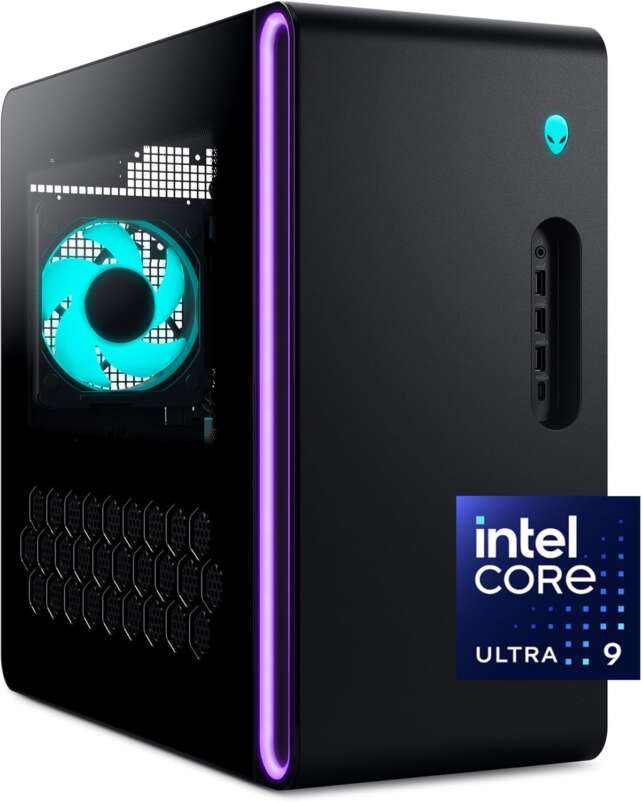
Description
The Alienware Aurora is a quiet, capable gaming desktop with strong 1440p performance, useful connectivity, and easy component access, but its proprietary parts and premium pricing limit its value for DIY-minded buyers.Positives
- Strong 1440p gaming performance from the RTX 5070 Ti configuration.
- Capable 4K gaming performance with appropriate settings and upscaling.
- Excellent all-around productivity and CPU performance for a mainstream desktop.
- Very quiet at idle and remarkably quiet during gaming loads.
- Useful front and rear connectivity, including Wi-Fi 7, Bluetooth 5.4, and 2.5Gb Ethernet.
- Straightforward access to most internal components.
- Two M.2 slots and a 3.5-inch drive bay provide practical storage expansion.
- Subtle AlienFX lighting offers customization without an overly aggressive appearance.
Negatives
- The plastic exterior feels less premium than expected at higher price points.
- Pricing is only especially attractive during sales or promotions.
- The motherboard is case-specific and the power supply is proprietary, reducing platform flexibility.
- The large RTX 5070 Ti occupies most of the lower chassis and leaves no room for additional PCIe expansion.
- The reviewed configuration includes only a 1TB SSD, which may fill quickly with modern games.
- Dell does not offer AMD processor options in the reviewed Aurora product family.
- Some configurations may not include a keyboard or mouse unless selected separately or included through an offer.
The specifications below refer to PCMag’s ACT1250 review configuration. Alienware Aurora specifications vary by configuration, so buyers should verify the exact Dell listing before ordering.
- Product: Alienware Aurora ACT1250 gaming desktop
- Reviewed processor: Intel Core Ultra 7 265KF
- Processor configuration: 8 performance cores and 12 efficiency cores, with up to 5.5GHz maximum turbo
- Graphics card: NVIDIA GeForce RTX 5070 Ti
- Memory: 32GB DDR5-6400 XMP memory
- Storage: 1TB SSD
- Operating system: Windows 11
- CPU cooling: 240mm liquid cooling on the reviewed higher-performance configuration
- Chassis: Alienware mid-tower with a plastic exterior shell over a metal frame
- Dimensions: Approximately 16.5 inches high, 7.75 inches wide, and 18.1 inches deep
- Cooling layout: Four 120mm fans, including one front intake, one rear exhaust, and two radiator exhaust fans
- Networking: Wi-Fi 7, Bluetooth 5.4, and 2.5Gbps Killer Ethernet
- Front connectivity: One audio jack, three USB Type-A ports, and one 10Gbps USB-C port
- Rear connectivity: Two USB Type-C ports, four USB Type-A ports, multiple audio jacks, and S/PDIF
- Internal storage expansion: Two M.2 SSD slots and one bottom-mounted 3.5-inch drive bay
- Memory expansion: Two DIMM slots supporting up to 64GB according to PCMag’s review
- Lighting: AlienFX lighting on selected configurations, with four customizable zones
- Power supply: Configuration-dependent; PCMag’s review notes a proprietary but replaceable power supply
- Warranty: Standard one-year warranty on PCMag’s review unit
Dell lists Aurora models with CPUs such as the Core Ultra 9 285K, GPUs up to the RTX 5080, 32GB DDR5 memory, and 2TB NVMe storage.
Gaming Performance
The Aurora is best positioned as a 1440p gaming desktop. In PCMag’s testing, the Core Ultra 7 265KF and RTX 5070 Ti combination delivered strong gaming performance across 1080p, 1440p, and 4K resolutions. The RTX 5070 Ti has enough graphics power for high refresh rates at 1440p and can handle many 4K games when settings, ray tracing, DLSS, or frame generation are adjusted appropriately.
The system also has enough performance for competitive gaming at high frame rates. At 1080p, the RTX 5070 Ti may be more GPU power than some esports titles require, allowing buyers to pair the desktop with a high-refresh monitor. At 4K, the Aurora is capable, but buyers should distinguish between running a game at native resolution and using upscaling or frame-generation technologies.
Dell’s higher Aurora configurations can move the system closer to enthusiast-level performance. The official page lists versions with a Core Ultra 9 285K, RTX 5080, 32GB DDR5 memory, and 2TB NVMe storage. Those systems should provide more 4K headroom, but they also need to be evaluated against larger, more expensive desktops such as the Alienware Area-51.
Productivity and Multitasking
The Core Ultra 7 265KF gives the Aurora a well-balanced productivity profile. PCMag reported top-tier PCMark 10 results and strong CPU performance, with the Aurora trailing only slightly behind the more powerful Area-51 in CPU-focused testing.
The 32GB DDR5 configuration is sufficient for gaming, streaming, office work, coding, photo editing, and substantial multitasking. The Aurora is also suitable for moderate video editing and content creation, although professionals working with very large projects may benefit from 64GB of memory and a larger storage configuration.
The absence of AMD processor options may disappoint buyers who prefer Ryzen systems, especially because certain AMD gaming processors are highly competitive in gaming-focused builds. However, the Intel platform remains capable for mixed gaming and productivity use.
Cooling, Noise, and Everyday Experience
The Aurora’s cooling design is one of its strongest practical features. The reviewed configuration uses a 240mm liquid cooler and four 120mm fans: one front intake, one rear exhaust, and two radiator exhaust fans.
PCMag found the Aurora nearly silent at idle and remarkably quiet under gaming loads. That makes it a strong choice for shared rooms, offices, bedrooms, or living-room setups where fan noise can be distracting. The system is not completely silent under sustained heavy workloads, but its acoustic behavior is better than many performance-focused gaming desktops.
The relatively compact mid-tower chassis is easier to place than the enormous Alienware Area-51. Its dimensions of approximately 16.5 by 7.75 by 18.1 inches make it a practical fit for a desk or floor, although buyers should still check clearance around the front and rear vents.
Design and Build Quality
The Aurora retains signature Alienware details, including the alien-head power button, rounded edges, a stadium-style front lighting ring, and optional AlienFX lighting zones. The styling is more restrained than classic Alienware designs, which broadens its appeal to buyers who want a gaming PC that does not dominate the room visually.
PCMag criticized the plastic outer shell, noting that it feels less premium than expected at higher price points. The internal metal frame provides structure, but the exterior does not create the same luxury impression as a high-end custom case with extensive metal or tempered glass.
When equipped with AlienFX, the Aurora provides four customizable lighting zones covering areas such as the power button, CPU water block, rear fan, and front stadium ring. The lighting is attractive without becoming excessive, though the Alienware Command Center software does not offer fully layered effects.
Upgradeability and Storage
The Aurora is easier to open than many OEM gaming desktops. PCMag found that loosening a rear screw releases the side-panel retention lever, after which the panel tilts outward and lifts away. Most components can be accessed without complicated disassembly.
Storage expansion is practical. The system includes two M.2 slots for SSDs and a bottom-mounted 3.5-inch drive bay. This is useful because the reviewed configuration’s 1TB SSD may not be enough for users with large modern game libraries.
The main limitations are the two-DIMM design, the lack of additional PCIe expansion room, the case-specific motherboard, and the proprietary power supply. These choices do not prevent all upgrades, but they make the Aurora less flexible than a standard ATX build. A GPU, SSD, memory kit, or replacement power supply may be possible depending on the exact configuration, while a motherboard replacement would be more complicated.
Connectivity and Software
Connectivity is a clear strength. PCMag lists front-facing USB Type-A and USB-C ports, rear USB-C and USB-A ports, multiple audio connections, S/PDIF, Wi-Fi 7, Bluetooth 5.4, and 2.5Gbps Ethernet. This gives the Aurora enough flexibility for modern peripherals, external storage, wired networking, and high-speed accessories.
Alienware Command Center controls lighting, performance profiles, basic CPU and GPU overclocking tools, and a built-in game library. The software is useful for managing the system, though users who prefer a minimal Windows installation may choose to disable features they do not need. PCMag described the Aurora as arriving with relatively little unnecessary software beyond standard Windows and Dell utilities.
Value for Money
The Aurora’s value depends heavily on the exact configuration and sale price. PCMag tested an Aurora at approximately $2,249 to $2,299 with a Core Ultra 7 265KF, RTX 5070 Ti, 32GB of RAM, and a 1TB SSD. PCMag considered that pricing slightly high for the specifications, although a temporary sale reduced the price to around $2,049 and made the value proposition more compelling.
Dell’s official Aurora page lists a build-your-own configuration starting at $1,849.99 when accessed, while higher versions with an RTX 5080 and Core Ultra 9 processor cost more. These prices are time-sensitive and should be checked against comparable systems from iBUYPOWER, CyberPowerPC, HP, and custom builders.
The Aurora earns its premium through convenience, support, quiet operation, Alienware styling, and a ready-to-use Windows installation. It is not the strongest choice for buyers who build their own PCs and prioritize the lowest possible cost or the most open upgrade path.
Frequently Asked Questions
Is the Alienware Aurora good for gaming?
Yes. The RTX 5070 Ti configuration is particularly well suited to 1440p gaming and can handle many 4K games with sensible settings, upscaling, or frame generation. Higher Aurora configurations with the RTX 5080 provide additional 4K performance headroom.
Is the Alienware Aurora quiet?
Yes. PCMag found the reviewed Aurora nearly silent at idle and remarkably quiet under gaming loads. Its 240mm liquid cooler and four-fan layout help keep noise under control.
How much RAM does the Aurora support?
PCMag’s review identifies two DIMM slots supporting up to 64GB of RAM, although the exact memory support may vary by configuration. The reviewed unit included 32GB of DDR5-6400 memory.
Can the Aurora be upgraded?
Yes, but it is not as open as a standard DIY ATX desktop. The Aurora offers accessible storage and memory upgrades, and its power supply is proprietary but replaceable according to PCMag. The case-specific motherboard, limited PCIe expansion, two-DIMM design, and configuration-specific clearance impose restrictions.
Is the 1TB SSD enough for gaming?
It is enough for starting out, but users with a large library of modern games may need additional storage. The Aurora includes two M.2 slots and a 3.5-inch drive bay, making expansion practical.
Does the Aurora support Wi-Fi 7?
The PCMag-reviewed configuration includes Wi-Fi 7, Bluetooth 5.4, and 2.5Gbps Ethernet. Buyers should verify the exact networking hardware on lower-cost or older Aurora listings.
Is the Alienware Aurora worth buying?
It can be worthwhile when discounted, especially for buyers who value quiet operation, easy setup, Alienware design, and Dell support. Its value is weaker at full price compared with similarly equipped competitors or a self-built PC.
Is the Aurora better than the Alienware Area-51?
The Aurora is the better choice for most users who want a smaller, quieter, and more affordable gaming desktop. The Area-51 offers higher-end hardware, more power, and greater 4K performance, but it is much larger, heavier, and more expensive. The right choice depends on the desired GPU tier and budget.
Verdict
The Alienware Aurora is a strong mainstream gaming desktop that gets the essentials right. It offers capable 1440p performance, respectable 4K gaming, excellent noise control, useful connectivity, a practical mid-tower size, and easy access to most internal components.
Its shortcomings are primarily structural and financial. The exterior materials do not feel as premium as the price suggests, the motherboard and power supply are not fully standard, PCIe expansion is limited, and the 1TB storage configuration can feel small for a modern game library.
The Aurora is best recommended when purchased during a strong Dell promotion or when the convenience of a supported prebuilt matters more than maximizing component value. Overall, the Alienware Aurora earns 4.5/5 stars for its balance of gaming performance, quiet operation, connectivity, and everyday usability.
