

The Alienware AW2725Q is a 26.7-inch, 27-inch class 4K QD-OLED monitor with a 3840 × 2160 resolution and a 240Hz refresh rate, positioned by RTINGS as a flat 27-inch alternative to larger curved 4K QD-OLED models. DisplayNinja calls it an excellent HDR gaming monitor that delivers image quality and performance similar to more expensive 4K 240Hz QD-OLED monitors at a lower price.
The AW2725Q is best positioned as a premium but value-oriented 27-inch 4K 240Hz QD-OLED monitor. Its strongest features are excellent pixel density, fast response, vivid color, deep blacks, HDMI 2.1 console support, Dolby Vision, eARC/Dolby Atmos passthrough, and a useful USB hub. Its main limitations are likely bright-room black-level elevation, VRR flicker, OLED burn-in risk, no DisplayPort 2.1, no KVM, no USB-C DisplayPort Alt Mode, and an HDR brightness profile that’s strongest in small highlights rather than full-screen white.
Specifications
- Model: Alienware AW2725Q
- Display size: 26.7-inch viewable, 27-inch class 4K QD-OLED
- Resolution and refresh: 3840 × 2160 at 240Hz, 166 PPI
- Response time: 0.03ms GTG
- Color: 99.3% DCI-P3, true 10-bit color
- HDR: VESA DisplayHDR True Black, Dolby Vision, 1000-nit peak brightness at a 3% window, 250-nit full-screen brightness
- Variable refresh rate: G-SYNC Compatible, FreeSync Premium Pro, VESA AdaptiveSync, 48–240Hz VRR
- Connectivity: One DisplayPort 1.4 input, two HDMI 2.1 ports (one with eARC/ARC and Dolby Atmos passthrough), a USB 5Gbps Type-B upstream port, three USB 5Gbps Type-A downstream ports, one USB-C 5Gbps downstream port with up to 15W Power Delivery
- Ergonomics: 110mm height adjustment, -5°/21° tilt, ±20° swivel, ±90° pivot, 100 × 100mm VESA
- Warranty: Three-year warranty covering burn-in, though it lacks some advanced OLED-care features like a proximity sensor or automatic screen saver, per DisplayNinja
- Reviewed pricing: Approximately $750–$900 per DisplayNinja; Dell’s own extracted listing showed an estimated value of $799.99
Gaming Performance
RTINGS found the AW2725Q fantastic for PC gaming. Strengths included extremely sharp motion, low input lag, 240Hz with common VRR formats, deep inky blacks in dark rooms, vivid wide-gamut colors, and small HDR highlights that really pop. Main weaknesses were raised black levels and desaturated colors in bright rooms, distracting VRR flicker when frame rates change, and inaccurate PQ EOTF tracking.
For console gaming, RTINGS found the AW2725Q supports full HDMI 2.1 bandwidth and modern console features, including 4K at 120Hz and Dolby Vision with Xbox Series X|S, alongside sharp motion, low input lag, deep blacks, and bright highlights. DisplayNinja separately reported approximately 2ms input latency and noted that OLED’s instantaneous response effectively removes visible ghosting, with only minor VRR brightness flicker in dark scenes that can be reduced by disabling VRR in affected games.
Image Quality and HDR
Description
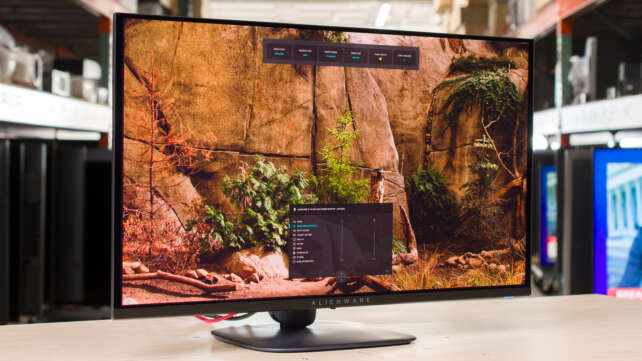
The Alienware AW2725Q delivers exceptionally sharp 4K gaming, vivid QD-OLED color, deep blacks, and smooth 240Hz motion. It is a superb gaming and console monitor, though bright-room black levels, VRR flicker, OLED burn-in risk, and the lack of DisplayPort 2.1 or USB-C DisplayPort support limit its versatility.Positives
- Extremely sharp 4K image quality on a compact 27-inch display.
- 240Hz refresh rate provides excellent motion clarity for high-end gaming.
- QD-OLED delivers deep blacks, vivid color, and no traditional LCD blooming.
- Near-instant response time and low input lag make the monitor highly responsive.
- HDMI 2.1 supports 4K at 120Hz for current consoles.
- Dolby Vision and eARC/Dolby Atmos passthrough add home-theater flexibility.
- Useful USB hub with USB-A and USB-C connectivity.
- High pixel density improves text sharpness compared with larger 32-inch 4K OLEDs.
- Strong ergonomic stand with height, tilt, swivel, and pivot adjustment.
- Three-year burn-in coverage advertised by Dell in the United States.
- Often costs less than competing monitors with DisplayPort 2.1, KVM, and higher USB-C power delivery.
Negatives
- Black levels can appear raised or purple in bright rooms.
- Colors can desaturate when ambient light hits the panel.
- VRR flicker can be distracting when frame rates fluctuate.
- OLED burn-in remains a risk with prolonged static content.
- No DisplayPort 2.1 input, unlike some premium competitors.
- USB-C provides downstream connectivity and limited power delivery but no DisplayPort Alt Mode.
- No KVM switch for easily sharing peripherals between multiple systems.
- Full-screen HDR brightness is lower than small-window peak brightness suggests.
- Out-of-box color accuracy may benefit from calibration.
- A 27-inch 4K display can make interface text and icons small without operating-system scaling.
DisplayNinja praised the high pixel density for crisp details and text, a dedicated sRGB mode, DCI-P3 emulation, wide viewing angles, and factory calibration. It noted the semi-glossy finish improves image vibrancy but can raise black levels under direct light — a familiar trade-off for QD-OLED coatings.
For work, RTINGS praised 4K text clarity, strong ergonomics, and reflection handling, though it found the monitor insufficiently bright for intense glare and noted the standard OLED burn-in risk with constant exposure to static elements. For content creation, RTINGS found realistic HDR images, deep blacks, vivid colors, sharp 4K detail, and good reflection handling, recommending calibration for best accuracy due to some out-of-box issues.
Connectivity and Design
RTINGS describes the AW2725Q as a lower-cost alternative to more premium 27-inch 4K QD-OLED monitors. It lacks DisplayPort 2.1 bandwidth and a KVM switch compared with some competing models, but its price can make it attractive for buyers who don’t need those specific features. DisplayNinja notes that DisplayPort 1.4 with DSC is sufficient for 4K 240Hz 10-bit with visually lossless compression, even without DisplayPort 2.1.
DisplayNinja lists a 110mm height adjustment, -5°/21° tilt, ±20° swivel, ±90° pivot, and 100 × 100mm VESA support, along with DisplayPort 1.4, two HDMI 2.1 ports, three USB-A ports, a USB-B upstream connection, and a USB-C port with 15W Power Delivery, but no audio jack. It notes the monitor also lacks USB-C DisplayPort Alt Mode. Pixel Refresh activates automatically after four hours of use or when the monitor enters standby after extended use.
Frequently Asked Questions
Is the AW2725Q a good value 4K OLED monitor?
Yes. DisplayNinja calls it an excellent HDR gaming monitor that delivers image quality and performance similar to pricier 4K 240Hz QD-OLED monitors at a lower price, provided you don’t need DisplayPort 2.1, a KVM, or USB-C DisplayPort Alt Mode.
Is it good for console gaming?
Yes. RTINGS found full HDMI 2.1 bandwidth support with 4K at 120Hz and Dolby Vision on the Xbox Series X|S, plus sharp motion and low input lag.
Does it have a KVM switch or DisplayPort 2.1?
No. RTINGS notes both are absent compared with some pricier competing models, which is part of why the AW2725Q can be offered at a lower price.
Does the monitor need calibration?
For the most accurate content-creation work, yes. RTINGS recommends calibration due to some out-of-box accuracy issues, though the monitor is factory-calibrated with a dedicated sRGB mode according to DisplayNinja.
What’s the typical price range?
DisplayNinja places typical pricing around $750–$900, though prices vary by region and promotion, so current pricing should always be verified before purchase.
Verdict
The Alienware AW2725Q is a genuinely compelling value pick among 4K 240Hz QD-OLED monitors. Its pixel density, response speed, vivid color, HDMI 2.1 console support, Dolby Vision, and useful USB hub deliver a premium gaming experience without a fully premium price tag.
The trade-offs that keep the price down are clear: no DisplayPort 2.1, no KVM, no USB-C Alt Mode, and the usual QD-OLED bright-room and burn-in considerations. For buyers who don’t need those specific extras, the AW2725Q is one of the stronger value propositions in the 4K OLED gaming-monitor category.
