
A budget gaming PC can be excellent for 1440p, but only when the graphics card receives the largest share of the budget. A desktop with a premium processor and weak graphics will usually disappoint more than a balanced system with a sensible CPU, a capable GPU, enough memory, and a quality power supply.
This guide compares current prebuilt and build-oriented listings, explains what each graphics tier can realistically do, and shows how to check the components that generic product titles often hide. Prices and configurations are snapshots and should be verified on the live listing.
Quick Answer
The best budget gaming PC for 1440p gaming should prioritize the graphics card, not a premium case or excessive processor. Look for an RTX 4060 or better, an RTX 5060 when pricing is sensible, or an AMD card with at least 12GB of VRAM such as the RX 7700 XT. Pair it with 16GB of RAM at minimum, a 1TB NVMe SSD when possible, and a modern six-core-or-better processor.
For the most balanced prebuilt search, start with the iBUYPOWER Slate MESH RTX 4060 desktop. The listing describes a Core i7-14700F, RTX 4060, 32GB of DDR5 memory, and a 1TB SSD. For more graphics headroom, monitor the MSI Codex R2 RTX 5060 desktop listing and compare its live price against other RTX 5060 systems.
What 1440p Gaming Actually Requires
1440p has 78 percent more pixels than 1080p, so the graphics card does more work. The exact frame rate depends on the game, quality preset, ray tracing, upscaling, frame generation, processor, memory, and cooling. There is no single “1440p GPU” that delivers the same result in every game.
| Performance tier | Sensible GPU target | Recommended use |
|---|---|---|
| Entry 1440p | RTX 4060 or comparable Radeon card | Esports and many modern games with tuned settings |
| Strong budget 1440p | RTX 5060, RTX 4060 Ti, or RX 7700 XT | Higher settings and better headroom for demanding games |
| High-refresh 1440p | RTX 4070-class or RX 7800 XT-class | Better for high settings and fast 1440p monitors |
| Ray-tracing focused | RTX 4070-class or newer | More comfortable RT performance with upscaling |
Best Budget Gaming PCs to Check First
These are current listing targets, not a claim that every configuration is always in stock or below a particular price. Prebuilt pricing changes quickly, and the same model name can appear with different processors, memory, storage, power supplies, or graphics cards.
1. iBUYPOWER Slate MESH with Core i7-14700F and RTX 4060 — Best Balanced Prebuilt Starting Point
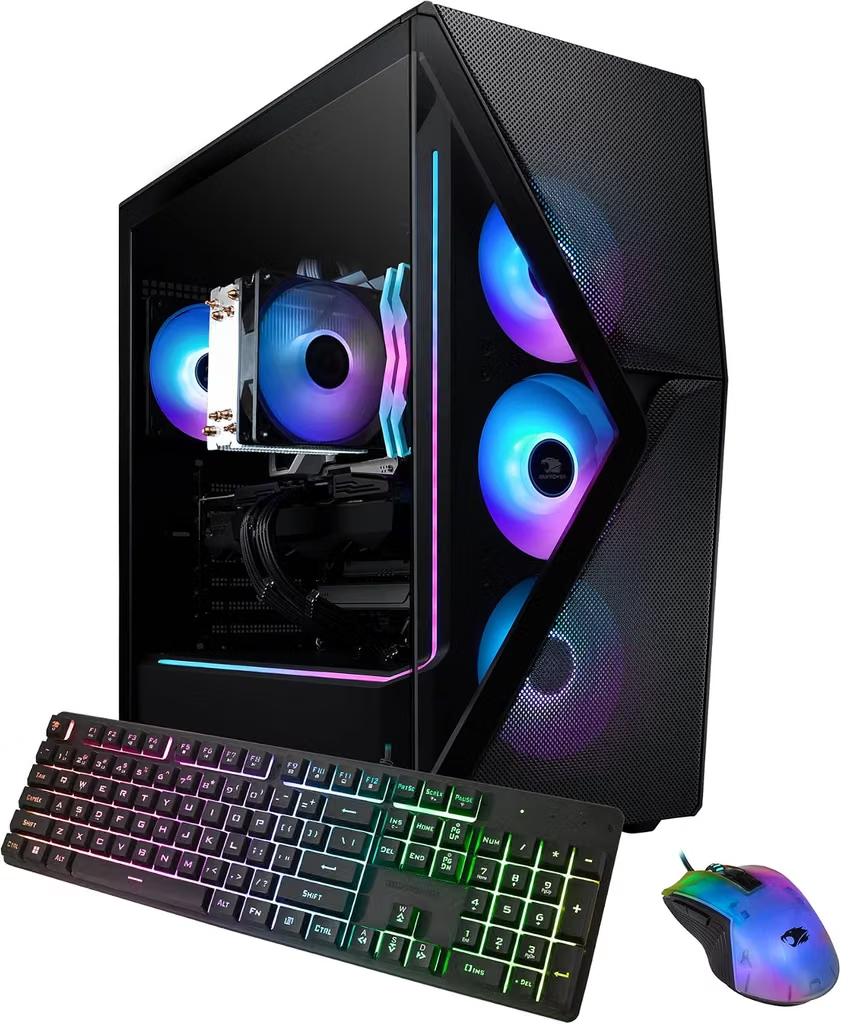
The listing reviewed for this guide describes an Intel Core i7-14700F, NVIDIA GeForce RTX 4060 with 8GB of graphics memory, 32GB of DDR5-5200 RAM, and a 1TB SSD. That is a strong overall configuration for a buyer who wants a ready-to-use desktop with enough processor and memory headroom for gaming, streaming, and multitasking.
The RTX 4060 is better viewed as an entry-to-midrange 1440p card than a guarantee of maximum settings in every new release. In competitive games it can pair well with a 1440p high-refresh monitor; in visually demanding games, use upscaling or a tuned quality preset.
Best for: A balanced prebuilt with generous memory and storage.
1440p approach: High settings in many games, with selective upscaling or reduced ray tracing when needed.
Check before buying: Power-supply model, cooling layout, motherboard expansion, and current price.
2. MSI Codex R2 with RTX 5060 — Best Modern GPU Deal Target

The MSI Codex R2 family is a strong target when the price is near the budget range. Current search results describe configurations using a Core i5-12600KF, GeForce RTX 5060 Ti with 16GB graphics memory, 32GB of DDR5 RAM, and a 1TB SSD; other Codex R2 variants use RTX 5060 graphics. Compare the exact card because RTX 5060 and RTX 5060 Ti are not interchangeable.
A modern RTX 5060-class system is appealing for 1440p because it offers newer features and more headroom than many older entry-level prebuilts. The exact value depends on VRAM, power limit, cooling, and the monitor’s refresh rate.
Best for: Buyers seeking a current-generation NVIDIA platform.
1440p approach: Use high settings and upscaling as appropriate; test ray tracing game by game.
Check before buying: Exact GPU, VRAM, RAM, SSD, power supply, and whether the listing includes a keyboard and mouse.
3. Gaming PC with Core i5-12600KF and RTX 5060 Ti 16GB — Best High-VRAM Configuration to Compare
The listing title identifies a Core i5-12600KF, GeForce RTX 5060 Ti with 16GB of graphics memory, 32GB of DDR5 RAM, a 1TB PCIe SSD, and software-controlled ARGB fans. A 16GB VRAM configuration is particularly interesting for buyers who want to keep a 1440p system longer, although the exact GPU model and seller should be confirmed on the live page.
The processor is older than the newest desktop platforms, but it remains a capable gaming CPU. The important question is whether the complete system is priced competitively against newer RTX 5060 or RX 7700 XT prebuilts.
Best for: 1440p buyers who prioritize graphics memory.
1440p approach: A good fit for high-quality presets when the game supports sensible upscaling.
Check before buying: Exact graphics card, motherboard, PSU, warranty, and upgrade path.
4. Ryzen 7 RTX 5060 Desktop with 32GB RAM and 1TB SSD — Best Spec-Sheet Value to Investigate
This listing describes a gaming desktop with an AMD Ryzen 7 processor, RTX 5060 graphics, 32GB of DDR4 RAM, and a 1TB NVMe SSD. It may offer attractive headline specifications for 1440p gaming, but third-party prebuilt listings deserve extra scrutiny because the exact CPU model, motherboard, power supply, cooling, and graphics-card brand can vary.
A capable RTX 5060 paired with 32GB of memory can make sense for a mixed-use desktop, but the GPU should remain the priority. Do not pay extra for RGB fans or a large SSD if the power supply and cooling are poorly specified.
Best for: Buyers comfortable checking every component in a third-party listing.
1440p approach: High settings are plausible in many current games, but verify the exact GPU variant.
Check before buying: CPU model, DDR4 versus DDR5, PSU certification and wattage, and return policy.
5. Ryzen 7 RTX 5060 Desktop with 16GB RAM and 512GB SSD — Best Upgrade-First Option
This configuration lists a Ryzen 7 processor, RTX 5060 graphics, 16GB of RAM, and a 512GB NVMe SSD. The graphics card is the right class for a budget 1440p discussion, but 512GB of storage is modest once Windows and several large games are installed.
It can be a reasonable starting point if the price is meaningfully lower than 1TB alternatives and the motherboard supports additional storage and memory. Treat the system as an upgrade candidate rather than assuming the headline specification tells the whole story.
Best for: Buyers planning a later SSD or RAM upgrade.
1440p approach: Use the RTX 5060’s modern features, with settings adjusted per game.
Check before buying: Number of RAM sticks, free M.2 slots, PSU quality, and case airflow.
6. HP OmniDesk with Ryzen 5 8500G — Best Everyday Desktop, Not a True 1440p Gaming Pick
The HP OmniDesk listing describes an eight-core Ryzen 5 8500G, 16GB of DDR5 memory, a 512GB SSD, HDMI, DisplayPort, Wi-Fi 6, and a wireless keyboard and mouse. It is a practical everyday desktop, but integrated graphics are not equivalent to an RTX 4060, RTX 5060, or RX 7700 XT.
This is included as a cautionary comparison. It may run lighter games, but it is not the best choice for someone specifically shopping for a 1440p gaming PC. A system with a dedicated GPU is a better use of the budget.
Best for: Work, school, and light gaming.
1440p approach: Suitable for desktop output and lighter games, not demanding AAA gaming.
Check before buying: Whether a dedicated GPU is required for the intended games.
7. iBUYPOWER and Similar RTX 4060 Systems — Best Deal-Comparison Category
RTX 4060 prebuilts can be good value when they include 16GB or 32GB of RAM, a 1TB SSD, a modern six-core-or-better CPU, and a reputable power supply. The iBUYPOWER Slate MESH is one concrete example, but the wider category is useful because prebuilt prices move frequently.
Compare total system value rather than choosing the cheapest listing. A slightly more expensive system with a better PSU, two memory sticks, a larger SSD, and easier upgrades may be the better 1440p purchase.
Best for: Buyers willing to compare several listings on the same day.
1440p approach: Tuned high settings, upscaling, and reduced ray tracing where needed.
Check before buying: The exact GPU, PSU, RAM layout, cooling, and warranty.
8. RX 7700 XT-Based Desktop or Build — Best AMD 12GB-Class Target
The RX 7700 XT is a useful 1440p target because it belongs to a higher performance tier than typical RTX 4060 systems and offers 12GB of graphics memory. Amazon search results may mix complete desktops with graphics cards, so confirm that the item is a full PC before ordering.
For buyers who are comfortable with a custom build, an RX 7700 XT paired with a modern Ryzen 5 or Core i5 processor, 32GB of RAM, a 1TB NVMe SSD, and a quality power supply can form a strong 1440p platform. For prebuilts, inspect the exact components rather than relying on a generic “gaming PC” title.
Best for: Buyers prioritizing rasterized 1440p performance and VRAM.
1440p approach: High settings are the intended use case; ray tracing behavior varies by game.
Check before buying: Full desktop versus graphics-card-only listing, PSU wattage, and CPU balance.
How Much Should a Budget 1440p PC Cost?
The right price depends on whether the system includes Windows, a keyboard, a mouse, a monitor, and a current dedicated GPU. A desktop advertised below $800 may be excellent for 1080p but weak for 1440p if it uses integrated graphics or an older entry-level card. A desktop around $900–$1,200 can be more realistic for a balanced 1440p prebuilt, especially when it includes RTX 5060-class or RX 7700 XT-class graphics.
| Budget level | What to prioritize | What to expect |
|---|---|---|
| Lowest viable | RTX 4060 or comparable dedicated GPU | Tuned 1440p; stronger at esports than demanding AAA games |
| Sweet spot | RTX 5060/5060 Ti or RX 7700 XT | Better high-setting performance and longer useful life |
| Stretch budget | RTX 4070-class or RX 7800 XT-class | Better for demanding games and high-refresh 1440p |
1440p Monitor Guidance
A gaming PC is only as useful as the monitor it drives. For a budget 1440p system, a 27-inch 1440p monitor at 144Hz or 165Hz is a sensible default. Choose a 240Hz panel only if the games you play can produce very high frame rates and you value competitive motion clarity more than image quality or resolution.
Adaptive sync, a responsive IPS or OLED panel, a usable stand, and good connectivity matter more than a decorative RGB feature. If the PC uses an RTX 4060, do not assume it will drive every new game at 1440p ultra settings; a monitor with adaptive sync gives you more flexibility.
RAM, VRAM, Storage, and Power-Supply Checklist
Choose 16GB of system RAM as the minimum and 32GB when affordable. Confirm whether the prebuilt uses two memory modules or a single module, because memory configuration can affect performance and upgrade planning.
For 1440p, 8GB of graphics memory can be limiting in some newer titles. A 12GB or 16GB GPU is more comfortable for buyers who want to keep the system longer, though VRAM alone does not determine performance.
A 1TB NVMe SSD is the practical target. A 512GB drive can work, but it fills quickly after Windows, updates, and several large games. Confirm that the motherboard has an available M.2 slot or that the existing drive can be replaced.
The power supply should be clearly identified, not described only as “high performance.” Look for a reputable model, enough wattage for the GPU, appropriate PCIe connectors, and reasonable efficiency certification. A quality PSU protects the upgrade path and reduces the risk of an underpowered system.
Common 1440p Gaming-PC Mistakes
Do not buy a desktop with an expensive processor and an entry-level GPU if gaming is the priority. At 1440p, the graphics card usually deserves the largest share of the budget.
Do not assume every RTX 4060, RTX 5060, or RX 7700 XT desktop has the same performance. Power limits, cooling, motherboard choices, and graphics-card variants matter.
Do not count a monitor as “included” unless the listing clearly includes one. Many gaming-PC bundles use a basic 1080p display that does not match a 1440p-focused build.
Do not accept vague listings that hide the PSU, motherboard, RAM layout, or exact CPU model. Component transparency is part of the value of a prebuilt.
Frequently Asked Questions
What is the best budget GPU for 1440p gaming?
The best value changes with pricing, but RTX 4060-class cards are a reasonable entry point, while RTX 5060/5060 Ti and RX 7700 XT-class cards provide more headroom. Compare the complete PC, not just the GPU name.
Is RTX 4060 good enough for 1440p?
RTX 4060 can handle 1440p gaming with tuned settings and upscaling, especially in esports and well-optimized games. It is less suitable for demanding new releases at ultra settings with ray tracing.
Is RTX 5060 better for 1440p?
An RTX 5060-class desktop is a stronger modern target than many RTX 4060 systems, but the exact result depends on the game, settings, power limit, and VRAM configuration. Verify the specific card in the listing.
Is RX 7700 XT good for 1440p gaming?
RX 7700 XT-class graphics are aimed at 1440p gaming and typically offer more VRAM than an RTX 4060. Ray-tracing and upscaling behavior differs by game, so choose based on the titles and features you use.
How much RAM does a 1440p gaming PC need?
16GB is the practical minimum, while 32GB is a comfortable target for modern games, browsers, voice chat, recording, and multitasking.
Should I build or buy a prebuilt gaming PC?
A prebuilt is convenient and can be good value during promotions. A custom build offers more control over the power supply, motherboard, cooling, and upgrade path. Whichever route you choose, prioritize the GPU and component transparency.
Do I need a 1440p monitor for a 1440p gaming PC?
No, but a 1440p monitor lets you use the resolution you paid for. A 1080p monitor can still be useful for high-refresh competitive gaming or as a secondary display.
