
The best gaming monitor for PS5 Pro under $500 should match the console’s most useful display features rather than simply advertise the highest PC refresh rate. For most buyers, the priority order is 4K resolution, 120Hz support, VRR, low input lag, and a reliable HDMI connection. A 1440p monitor can still be an excellent value, especially for competitive games or a smaller desk, but a 4K 120Hz display better matches the PS5 Pro’s premium image-quality goals.
Sony’s official support guidance confirms that PS5 consoles support HDMI 2.1 and 4K 120Hz output. The console also exposes settings for VRR, 120Hz output, HDR, and 1440p testing, although results vary by display and game.[1] The PS5 Pro cannot make every game run at 4K/120Hz, so the right monitor is one that gives you flexibility without wasting the budget on specifications the console cannot consistently use.
Quick Answer
The best overall target is a 27-inch or 32-inch 4K monitor with at least 120Hz, VRR, and HDMI 2.1 or clearly documented 4K/120 support. Under $500, the Dell S2725QS 27-inch 4K 120Hz monitor is the practical value pick to investigate first. It offers 4K resolution, 120Hz, IPS technology, and FreeSync Premium according to the current product listings.
If true 4K/120Hz HDMI 2.1 availability is not within budget, consider the Gigabyte M27U 4K 160Hz monitor or a 1440p high-refresh option such as the ASUS TUF VG27AQ3A. Verify the exact HDMI bandwidth and PS5 compatibility on the live listing before buying.
What PS5 Pro Monitor Specifications Matter?
| Feature | Recommended target | Why it matters |
|---|---|---|
| Resolution | 4K for maximum image detail; 1440p for value | PS5 Pro is designed around enhanced image quality, while 1440p can reduce cost |
| Refresh rate | 120Hz minimum for the console’s high-frame-rate modes | Sony documents 120Hz output support on PS5 consoles |
| HDMI | HDMI 2.1 preferred for 4K/120; verify the port’s actual bandwidth | A monitor can advertise HDMI 2.1 features without offering every HDMI 2.1 capability |
| VRR | HDMI VRR with a documented supported range | Helps smooth variable frame rates in supported games |
| HDR | HDR support with useful brightness, not just an HDR label | HDR quality depends on brightness, contrast, local dimming, and tone mapping |
| Input lag | Low latency in the actual gaming mode | Responsiveness matters more than a headline 1ms pixel figure |
| Size | 27 inches for desk sharpness; 32 inches for immersion | Choose based on viewing distance and desk depth |
Best PS5 Pro Monitors Under or Near $500
Prices and availability change quickly. The recommendations below distinguish confirmed specifications from features that must be checked on the live product page. A monitor is not labeled a confirmed under-$500 buy unless its current price is visible and qualifies.
1. Dell S2725QS 27-inch 4K 120Hz — Best Value 4K Starting Point
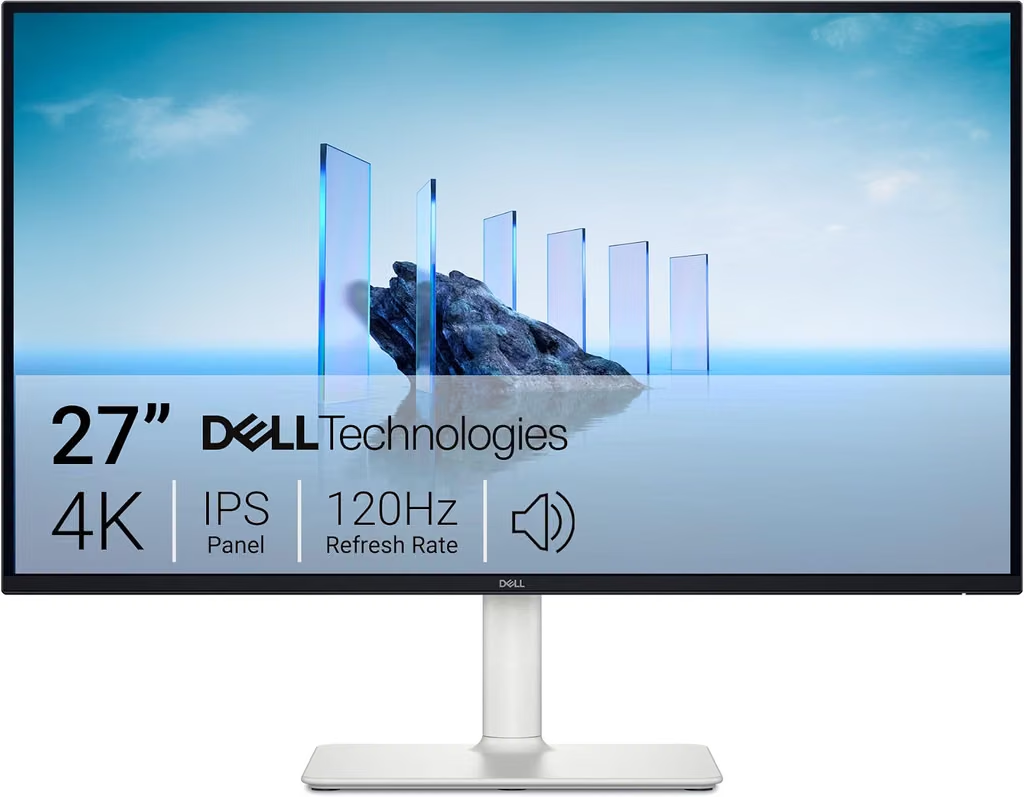
The Dell S2725QS is one of the most practical monitors to investigate for a PS5 Pro desk setup. Current listings describe a 27-inch 4K UHD IPS display with a 120Hz refresh rate, 5ms response time, and FreeSync Premium. Search results identified it as a budget 4K monitor and a current value option.[2]
Its main appeal is getting sharp 4K output and a 120Hz ceiling without moving into premium OLED pricing. Confirm whether the specific listing supports the PS5’s desired 4K/120 signal through the included HDMI ports, and check the HDR performance expectations before buying.
Best for: Buyers who want the most straightforward 4K value.
Strength: 4K, 120Hz, IPS, and a desk-friendly 27-inch size.
Check first: HDMI bandwidth, VRR behavior, HDR brightness, and current price.
2. Gigabyte M27U 27-inch 4K 160Hz — Best Feature-Rich 4K Deal Watch

The Gigabyte M27U is a strong PS5 Pro candidate because current product references describe a 27-inch 4K display running up to 160Hz with HDMI 2.1 connectivity. A 160Hz PC refresh ceiling is not necessary for PS5 Pro, but it can make the monitor more useful if you also connect a gaming PC.
The important detail is not the 160Hz number itself; it is whether the monitor’s HDMI 2.1 port supports the exact 4K/120, VRR, and HDR combination you want. The live Amazon listing should be checked for price, port bandwidth, and firmware notes.
Best for: PS5 Pro owners who also plan to connect a PC.
Strength: 4K resolution with a high refresh ceiling and HDMI 2.1 positioning.
Check first: Actual HDMI bandwidth, VRR range, HDR mode, and price under $500.
3. ASUS TUF VG27AQ3A 27-inch 1440p 180Hz — Best Competitive-Gaming Value
The ASUS TUF VG27AQ3A is a 27-inch 1440p Fast IPS gaming monitor with a refresh rate up to 180Hz, ELMB Sync, and adaptive-sync features. Current Amazon search results specifically associate the model with PS5 and console use.[3]
This is a sensible choice for competitive games where responsiveness matters more than 4K detail. It also leaves more budget for a headset, monitor arm, or second display. Because PS5 Pro buyers may expect 4K output, understand that this monitor is a value and performance alternative, not the best 4K showcase.
Best for: Competitive shooters, sports games, and smaller desks.
Strength: High refresh rate, fast IPS response, and lower cost than 4K options.
Trade-off: It is 1440p rather than 4K.
4. ASUS TUF VG27AQ5A 27-inch 1440p 210Hz — Best Newer High-Refresh Alternative
The ASUS TUF VG27AQ5A listing describes a 27-inch 1440p display with a 210Hz overclocked refresh rate, 0.3ms advertised response time, Fast IPS technology, ELMB Sync, and FreeSync Premium. It is aimed more directly at high-refresh PC and competitive gaming than at 4K console presentation.
For PS5 Pro, the panel’s maximum refresh rate is well beyond what the console normally needs. The value comes from its motion handling and potential PC upgrade path, not from using 210Hz on the console.
Best for: Buyers who play on both PS5 Pro and a high-refresh gaming PC.
Strength: Fast IPS and a high refresh ceiling.
Trade-off: 1440p resolution and possible overclock limitations over HDMI.
5. KTC 27-inch 1440p 240Hz — Best Affordable High-Refresh PC/Console Hybrid
The KTC listing describes a 27-inch 1440p monitor with a 240Hz refresh rate, 1ms response time, HDR, 130% sRGB coverage, and FreeSync/G-Sync compatibility. It is primarily a high-refresh gaming monitor, so the PS5 Pro buyer should verify its supported console resolutions and refresh rates rather than assuming the PC specification transfers directly.
This is best considered when a buyer prioritizes competitive gaming, intends to connect a PC, or wants a lower-cost 1440p display. It is not the first choice for showcasing PS5 Pro’s 4K image quality.
Best for: High-refresh gaming and mixed PC/console desks.
Strength: 240Hz class refresh rate and wide-gamut specification.
Trade-off: 1440p rather than 4K; verify HDMI console modes.
6. INNOCN 32-inch Mini-LED 4K 144Hz — Best HDR-Focused Deal Watch
The INNOCN 32M2V family is described in current listings as a 32-inch 4K 144Hz Mini-LED IPS monitor with HDR1000, 1ms response time, and HDMI 2.1. Mini-LED local dimming can offer a more meaningful HDR experience than a basic HDR label, although real performance depends on the exact model, firmware, and settings.
The 32-inch size is immersive for a PS5 Pro desk, but it requires more viewing distance than a 27-inch monitor. Check whether the specific Amazon listing is a monitor-only product, a bundle, or a regional configuration.
Best for: Buyers who value HDR and a larger 4K screen.
Strength: Mini-LED/HDR1000 positioning and 4K 144Hz specification.
Check first: Exact model, HDMI 2.1 bandwidth, current price, and warranty.
7. 32-inch 4K 144Hz HDMI 2.1 Touch Monitor — Best Multi-Use Curiosity
This listing describes a 32-inch 4K 144Hz touchscreen with HDMI 2.1, DisplayPort 1.4, USB-C, HDR400, and height adjustment. It may appeal to buyers who want a multi-use screen for a desk, creative work, and console gaming, but it should not automatically be considered a better gaming monitor than a purpose-built display.
Verify input lag, VRR, HDMI 2.1 bandwidth, and whether the touch functionality adds cost without improving the PS5 Pro experience. It is a useful comparison option when a sale places it under $500.
Best for: Mixed productivity, touch, and console use.
Strength: 4K 144Hz and broad connectivity.
Trade-off: Touch hardware may be unnecessary for a gaming-first buyer.
8. PIJ 32-inch 4K 160Hz Curved Monitor — Best Large-Screen Budget Deal Watch
The PIJ listing describes a 32-inch curved 4K monitor with a 160Hz refresh rate and built-in speakers. The model may be attractive if the price is substantially below better-known alternatives, but the PS5 Pro buyer should verify HDMI version, VRR support, HDR capability, and console resolution modes.
A high PC refresh-rate label does not guarantee 4K/120 over HDMI. Treat this as a budget deal watch and not a confirmed PS5 Pro recommendation until the live specifications are checked.
Best for: Buyers who want a large curved display at a low price.
Strength: 4K and high refresh-rate headline specifications.
Check first: HDMI 2.1 status, VRR, HDR, input lag, and manufacturer support.
4K or 1440p for PS5 Pro?
Choose 4K if you want the sharpest image, play cinematic single-player games, sit close to the display, or want a monitor that better matches the PS5 Pro’s premium positioning. Choose 1440p if you play competitive games, want a smaller and cheaper desk monitor, or plan to use the display primarily with a PC.
Sony’s PS5 support page lets users test 1440p output for SDR/HDR 60Hz/120Hz and VRR, so 1440p is a legitimate console mode rather than a workaround.[1] However, a 1440p screen cannot show the full native detail of a 4K output.
| Choose 4K when… | Choose 1440p when… |
|---|---|
| Image detail is the priority | Motion clarity and price matter more |
| You want a 27–32 inch premium desk display | You play competitive games at a closer distance |
| You may connect a PC later | You want more budget for accessories |
| HDR and single-player immersion matter | You want a higher refresh ceiling for PC gaming |
Do You Need HDMI 2.1?
HDMI 2.1 is the safest target for 4K/120Hz PS5 Pro use, but the label alone is not enough. Check the monitor’s documented bandwidth and supported combinations. Some displays use “HDMI 2.1” for a limited feature set, while others support the full 4K/120, VRR, HDR, and bandwidth combination.
If you only need 1440p at 120Hz, HDMI 2.0 may be sufficient depending on the monitor and signal format. For a purchase under $500, the better question is whether the display clearly supports the PS5 output mode you intend to use.
How to Set Up the Monitor on PS5 Pro
Connect the console directly to the monitor’s appropriate HDMI port using the included cable or a certified Ultra High-Speed HDMI cable. In Settings → Screen and Video → Video Output, leave Resolution on Automatic or choose 2160p for a 4K display. Turn on 120Hz Output and Allow VRR when the monitor supports them.
Use the console’s Information for the Connected HDMI Device panel to inspect the detected resolution, VRR, and HDR capabilities. If 4K/120 does not appear, check the HDMI port, cable, monitor input mode, firmware, and any intermediate receiver or switch.[1]
What to Check Before Buying
Confirm the exact resolution, refresh rate over HDMI, VRR range, HDR mode, and HDMI port bandwidth. Do not rely only on the title’s “240Hz,” “1ms,” or “HDMI 2.1” wording.
Check whether the monitor has built-in speakers, a headphone output, height adjustment, VESA support, and a stand that fits your desk. For PS5 Pro, a monitor with a usable low-latency gaming mode matters more than an unusually low advertised pixel response time.
Review the return policy and warranty. Budget monitor brands and marketplace listings can vary in dead-pixel coverage, firmware, and regional specifications.
Common Mistakes to Avoid
Do not buy a 240Hz 1080p display for a PS5 Pro if your priority is image quality. Do not assume a 4K monitor supports 4K/120 just because it has a high refresh rate over DisplayPort. Do not assume FreeSync automatically means the PS5’s VRR mode will work; verify HDMI VRR compatibility.
Do not pay for OLED or Mini-LED unless you value the contrast and HDR improvement enough to accept the price, burn-in considerations, or warranty terms. A good IPS 4K 120Hz monitor can be the more balanced under-$500 purchase.
Frequently Asked Questions
What is the best gaming monitor for PS5 Pro under $500?
Start with a 4K 120Hz model such as the Dell S2725QS if its live HDMI, VRR, HDR, and price details meet your needs. The Gigabyte M27U is a stronger feature-rich deal watch, while the ASUS TUF VG27AQ3A is a good 1440p competitive-gaming alternative.
Does PS5 Pro need HDMI 2.1?
HDMI 2.1 is the safest choice for 4K/120Hz output and is recommended when you want the full high-bandwidth feature set. For 1440p/120Hz, HDMI 2.0 may be sufficient depending on the monitor’s documented support.
Can PS5 Pro run 4K at 120Hz?
The PS5 platform supports 4K 120Hz output, but individual games and display modes determine what you actually receive. Sony also notes that results vary by display and that some games support 120Hz output while others do not.[1]
Is 1440p good enough for PS5 Pro?
Yes, especially for competitive gaming and smaller desks. Sony provides a 1440p output test for 60Hz/120Hz and VRR. A 4K monitor remains better if maximum image detail is your priority.
Is HDR important on a PS5 Pro monitor?
HDR can improve supported games, but the quality depends on brightness, contrast, local dimming, and tone mapping. A monitor’s HDR400 label alone does not guarantee a dramatic HDR experience.
Should I buy a 27-inch or 32-inch monitor?
A 27-inch 4K monitor is sharper at a typical desk distance and easier to fit. A 32-inch model is more immersive but needs more viewing distance and desk depth.
Can I use a gaming monitor for both PS5 Pro and PC?
Yes. A monitor with 4K resolution, high refresh rate, HDMI 2.1, DisplayPort, VRR, and USB-C or a built-in KVM can work well as a mixed console/PC display. Verify which features work through each input.
