

The Creative Pebble Pro is a compact 2.0 desktop speaker system that delivers clear vocals, useful bass, multiple input options, and surprisingly high output for its size. Two 2.25-inch full-range drivers sit at a fixed 45-degree upward angle, paired with rear passive radiators, Creative’s BassFlex low-frequency processing, and Clear Dialog voice enhancement. It produces up to 10W RMS/20W peak from ordinary USB power and up to 30W RMS/60W peak when paired with a suitable 30W USB-PD adapter — though that PD port supplies power only, so high-power operation still requires a separate audio connection.
Tom’s Hardware found the speakers remained enjoyable at moderate-to-high levels, measuring 69.4dBA at 50% volume and 88.2dBA at full volume from one meter, with distortion not becoming uncomfortably obvious until around 78% volume. Those results make the Pebble Pro far more capable than its small enclosures suggest, though bass is the main compromise: BassFlex gives it more low-end weight than most tiny desktop speakers, but deep and layered bass becomes compressed compared with a system that has a dedicated subwoofer.
This review covers the Creative Pebble Pro specifically — not the Pebble X Plus, Pebble X, Pebble V3, or Pebble Plus, which have different drivers, power ratings, and features.
Specifications
- Configuration: 2.0 stereo desktop system
- Drivers: Two 2.25-inch full-range drivers, one per speaker, with a rear passive radiator in each
- Driver angle: Fixed 45-degree upward elevation
- Frequency response: 80Hz–20kHz
- Signal-to-noise ratio: At least 75dB
- Standard USB output: 10W RMS total, 20W peak
- USB-PD output: Up to 30W RMS total, 60W peak, with a suitable 30W USB-PD adapter (not included as standard)
- Connectivity: USB-C audio, Bluetooth 5.3, 3.5mm AUX, plus a 4-pole headset jack and 3-pole microphone jack on the right speaker
- Audio technologies: BassFlex and Clear Dialog processing
- Software: Creative App plus Windows-focused SmartComms Kit (VoiceDetect, NoiseClean-in, NoiseClean-out)
- Lighting: Customizable RGB with cycle, pulsate, and solo effects, or off
- Dimensions: Approximately 4.8 x 4.8 x 4.6 inches per speaker
- Total weight: Approximately 1.77lb / 803g for both speakers
- Included cables: USB-C-to-USB-C, USB-C-to-USB-A, and 3.5mm AUX
- Reviewed price: $59.99 at launch
Sound Quality
The Pebble Pro’s compact enclosures produce sound that’s larger and more substantial than the product’s footprint suggests. Voices are the system’s most consistently successful area — Tom’s Hardware describes dialogue and vocals as clear, crisp, and full even at lower volume, with Creative’s Clear Dialog processing helping keep speech understandable over effects and ambient sound, though the effect wasn’t dramatically more vocal-forward than the speakers’ naturally clear presentation.
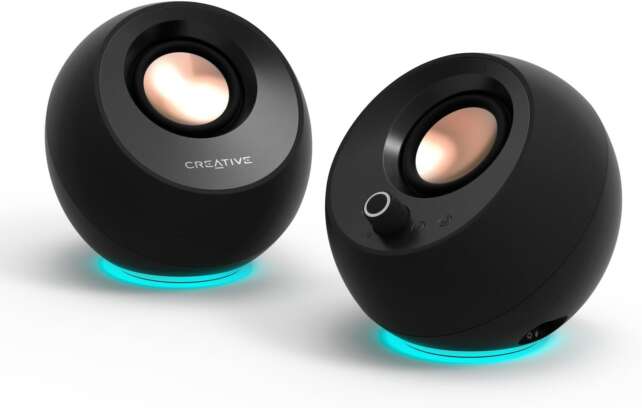
Description
The Creative Pebble Pro is a small 2.0 desktop speaker set with two 2.25-inch full-range drivers, rear passive radiators, USB-C audio, Bluetooth 5.3, 3.5mm AUX, and integrated RGB lighting. The drivers sit at a fixed 45-degree upward angle to direct sound toward the listener at a normal desk position.It produces up to 10W RMS/20W peak from ordinary USB power and up to 30W RMS/60W peak when paired with a suitable 30W USB-PD adapter. The PD port supplies power only, so high-power operation still requires a separate audio connection.
Positives
- Very compact footprint with a clean 2.0 stereo layout.
- 2.25-inch drivers and passive radiators produce fuller sound than the size suggests.
- Clear, crisp, and full vocals and dialogue.
- BassFlex adds useful low-end weight without a separate subwoofer.
- 10W RMS/20W peak standard USB mode is convenient for everyday desktop use.
- Optional 30W RMS/60W peak mode provides much more headroom with a suitable USB-PD adapter.
- USB audio, Bluetooth 5.3, AUX, headset, and microphone connectivity.
- Drivers are angled upward at 45 degrees for near-field desktop listening.
- Clear Dialog can improve speech intelligibility in video, games, and movies.
- SmartComms Kit adds Windows voice-detection and static-noise features.
- Included USB-C, USB-A, and AUX cables simplify setup.
- RGB can be disabled for a more restrained desk appearance.
- Much more capable than typical laptop speakers while remaining easy to install.
Negatives
- No subwoofer and no subwoofer output.
- Deep and layered bass can sound compressed, with reduced low-end detail.
- 30W RMS/60W peak mode requires a separate 30W USB-PD adapter.
- USB-PD input carries power only, not audio.
- USB audio may be unreliable through some monitor hubs or unpowered hubs.
- Fixed driver angle limits placement flexibility.
- Stiff speaker cable can make the pair slide while being positioned.
- RGB lighting adds cost and will not appeal to every user.
- SmartComms Kit is primarily useful on Windows and is not a universal noise-removal system.
- Compact enclosures cannot match the scale, headroom, or sub-bass of larger speakers.
- Higher launch price than older Pebble variants.
- The 2.0 system cannot provide independent multichannel control for serious production.
For games, the elevated drivers make it easy to aim the pair at the listener when placed on a desk, offering enough stereo separation for casual directional awareness. Music performance is enjoyable for casual listening — Tom’s Hardware heard good impact in some bass-heavy material, but deeper, layered bass became compressed with reduced low-frequency texture. A later listening report from ITNerd was particularly positive, comparing the overall sound favorably with a pair of HomePod minis in its setup, reinforcing that the Pebble Pro can sound unusually full for an inexpensive compact pair.
Power and Connectivity
Standard USB power provides 10W RMS/20W peak, already enough for near-field desktop listening and moderate room volume. A suitable 30W USB-PD adapter increases the claimed output to 30W RMS/60W peak — ITNerd found a 47W USB-C charger made the speakers sound noticeably better in its setup. The extra capability is optional and requires a separate power adapter, since the PD port supplies power only and doesn’t carry audio.
USB-C audio, Bluetooth 5.3, 3.5mm AUX, and headset/microphone jacks on the right speaker give the Pebble Pro unusually flexible connectivity for a compact pair. ITNerd found USB worked directly with a Mac but was unreliable through a BenQ monitor’s USB hub, switching to AUX with a separate USB-C charger instead — a useful reminder that direct computer connection is safer than assuming every monitor or hub will provide stable USB audio and sufficient power.
SmartComms Kit and RGB
Creative’s SmartComms Kit is a separate Windows-focused software feature set. VoiceDetect can automatically unmute when the user speaks and mute after speech stops, while NoiseClean-in and NoiseClean-out are designed to reduce static background noise such as fans, air conditioners, and air purifiers — not a universal noise remover for variable voices, intermittent noises, or keyboard clicks. The speakers themselves remain fully functional without SmartComms Kit, and it depends on a supported Windows environment.
RGB rings around the base offer a spectrum cycle, a pulsating single color, and a fixed glow, or can be turned off entirely. Both Tom’s Hardware and ITNerd found the RGB unnecessary in the otherwise minimalist Pebble design and questioned whether it justified paying more than an older Pebble model — it’s best viewed as an optional cosmetic feature rather than a reason to buy.
Frequently Asked Questions
Does Pebble Pro include a subwoofer?
No. It’s a 2.0 system with two speakers and rear passive radiators, and it has no subwoofer output, so it can’t be expanded into a conventional 2.1 setup through the speakers themselves.
Is the 30W USB-PD adapter included?
Not as standard, according to official product information and Tom’s Hardware’s review, though retailer or direct-store promotions may bundle one. Check the contents of the specific regional package.
Can the USB-PD port carry audio?
No. Creative states the USB-PD port supplies power only. You still need a separate USB audio, Bluetooth, or AUX connection for sound.
Is Creative Pebble Pro good for gaming?
Yes, particularly for desk-based gaming, with clear dialogue, useful stereo separation, and enough volume for near-field play. It lacks the deep bass and scale of a larger 2.1 or surround system.
Is it worth buying at $59.99?
At that price it’s attractive for buyers who prioritize compact size, flexible inputs, and clear everyday sound. The value is less obvious if an older Pebble model is heavily discounted or a similarly priced 2.1 system offers a subwoofer.
Verdict
The Creative Pebble Pro is an excellent compact desktop speaker system for buyers who want a tidy 2.0 setup with more capability than basic laptop speakers. It combines clear vocals, respectable bass, good near-field volume, USB audio, Bluetooth 5.3, AUX, headset and microphone ports, and an optional high-power USB-PD mode in a very small footprint.
The main buying decision is whether flexible connectivity and compact design matter more than bass extension and upgradeability. For a small bedroom desk, office, laptop setup, or gaming station, the Pebble Pro is easy to recommend; for a bass-heavy music system or a future-expandable setup, a 2.1 system is the better direction. Overall, it earns 4 out of 5 stars — a well-designed, unusually flexible compact speaker set whose missing subwoofer and optional high-power adapter are reasonable compromises for the right desktop.
