

The GuliKit KK3 Max is an unusually ambitious controller for its price. It combines Hall-effect sticks and triggers, switchable analog and digital trigger modes, four detachable metal rear paddles, a replaceable 950 mAh battery, a carrying case in some bundles, gyro, vibration modes, onboard remapping, and a wireless dongle. It is comfortable, precise in many stick tests, and especially attractive to PC and Switch users who want pro-style controls without paying Elite-level prices.
Its headline 1000 Hz wireless promise needs qualification. GuliKit advertises 1000 Hz wired and wireless operation, and one independent review reports nearly 1000 Hz through the dongle. However, Gamepadla’s displayed tests measure about 992 Hz and 5.4 ms average latency wired, but only about 249 Hz and 18.3 ms average latency through one dongle firmware path; a separate older/alternate result shows 884 Hz with higher latency. Wireless quality is therefore firmware- and mode-dependent, not a universal guarantee.
Overall rating: 4/5 stars. The KK3 Max is a feature-rich value leader for Windows/Switch/mobile users, but it lacks a dedicated configuration app, native Xbox/PlayStation support, and completely consistent high-rate wireless results.
The KK3 Max’s biggest strength is that its hardware feels more expensive than its price. HLPlanet praises the balance and ergonomics, Digitally Downloaded finds the surface soft and comfortable, and Gamepadla’s stick tests show no inner deadzone, minimal outer deadzone, excellent circle error, and strong resolution and centering results. The controller does not merely advertise Hall-effect sensors; it delivers a generally precise hands-on experience.
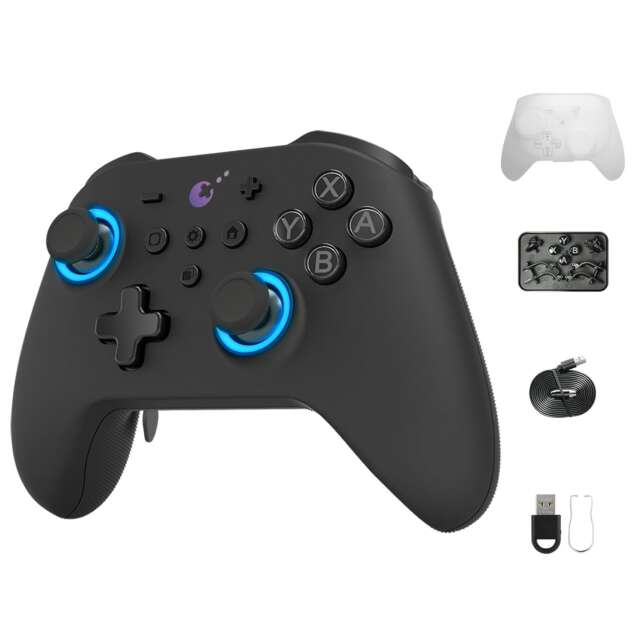
Description
The GuliKit KK3 Max is an unusually ambitious controller for its price. It combines Hall-effect sticks and triggers, switchable analog and digital trigger modes, four detachable metal rear paddles, a replaceable 950 mAh battery, a carrying case in some bundles, gyro, vibration modes, onboard remapping, and a wireless dongle. It is comfortable, precise in many stick tests, and especially attractive to PC and Switch users who want pro-style controls without paying Elite-level prices.Its headline 1000 Hz wireless promise needs qualification. GuliKit advertises 1000 Hz wired and wireless operation, and one independent review reports nearly 1000 Hz through the dongle. However, Gamepadla’s displayed tests measure about 992 Hz and 5.4 ms average latency wired, but only about 249 Hz and 18.3 ms average latency through one dongle firmware path; a separate older/alternate result shows 884 Hz with higher latency. Wireless quality is therefore firmware- and mode-dependent, not a universal guarantee.
**Overall rating: 4/5 stars.** The KK3 Max is a feature-rich value leader for Windows/Switch/mobile users, but it lacks a dedicated configuration app, native Xbox/PlayStation support, and completely consistent high-rate wireless results.
Positives
- Hall-effect sticks and triggers with strong independent stick-test results.
- Switchable analog and digital SmartTrigger modes.
- Four rear slots with detachable, swappable, remappable paddles and optional additional paddle sets.
- Replaceable 950 mAh battery and multiple vibration modes.
- USB, wireless dongle, and Bluetooth connectivity.
- Official support for Windows, Switch, Switch 2, Android, and iOS.
- Useful six-axis gyro and onboard motion-aim settings.
- Excellent wired Gamepadla result of 5.4 ms average latency and about 992 Hz in the displayed test.
- Carrying case, spare buttons, tool, and dongle are included in some bundles.
- Strong comfort, balanced weight, and grippy soft surface.
- High feature density around the $79.99 price context.
Negatives
- Official Xbox and PlayStation support is absent; adapter-based Xbox/PS4 results are not native compatibility.
- Wireless 1000 Hz behavior is inconsistent across displayed Gamepadla firmware/mode results.
- Bluetooth and Switch modes can have materially higher latency and lower polling.
- No dedicated GuliKit configuration application, keyboard-key remapping, or macros.
- Face buttons marketed or described as mechanical may actually use conductive rubber domes in a clicky housing.
- Analog triggers can feel heavy, stiff, or long-travel depending on the reviewer.
- Device/mode switching through the power/mode control can be awkward.
- D-pad is small and concave rather than clearly optimized for fighting games.
- Joystick tension cannot be adjusted.
- Battery runtime evidence ranges from week-long use to up-to-28-hour claims rather than one standardized result.
- Accessory contents vary by retailer and region.
The rear-control system is flexible. The controller has four rear slots, and bundles can include metal paddles and smaller back buttons that can be installed in different combinations. Mapping is performed onboard and can assign rear controls to face buttons or stick clicks. The absence of keyboard-key mapping and a dedicated remapping application is a meaningful limit for PC players who want macros or game-specific profiles.
The SmartTrigger system is also practical. A physical switch changes between Hall-effect analog triggers and digital click-style triggers. Digital mode suits shooters and fast actions; analog mode is better for racing and driving. Independent impressions disagree on how good the analog mode feels: HLPlanet finds it precise but relatively heavy, while Digitally Downloaded criticizes the long, stiff analog travel.
Platform support is broad but not universal. GuliKit lists Windows, Switch, Switch 2, Android, and iOS. HLPlanet reports Xbox Series X and PS4 operation through a separate Goku adapter, not natively, and does not verify PS5. Buyers should treat Xbox and PlayStation as adapter experiments rather than official support.
The final value calculation depends on price and box contents. Around $79.99 or a little over $100 AUD, the controller is compelling, especially when a case, dongle, paddles, spare buttons, and tool are included. Firmware, adapter, battery-runtime, and bundle differences mean that the exact retailer listing deserves careful inspection.
Specifications
- Model: GuliKit KK3 MAX / KingKong 3 MAX, NS39.
- Official native platforms: Windows, Nintendo Switch, Switch 2, Android, and iOS.
- Independent additional platform results: HLPlanet reports Xbox Series X and PS4 operation with a Goku adapter; PS5 was not tested.
- Connectivity: USB-C wired, GuliKit wireless dongle/Hyperlink Adapter, and Bluetooth.
- Joysticks: Hall-effect sensors; GuliKit identifies high-precision Level 2200 sticks, and an independent distributor identification names GL1806.
- Triggers: Hall-effect triggers with SmartTrigger switching between analog and digital modes.
- Rear controls: Four rear slots; detachable, swappable, remappable metal paddles and smaller back buttons depending on bundle.
- Paddle ecosystem: GuliKit says six metal rear paddles are offered; reviewed packages may include four paddles and two buttons.
- Face buttons: Clicky-feeling buttons in housings; HLPlanet reports a teardown showing conductive rubber domes rather than true mechanical switches.
- D-pad: Small, tactile, and somewhat concave according to independent reviews.
- Polling claim: 1000 Hz wired and wireless according to GuliKit.
- Measured polling examples: Gamepadla displays 992.06 Hz wired, 249.19 Hz in one dongle XInput test, 265.18 Hz Bluetooth XInput, and an alternate 884.46 Hz dongle result.
- Measured latency examples: Gamepadla displays 5.40 ms average wired primary XInput, 18.3 ms dongle XInput, 18.3 ms Bluetooth primary XInput, and higher Switch-mode values.
- Motion: Six-axis gyro.
- Vibration: Patented Maglev motor plus HD/rotary vibration modes described by independent coverage.
- Battery: Replaceable 3.7 V, 950 mAh battery.
- Battery runtime: Source claims range from roughly a week of ordinary use to up to 28 hours; no universal standardized figure.
- Firmware: Downloadable firmware update through the controller’s flash storage/update process.
- Dedicated configuration software: None identified in HLPlanet’s review; most settings are adjusted onboard.
- Onboard settings: Rear mappings, trigger mode, motion aim assist, dead-zone mode, sensitivity, brightness, rapid fire, button swap, vibration intensity/mode, and APG recording.
- Accessories: Wireless dongle, button tool, spare face buttons, case, cable, paddles, and adapter availability vary by package.
- Price context: Approximately $79.99 or a little over $100 AUD in independent reviews.
Detailed Product-Specific Analysis
Premium features at a midrange price
The KK3 Max is designed to compete above its price class. Four rear inputs, swappable face buttons, a case, Hall-effect sticks and triggers, motion control, a replaceable battery, and a wireless dongle make it closer to a customizable performance controller than a basic wireless pad.
The cost-saving decisions are visible in the software and marketing language. There is no dedicated configuration app in HLPlanet’s review, and the “mechanical” button claim is softened by a teardown finding that the switch mechanism is still a conductive rubber dome inside a clicky shell. Those compromises do not make the buttons bad, but they mean the KK3 Max should be judged as a strong feature-rich controller rather than a literal substitute for every premium design detail.
Stick quality and the Hall-effect promise
The Hall-effect sticks are one of the KK3 Max’s most successful elements. HLPlanet finds them smooth and comfortable, Digitally Downloaded reports very little dead zone and slightly stiff resistance, and Gamepadla records no inner deadzone, a 0.8 mm outer deadzone, 0.0%/0.1% circle error, and center error of 2.9%/2.2% for the left/right sticks.
Gamepadla also reports 15.2% left and 18.3% right stick asymmetry in partial-deflection testing. That result is less perfect than the circle-error values, and it is a useful reminder that a near-perfect full-range plot does not necessarily mean identical behavior at every angle. The practical conclusion is positive but not absolute: the KK3 Max sticks are capable of fine control and strong measured geometry, with some directional inconsistency in a more demanding test.
Hall-effect sensing lowers the drift risk associated with potentiometer contact wear, but it does not make the entire mechanical assembly immortal. Caps, springs, gates, bearings, calibration, and electronics can still age. GuliKit’s sensor choice is a strong reason to prefer the KK3 Max, not a guarantee against all future stick problems.
Analog and digital SmartTriggers
GuliKit’s SmartTrigger switch changes the triggers between analog Hall-effect operation and digital click mode. This is a meaningful physical feature: racing and flight games can use analog range, while shooters and action games can use shorter click-style actuation.
The analog trigger experience is the main area of independent disagreement. HLPlanet calls the triggers precise but heavy and says the analog travel can feel short. Digitally Downloaded is more critical, describing a long and stiff L2/R2 press without a satisfying tactile end-stop. These reports may reflect reviewer preference, game context, or hardware/firmware differences, but buyers should not assume the analog triggers feel like an Xbox first-party pad.
Rear paddles and onboard remapping
The KK3 Max’s four rear slots provide more physical customization than the two-button systems on many midrange controllers. HLPlanet’s package included four metal paddles and two smaller buttons, which could be installed in different configurations. GuliKit’s official page also says six metal paddles are offered, suggesting an accessory ecosystem rather than one guaranteed universal in-box layout.
Mapping is performed without a PC application: hold the setting button and the desired rear input, press the source button, and the controller stores the assignment. Face buttons and L3/R3 are available sources according to HLPlanet. This is quick and platform-neutral, but it cannot map rear controls to keyboard keys, and Steam sees the device as an Xbox One controller rather than exposing a dedicated GuliKit profile editor.
For ordinary console use, onboard mapping is enough. For PC users who want macros, keyboard shortcuts, per-game layers, or extensive profile management, the lack of dedicated software is a real limitation.
Face buttons, bumpers, and D-pad
The KK3 Max’s face buttons feel clicky to independent reviewers, but HLPlanet reports that a teardown found conductive rubber domes inside a clicky casing. This likely explains why the buttons can sound and feel responsive without being true mechanical switches. The user experience can still be satisfying; the caveat is about construction and marketing precision.
The D-pad is small and somewhat concave. HLPlanet prefers it to the KingKong 2 Pro’s pad, while Digitally Downloaded finds the controller’s short-travel L1/R1 buttons especially useful for retro games. The D-pad is suitable for menus and ordinary directional play, but the available sources do not establish it as a fighting-game specialist.
Wireless modes and the 1000 Hz question
GuliKit advertises 1000 Hz wired and wireless performance. HLPlanet’s personal testing reports near-1000 Hz through USB and the included dongle, and Digitally Downloaded says the Hyperlink Adapter supports 1000 Hz.
Gamepadla provides a more nuanced picture. Its displayed current-style results show 992.06 Hz and 5.40 ms average latency for cable primary XInput. The dongle XInput result on firmware 5.2.3.6 shows 249.19 Hz and 18.3 ms average latency, while Bluetooth primary XInput shows 265.18 Hz and 18.3 ms. An additional older/alternate dongle result shows 884.46 Hz with 35.4 ms average latency.
These results do not necessarily prove that one source is wrong. The controller may change behavior with firmware, adapter generation, test build, mode, operating system, or whether a high-rate mode is enabled. The important buying conclusion is that wired USB is the most reliably high-performance path, while wireless polling and latency should be verified with the exact firmware and adapter.
Switch mode is useful but slower
GuliKit officially supports Nintendo Switch and Switch 2. Gamepadla displays approximately 124.95 Hz and 18.3 ms average latency for cable Switch mode, and approximately 104.01 Hz and 32.8 ms for Bluetooth Switch mode. This is materially slower than wired PC XInput in the same displayed data.
For most Switch games, that trade-off is acceptable. For competitive play, the user should prefer the lowest-latency available mode and avoid assuming that the official 1000 Hz phrase applies equally to Switch mode. The controller’s gyro and swappable ABXY buttons also make it interesting for Switch-style layouts, but the exact button configuration should be checked after installation.
PC, Xbox, and PlayStation compatibility
Windows is the KK3 Max’s best performance platform. USB and the wireless dongle provide the clearest PC paths, and HLPlanet reports that the dongle works after pairing. Bluetooth is available but can be slower and less consistent.
GuliKit’s official compatibility list does not include Xbox or PlayStation. HLPlanet reports that Xbox Series X and PS4 worked using a Goku adapter, but this is not native support and PS5 was not tested. Adapter-based use can add cost, setup, firmware dependence, and compatibility risk. Buyers seeking a plug-and-play Xbox or PS5 controller should choose an officially supported model instead.
Motion aim assist and gyro
The KK3 Max includes a six-axis gyroscope and onboard motion aim-assist settings. Digitally Downloaded found the gyro accurate enough for emulated Wii games after tuning. HLPlanet lists low, medium, high, and disabled motion aim-assist settings.
Motion controls are a bonus rather than the core reason to buy the controller. The sources do not establish consistent simultaneous use of gyro and stick across every game or platform, and the official support list does not turn the KK3 Max into a Switch-exclusive motion controller. Treat the gyro as useful extra functionality whose value depends on software and setup.
Vibration and the replaceable battery
GuliKit advertises a patented Maglev vibration motor, and HLPlanet lists rotary, Maglev haptic, and HD vibration modes. This is more configurable than a simple on/off rumble motor.
The 3.7 V, 950 mAh battery is replaceable, which is a meaningful repairability advantage. HLPlanet reports that the RGB logo indicator turns orange slowly when the battery is low. Runtime evidence is less precise: Digitally Downloaded expects most users to get a week, while an AKNES listing gives an up-to-28-hour claim and another retailer snippet can imply a lower figure. Actual use depends on vibration, lighting, connection mode, and battery condition.
Firmware without a dedicated app
Firmware updating is performed through a downloadable file and the controller’s update/flash-storage process. HLPlanet found this easy, but also notes that GuliKit does not provide a dedicated configuration application.
Onboard settings cover more than many budget controllers: rear-button assignments, trigger mode, motion aim assist, stick dead-zone mode, sensitivity, brightness, rapid-fire behavior, A/B and X/Y swap, vibration, and APG recording. That is a clever low-software approach, but it is slower to manage than a desktop or mobile GUI and does not provide keyboard-key remapping.
Accessories and price
The strongest bundles include a wireless dongle, case, button tool, spare face buttons, rear paddles, and smaller rear buttons. GuliKit says the Hyperlink Adapter, six-paddle set, and PC Button Kit are offered, but the wording does not guarantee that every seller includes them. Buyers should inspect the exact NS39 package.
HLPlanet uses $79.99 as its price context, while Digitally Downloaded describes a little over $100 AUD. At either level, the feature set is strong, but accessory completeness matters. A package without a case, high-rate adapter, or preferred paddle set may be less attractive than a discounted bundle that includes them.
Frequently Asked Questions
What exact GuliKit model is this review about?
It covers the GuliKit KK3 MAX / KingKong 3 MAX, NS39. It is not the KK3 Pro, KK3 Standard, KingKong 2 Pro, or another GuliKit model.
What platforms does it officially support?
GuliKit lists Windows, Nintendo Switch, Switch 2, Android, and iOS.
Does it work on Xbox?
Xbox is not listed as native official support. HLPlanet reports Xbox Series X operation through a Goku adapter, but adapter use is a separate setup and may add latency or compatibility issues.
Does it work on PlayStation?
PlayStation is not listed as native support. HLPlanet reports PS4 adapter use but did not test PS5. Do not buy it expecting plug-and-play PS5 compatibility.
Does it have Hall-effect sticks and triggers?
Yes. GuliKit lists Hall-effect joysticks and triggers, and the independent sources confirm Hall-effect sticks and SmartTrigger behavior.
Can the triggers switch between analog and digital?
Yes. SmartTrigger switches between Hall-effect analog mode and digital click mode. Analog is useful for racing and driving; digital mode is better for fast-action inputs.
How many paddles does it include?
The controller has four rear slots. HLPlanet’s bundle included four metal paddles and two smaller buttons. GuliKit says six metal rear paddles are offered, which may refer to the broader accessory ecosystem. Check the exact retailer package.
Can I remap the rear buttons?
Yes, through onboard controls. The rear buttons can be mapped to face buttons and L3/R3 according to HLPlanet. Keyboard-key mapping and macro assignment are not available through the onboard system.
Does it have a PC software app?
HLPlanet reports that GuliKit did not provide a dedicated configuration application. Firmware is updated through a downloadable file, and many settings are adjusted on the controller itself.
What is the polling rate?
GuliKit advertises 1000 Hz wired and wireless. Gamepadla’s displayed results show about 992 Hz wired, but approximately 249 Hz in one dongle test, 265 Hz in Bluetooth XInput, and 884 Hz in an alternate older dongle result. Treat 1000 Hz as mode- and firmware-dependent rather than universal.
How fast is the controller?
Gamepadla displays approximately 5.4 ms average latency for cable primary XInput, 18.3 ms for one dongle XInput result, 18.3 ms for Bluetooth primary XInput, and higher values in Switch modes. Wired USB is the safest choice for consistently low latency.
Does Bluetooth work with mobile devices?
Yes. GuliKit lists Android and iOS, and HLPlanet also reports macOS Bluetooth use. Bluetooth is slower than the best wired/dongle paths in the displayed measurements.
How long does the battery last?
The controller uses a replaceable 3.7 V, 950 mAh battery. Independent evidence ranges from most users getting about a week to retailer claims of up to 28 hours. Runtime varies with vibration, lighting, connection, and battery condition.
Does it have gyro controls?
Yes. It has a six-axis gyroscope and onboard motion aim-assist settings. Digitally Downloaded found it useful for emulated Wii games after tuning.
What vibration modes are available?
The controller supports GuliKit’s Maglev vibration plus HD and rotary vibration modes according to the official and independent materials.
Are the face buttons mechanical?
They can feel clicky, but HLPlanet reports a teardown showing conductive rubber domes in a clicky casing. They should not be treated as verified full mechanical switches.
Is the KK3 Max good for competitive PC gaming?
It can be very good over wired USB, where Gamepadla displays about 5.4 ms average latency and 992 Hz polling. Wireless performance depends on adapter, firmware, and mode, so competitive players should verify their exact setup rather than rely only on the 1000 Hz marketing claim.
Is it worth buying?
Yes for Windows, Switch, Android, or iOS users who value Hall-effect controls, rear paddles, gyro, replaceable battery, and a case/dongle-rich bundle. It is a weaker choice for native Xbox/PlayStation buyers, users who require a deep software suite, or anyone who wants guaranteed 1000 Hz wireless behavior in every mode.
Important Caveats
Confirm the exact NS39 model and the firmware version before comparing reviews. GuliKit supplies firmware links, and the displayed Gamepadla results vary significantly by firmware, adapter, and mode.
The official 1000 Hz wired and wireless claim does not mean every connection mode will measure at 1000 Hz. Gamepadla shows excellent wired performance but materially lower or more variable wireless and Switch-mode results.
Xbox and PlayStation are not official native platforms. Adapter-based success with Xbox Series X or PS4 should not be generalized to Xbox wireless operation or PS5.
Hall-effect sensors reduce one common potentiometer-wear pathway but do not guarantee that sticks, springs, caps, calibration, or other electronics cannot fail.
GuliKit’s optional six-paddle ecosystem and Hyperlink Adapter should not be assumed to be in every box. HLPlanet’s reviewed package included four paddles, two buttons, a case, dongle, spare face buttons, and a tool, but bundles vary.
The analog trigger mode may feel heavy or long-travel. Test or buy from a retailer with a suitable return policy if racing and driving games are a primary use.
There is no dedicated configuration application in the independent review evidence. Onboard remapping is useful but does not provide keyboard mapping, macros, or a modern per-game profile library.
The face buttons are clicky-feeling but may use conductive rubber domes rather than true mechanical switches.
Battery runtime is not standardized. Treat the 950 mAh capacity as the stable fact and the week/up-to-28-hour statements as workload-dependent estimates.
The controller can be relatively small for very large hands, and the D-pad is small and concave. Ergonomics remain personal.
Verdict
The GuliKit KK3 Max is one of the most feature-dense controllers in the midrange. It offers the right headline hardware—Hall-effect sticks and triggers—alongside an analog/digital trigger switch, four rear slots, a replaceable battery, gyro, vibration modes, onboard remapping, and a carrying case in some bundles. The sticks are particularly convincing: independent hands-on reviews are positive, and Gamepadla’s displayed tests show excellent inner-deadzone, circle-error, resolution, and centering behavior.
The controller’s weaknesses are concentrated in the software and compatibility layers. There is no dedicated GuliKit configuration app, no keyboard-key mapping, no native Xbox or PlayStation support, and no single wireless result that validates the 1000 Hz claim across all firmware and modes. Gamepadla’s measurements make wired USB the safest high-performance choice, while dongle and Bluetooth behavior requires more careful setup.
Final recommendation: Buy the KK3 Max if you use Windows, Switch, Switch 2, Android, or iOS and want extensive physical customization at about $80 / a little over $100 AUD, especially when the bundle includes the case, dongle, paddles, and spare buttons. Avoid it if you need native Xbox/PS5 support or a full software suite. It earns 4/5 stars overall and is a standout value when its platform and wireless caveats are understood.
