

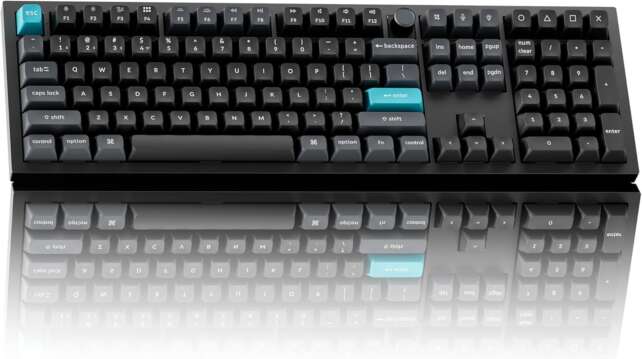
The Keychron Q6 Ultra 8K is a full-size wireless mechanical keyboard built for users who want a complete number pad, premium aluminum construction, refined acoustics, hot-swappable Silk POM switches, and flexible connectivity. It supports 8,000Hz polling in wired and 2.4GHz wireless modes, Bluetooth 5.3 for up to three devices, and up to 660 hours of battery life with the backlight disabled.
Its excellent stability, soft double-gasket feel, and quiet typing make it especially suitable for office work, programming, spreadsheets, and general gaming. However, it’s extremely large and heavy, its tall KSA keycaps benefit from a wrist rest that isn’t included, and the 8K polling feature offers little practical advantage for most users.
Specifications
- Product: Keychron Q6 Ultra 8K Wireless Custom Mechanical Keyboard
- Layout: 100% full-size layout with number pad, function row, navigation cluster, arrow keys, and rotary knob
- Case: CNC-machined full aluminum body
- Mounting: Double-gasket design
- Switches: Pre-lubed Keychron Silk POM mechanical switches; Red, Brown, or Banana options
- Hot-swap: Yes
- Keycaps: Double-shot PBT, KSA profile, with Mac and Windows keycaps
- Polling rate: Up to 8,000Hz in wired and 2.4GHz wireless modes
- Wireless: 2.4GHz receiver and Bluetooth 5.3, up to three devices
- Wired connection: USB-C
- Firmware: ZMK
- Battery life: Up to 660 hours with backlight off
- Backlight: RGB with per-key customization
- Software: Keychron Launcher web configurator
- Operating systems: Windows and macOS with system toggle; Launcher also supports Linux and other platforms
- Wrist rest: Not included
- Official listed price at research time: $239.99
Design and Layout
The full-size layout is the Q6 Ultra 8K’s clearest point of differentiation, providing a dedicated number pad for accounting, spreadsheet work, data entry, and productivity workflows while retaining the function row and navigation keys. This layout is familiar and efficient, but it isn’t compact — the Q6 takes more horizontal space than a TKL or 75% keyboard, and the number pad can push the mouse farther to the right. Users with large desks or frequent numeric workloads will appreciate the completeness; users with limited space may prefer the Q3 or Q1 Ultra 8K instead.
The aluminum case is available in black and white versions with Mac and Windows keycaps and a system switch included. The keyboard’s size and weight are significant — it’s extremely large and heavy, and the full-size format isn’t intended for mobile use. It remains planted during rapid typing, but moving it between desks is inconvenient.
Build Quality and Typing Feel
Description
The Keychron Q6 Ultra 8K is a full-size wireless mechanical keyboard built for users who want a complete number pad, premium aluminum construction, refined acoustics, hot-swappable Silk POM switches, and flexible connectivity. It supports 8,000Hz polling in wired and 2.4GHz wireless modes, Bluetooth 5.3 for up to three devices, and up to 660 hours of battery life with the backlight disabled.Its excellent stability, soft double-gasket feel, and quiet typing make it especially suitable for office work, programming, spreadsheets, and general gaming. However, it is extremely large and heavy, its tall KSA keycaps benefit from a wrist rest that is not included, and the 8K polling feature offers little practical advantage for most users.
Positives
- Outstanding full-metal build quality and desk stability.
- Complete full-size layout with number pad and rotary knob.
- Smooth Silk POM switches and improved larger-key stabilizers.
- Soft double-gasket feel and quiet, controlled acoustics.
- Excellent single-key and multi-key latency in wired and 2.4GHz modes.
- 8K polling available over wired and 2.4GHz wireless connections.
- Bluetooth 5.3 supports up to three devices.
- Up to 660 hours of battery life with RGB disabled.
- Hot-swappable PCB and extensive Launcher customization.
- Useful Mac/Windows compatibility and keycap sets.
- Excellent choice for spreadsheets, programming, office work, and numeric input.
Negatives
- Extremely large and heavy; poor portability.
- Tall KSA keycaps benefit from a wrist rest that is not included.
- 8K polling provides little tangible benefit in independent testing.
- No Hall Effect sensing, adjustable actuation, analog input, or Rapid Trigger.
- Non-shine-through keycaps make RGB mainly decorative.
- Bright RGB reduces battery life significantly.
- No dedicated macro keys, although macros can be assigned in software.
- Some media functions are limited by Windows/Mac mode behavior.
- Premium price is high compared with cheaper Keychron alternatives.
- Full-size layout may crowd the mouse area for competitive gaming.
Build quality is outstanding: the full aluminum chassis feels rigid and durable, while its weight prevents the keyboard from sliding. The double-gasket mount adds controlled flex and softens the bottom-out feel, which is particularly valuable on a full-size keyboard where long sessions often expose harshness or vibration in the larger keys. Revised stabilizers reduce rattle on larger keys, benefiting the space bar, Enter, Shift, Backspace, and number-pad keys — a full-size board has more large stabilized keys than compact layouts, so this refinement has practical value beyond the specification sheet.
Pre-lubed Silk POM switches provide smooth travel across Red (linear), Brown (tactile), and Banana (more pronounced tactile) options, and the PCB is hot-swappable for those who want to change feel later. The full-size layout makes stabilizer quality especially important, and the foam layers reduce hollow resonance for a controlled rather than silent sound. The KSA keycaps are tall and strongly concave, so a wrist rest is recommended for long sessions — Keychron’s omission here is a weakness at this price.
Gaming Performance and Wireless Connectivity
The Q6 Ultra 8K performs very well as a conventional mechanical gaming keyboard, with outstanding raw performance including excellent single-key and multi-key latency through both wired and 2.4GHz wireless connections. The number pad is useful for MMOs, simulations, strategy games, and users who rely on extensive key bindings. The 8,000Hz polling mode works through USB-C and 2.4GHz wireless and reduces the theoretical reporting interval, though testing found no tangible improvement in latency compared with lower polling settings.
The Q6 supports extensive remapping and macros through Keychron Launcher, but it lacks Hall Effect sensing, adjustable actuation, analog input, and Rapid Trigger — competitive FPS players who prioritize movement control should choose a specialized Hall Effect board instead. The keyboard’s full-size footprint can also affect gaming ergonomics, since the number pad occupies space a mouse might otherwise use. Wireless connectivity spans wired USB-C, 2.4GHz, and Bluetooth 5.3 (up to three devices), with the Mac/Windows toggle making the keyboard suitable for mixed-device environments.
Battery Life and Software
Keychron advertises up to 660 hours with the RGB backlight off, a major improvement over the approximately 180-hour estimate of the previous Q6 Max generation, enabled largely by the more power-efficient ZMK firmware. The 660-hour figure is a low-power maximum — RGB brightness, high polling, wireless mode, and sleep settings all affect the result, so users who run bright RGB continuously should expect considerably less. The keyboard can be used while charging.
Keychron Launcher supports remapping, macros, layers, profiles, RGB customization, and polling adjustment across Windows, macOS, Linux, and other operating systems through compatible browsers. The Q6 can assign macros to existing keys even without dedicated macro buttons, useful for productivity workflows, editing, programming, and games with large control sets.
Frequently Asked Questions
Does 8K polling work over wireless?
Yes. The 8,000Hz polling mode works with the 2.4GHz receiver and through wired USB-C. Bluetooth doesn’t use the 8K mode.
Does 8K polling make a noticeable difference?
Usually not. Testing found no tangible latency improvement from increasing the rate to 8,000Hz, although the Q6 still has excellent overall latency.
Does it have Hall Effect switches or Rapid Trigger?
No. The Q6 Ultra 8K uses conventional mechanical switches and doesn’t support adjustable actuation, analog input, or Rapid Trigger.
Is a wrist rest included?
No. The keyboard’s tall profile makes a wrist rest useful for long sessions, but one isn’t included.
How large and heavy is it?
It’s a 100% full-size keyboard described as extremely large and heavy in independent testing. It’s best used as a stationary desk keyboard rather than something you move often.
Verdict
The Keychron Q6 Ultra 8K earns 4.5 out of 5 stars. It’s a superb full-size mechanical keyboard with a dense aluminum chassis, a soft double-gasket feel, quiet and refined acoustics, smooth Silk POM switches, improved stabilizers, useful wireless modes, and excellent battery potential. For office work, spreadsheets, programming, and users who simply prefer a complete layout, it’s one of the most capable premium wireless boards available.
The limitations are practical rather than fundamental: the Q6 is very large and heavy, its tall KSA keycaps benefit from a wrist rest that isn’t included, RGB reduces battery life, and the 8K polling rate isn’t a meaningful upgrade for most users. Buy the Q6 Ultra 8K if the number pad is important and you want a keyboard that feels like a long-term desk fixture; choose the Q3 or Q1 if you want to reclaim desk space, and a Hall Effect board if competitive gaming features matter more than full-size productivity.
