

The Mayflash F500 Elite remains one of the more convincing entry-to-midrange universal arcade sticks because it combines genuine Sanwa joystick and button hardware with a heavy metal-backed chassis, a customizable acrylic top panel, turbo controls, multiple input modes, and broad legacy-console support. It is especially attractive to PC, PS4, Xbox One, Switch, and retro-console players who want a mod-friendly platform without immediately buying premium tournament hardware.
Its main compromise is the meaning of “universal.” The F500 Elite is fundamentally a wired USB stick, and some consoles require a native controller-authentication path or a separate Mayflash adapter; PS5 play is specifically associated with the Magic-S Ultimate rather than built in. Mayflash’s “1 ms” figure is also a firmware claim, not an independent end-to-end latency measurement.
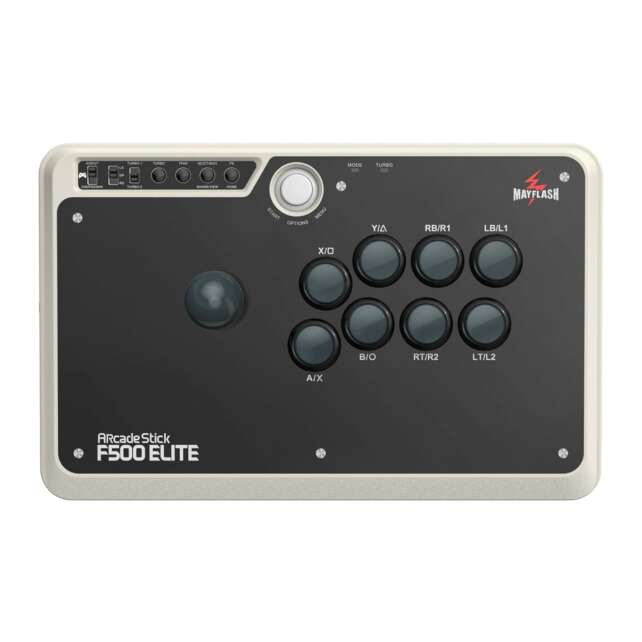
The F500 Elite is the Sanwa-equipped version of Mayflash’s original F500 line. Mayflash lists nine highly responsive buttons and a precision 4-way joystick, while independent coverage reports that the genuine Sanwa parts are a meaningful improvement over the standard F500’s stock hardware. The two-metal-panel construction and rubber feet give it the stability expected from a full-size stick, and its broad surface leaves useful wrist room for both lap and desk play.
The value proposition is practical rather than luxurious. You get a familiar arcade layout, an included octagonal gate, accessible internals, an easy-to-remove acrylic artwork panel, cable storage, turbo, and switchable D-pad/analog-axis behavior. The trade-off is a relatively old platform architecture: there is no native wireless radio, no dedicated L3/R3 pair on the main panel, and PS5 compatibility adds adapter cost and setup work.
Description
The Mayflash F500 Elite remains one of the more convincing entry-to-midrange universal arcade sticks because it combines genuine Sanwa joystick and button hardware with a heavy metal-backed chassis, a customizable acrylic top panel, turbo controls, multiple input modes, and broad legacy-console support. It is especially attractive to PC, PS4, Xbox One, Switch, and retro-console players who want a mod-friendly platform without immediately buying premium tournament hardware.Its main compromise is the meaning of “universal.” The F500 Elite is fundamentally a **wired USB stick**, and some consoles require a native controller-authentication path or a separate Mayflash adapter; PS5 play is specifically associated with the Magic-S Ultimate rather than built in. Mayflash’s “1 ms” figure is also a firmware claim, not an independent end-to-end latency measurement.
Positives
- Genuine Sanwa joystick and buttons are included from the start rather than being an upgrade path.
- Heavy metal construction and rubber feet provide stability for lap and desk play.
- Broad legacy and current-platform coverage, including PC, PS4, Xbox One, Switch, and retro systems, with Xbox Series and Switch 2 caveats.
- XInput/DInput switching is useful for Windows compatibility.
- Removable acrylic panel and accessible internals make artwork and component modification approachable.
- Included octagonal gate, internal cable storage, and extra rubber cushions add practical value.
- Turbo, headset support on specified consoles, selectable input modes, and firmware updates offer more flexibility than many basic sticks.
- The F500 Elite’s wired design avoids battery maintenance and is suitable for low-latency competitive use.
Negatives
- It is not natively wireless; some retailer descriptions can obscure that distinction.
- PS5 compatibility requires planning and may require the separate Magic-S Ultimate adapter.
- Xbox Series and Switch 2 behavior should be checked against current firmware and the exact game rather than assumed from a broad compatibility list.
- There are no dedicated L3/R3 buttons on the main panel, according to independent coverage.
- Headset support is specified for PS4 and Xbox One, not universally across all listed platforms.
- Vibration uses an optional wrist strap rather than conventional built-in rumble.
- The official and retailer dimensions/weight figures conflict, which complicates travel-case selection.
- Mayflash’s 1 ms latency statement is an official claim rather than an independent end-to-end measurement.
- The chassis is large and heavy compared with compact or premium low-profile alternatives.
Mayflash’s official page lists PS4, PS3, Xbox One, Xbox 360, PC, Android, Nintendo Switch 2/Switch/OLED, NEOGEO mini, and Sega Astro City Mini, with Xbox Series X/S also appearing in its compatibility feature list. Those claims should be read alongside the controller-authentication requirements that can vary by console and firmware. For a buyer who primarily plays on PC, PS4, Xbox One, Switch, or older systems, the F500 Elite is a strong value. For native PS5 games or a genuinely cable-free setup, the total cost and complexity are less compelling.
Specifications
- Product: Mayflash F500 Elite Universal Arcade Stick.
- Generation boundary: Original F500 Elite; separate from F500 V2, F500 Flat Elite, and F700.
- Primary connection: USB; the F500 Elite itself is not a self-contained wireless arcade stick.
- Officially listed systems: PS4, PS3, Xbox One, Xbox 360, PC, Android, Nintendo Switch 2/Switch/OLED, NEOGEO mini, and Sega Astro City Mini; Xbox Series X/S appears in the official feature list but should be treated as firmware/compatibility dependent.
- PC modes: XInput and DInput.
- Installed controls: Premium Sanwa joystick and nine Sanwa buttons, including the eight-button action layout plus system/turbo controls.
- Gate: Four-way joystick configuration with an octagonal gate included in the package.
- Additional functions: Turbo with multiple speed settings, switchable D-pad/LS/RS or analog-axis modes, touchpad/system mappings where supported, and headset output on PS4/Xbox One.
- Vibration: Supported through an optional Mayflash wrist-strap accessory rather than conventional built-in controller rumble.
- Chassis: Metal cover and metal base with an acrylic/PMMA top panel for custom artwork.
- Official size figures: 360 × 231.3 × 118.3 mm and 3 kg in one Mayflash specification block; another Mayflash block lists approximately 36.2 × 23.3 × 11.5 cm and 2,482 g.
- Retailer size figures: ArcadExpress lists approximately 41 × 28 × 14.5 cm and 3,000 g; these figures conflict with Mayflash’s page.
- Cable/accessories: Micro USB cable, USB Type-C cable/adapter, user manual, octagonal gate, and four rubber cushions are listed by Mayflash.
- PS5 path: Mayflash’s Magic-S Ultimate adapter is specified as compatible with the F500/F500 Elite for PS5 games.
- Firmware: Mayflash’s V1.11 firmware page claims “real lowest 1 ms input lag for all platforms”; updating requires a Windows PC.
- Release context: eStarland lists April 1, 2019 as the release date.
- Price context: Opened sources show variable retailer and secondary-market prices rather than one stable current MSRP; snapshots range from about $67.95 pre-owned at eStarland to approximately $102 loose, $117 complete, and $143 new in PriceCharting’s PAL guide.
Detailed Analysis
Sanwa parts make the Elite the right F500 to buy
The most important distinction is the word Elite. Mayflash’s official specification says the F500 Elite uses premium Sanwa hardware, with nine highly responsive buttons and a precision 4-way joystick. The Arcade Stick review likewise says the Sanwa-equipped Elite performs materially better than the standard F500’s average stock parts and reports that the parts passed its acceptance test.
That gives the F500 Elite a much stronger starting point than a generic budget stick. Sanwa parts are familiar to arcade players, easy to source, and straightforward to replace, so the controller can remain useful even if a player later prefers a different actuator, gate, or button weight. The included octagonal gate is a practical bonus for players who want more pronounced diagonal engagement than the default four-way feel.
A stable, full-size body for lap or desk play
The F500 Elite’s two metal panels give the chassis meaningful heft, and the independent review emphasizes that the width and rubber feet make it comfortable for both lap and desk play. The substantial surface area leaves room for the wrists, while the recessed Start button reduces the chance of accidental pauses during play.
Published dimensions and weight are not perfectly consistent. Mayflash provides both a 360 × 231.3 × 118.3 mm/3 kg specification and a 36.2 × 23.3 × 11.5 cm/2,482 g block, while ArcadExpress lists about 41 × 28 × 14.5 cm/3 kg. The practical conclusion is reliable even though the numbers are not: this is a large, heavy, desk- or lap-oriented stick, not a compact travel model.
Modding and artwork are genuine strengths
The acrylic top panel is removable, letting owners replace the stock design with custom artwork; Mayflash also supplies a decorative-paper template. The Arcade Stick review describes six visible bottom screws, accessible internals, organized wiring, and easy replacement of the gate and buttons.
This makes the F500 Elite more than a fixed appliance. A new player can use the installed Sanwa controls immediately, while an enthusiast can change the gate, button set, artwork, or other internal components over time. The case is not as refined as a premium tournament chassis, but it is unusually friendly to customization at this price tier.
Universal compatibility is broad but not frictionless
Mayflash lists a wide collection of systems, including PS4, PS3, Xbox One, Xbox 360, PC, Android, Switch 2/Switch/OLED, NEOGEO mini, and Sega Astro City Mini. On PC, the choice between XInput and DInput is useful because it covers modern controller APIs and older software with different input expectations.
The limitation is that this breadth comes from Mayflash’s universal architecture rather than from native certification on every modern platform. Independent coverage warns that some consoles require a native controller connection, and specifically recommends the Magic-S Ultimate for PS5 compatibility. Mayflash’s own Magic-S Ultimate page says that the adapter can connect the F500 and F500 Elite for PS5 games.
In other words, a buyer should check the exact game and console path before assuming plug-and-play support. The broad list is a strength for multi-system households, but it can become a setup project for PS5, Xbox Series, or other environments where authentication and firmware matter.
Wired operation is dependable, but “wireless” listings are misleading
Mayflash’s official F500 Elite page lists USB connectivity and provides a Micro USB cable plus a USB Type-C adapter cable. The F500 Elite should therefore be treated as a wired stick. Some retailer copy describes it as “wired or wireless,” but the independent review’s discussion of controller piggybacking and Mayflash’s adapter documentation point to authentication/pass-through arrangements rather than an internal wireless radio in the F500 Elite itself.
That is not necessarily a performance weakness. Wired operation avoids charging and radio interference, and it is appropriate for tournament-style play. It is a convenience limitation, however, especially when compared with newer wireless products such as the Mayflash F700. Buyers who want the F500 Elite on a wireless-console setup should budget for the required controller or adapter path rather than assuming the stick will pair directly.
Response and firmware
Mayflash’s V1.11 firmware page states that the update delivers the “real lowest 1 ms input lag for all platforms.” The page also says the update must be performed on a Windows PC and cannot be completed individually on a console. This is useful evidence that Mayflash actively addressed input response, but it is still an official firmware claim.
The opened independent review reports that the F500 Elite’s Sanwa controls passed its acceptance test and describes the stick as capable of tournament play, but it does not provide a comparable end-to-end latency number. The fairest reading is that the F500 Elite should feel responsive after current firmware, while the precise 1 ms figure should not be presented as an independently verified full-system measurement.
Audio, turbo, and unusual accessory features
Mayflash and independent coverage list headset output for background audio and online chat on PS4 and Xbox One. The Arcade Stick review also describes a mute button and a port for an optional rumble wrist strap. The wrist-strap vibration feature is unusual, but it is not a substitute for built-in rumble and the accessory is not included.
Turbo is available with multiple speed settings, and the independent review identifies two turbo modes plus an indicator light. Turbo can be useful for retro titles, but competitive fighting-game players will normally leave it disabled and should be aware that console rules or tournament regulations may prohibit it.
Value depends on the platform you already own
The F500 Elite launched in the 2019 period; eStarland lists April 1, 2019 as its release date. Current pricing is difficult to reduce to a single number because the opened sources show used and secondary-market listings rather than a stable official MSRP. eStarland’s captured listing shows a current sell price of $67.95, while PriceCharting’s PAL guide reports approximately $102 loose, $117 complete, and $143 new, based on historical completed sales.
A pre-owned PayMore listing shows $89.99, but that is a store-specific used-market snapshot. The practical value calculation also depends on the platform: a PC or PS4 owner may need only the stick and cable, whereas a PS5 buyer may need the Magic-S Ultimate adapter, increasing the effective cost.
Frequently Asked Questions
Is the Mayflash F500 Elite wireless?
No. The official F500 Elite page lists USB connectivity and includes USB cables. Some retailer wording calls it “wired or wireless,” but that appears to refer to controller pass-through or authentication arrangements rather than a built-in wireless radio in the F500 Elite itself.
Does the F500 Elite work on PS5?
Mayflash’s Magic-S Ultimate documentation states that the adapter can connect the F500 and F500 Elite to play PS5 games. The stick should therefore be treated as requiring the appropriate adapter path for PS5 rather than as a native PS5 controller.
Does it work on PC?
Yes. Mayflash lists both XInput and DInput PC modes. The mode choice can help with modern Windows games and older software that expects a different input API.
Does it include Sanwa parts?
Yes. Mayflash identifies the F500 Elite as using premium Sanwa hardware, and independent coverage describes the Sanwa-equipped parts as a substantial upgrade over the standard F500’s stock components.
Can I replace the buttons and joystick?
Yes. Mayflash and independent coverage describe the F500 Elite as mod-friendly, with accessible internals and replaceable joystick and button components. An octagonal gate is also included.
Does it have built-in rumble?
It does not provide conventional built-in rumble. Mayflash lists vibration through an optional wrist-strap accessory, which is sold separately.
Does it support Xbox Series X/S and Switch 2?
Mayflash’s current product page mentions Xbox Series X/S and lists Nintendo Switch 2/Switch/OLED support, but the page’s compatibility sections are not perfectly consistent. Firmware, authentication, and the exact game can affect the result, so buyers should verify the current Mayflash instructions for their platform.
What is the current price?
There is no single stable price in the opened official material. Captured snapshots include $67.95 at an eStarland pre-owned listing and approximately $102 loose, $117 complete, and $143 new in PriceCharting’s PAL market guide. A used PayMore listing showed $89.99. Treat these as dated retailer or secondary-market indicators rather than a universal MSRP.
Is the F500 Elite the same as the F500 V2?
No. Mayflash maintains a separate official F500 V2 page, and the review treats the original F500 Elite as a distinct product. The F500 Flat Elite and F700 are also separate models.
Important Caveats
- Model boundary: This review is for the original Mayflash F500 Elite. Do not substitute the F500 V2, F500 Flat Elite, F700, or standard F500 when comparing specifications or prices.
- Wired operation: The official F500 Elite page lists USB connectivity. Treat retailer “wireless” language cautiously; the stick is not documented as a self-contained wireless product.
- Console authentication: Some consoles require a native controller or an adapter. PS5 play is specifically tied to Magic-S Ultimate support.
- Platform variability: The official compatibility list is broad, but Xbox Series, Switch 2, headset behavior, touchpad mapping, and authentication may depend on firmware and the selected mode.
- Latency: Mayflash’s V1.11 “1 ms” statement is an official firmware claim, not an independent end-to-end measurement.
- Dimensions and weight: Published figures conflict. Verify the physical unit and case requirements before buying a travel bag.
- Optional accessories: The rumble wrist strap is not included, and the PS5 adapter is a separate purchase.
- Price: Current figures vary across new, used, refurbished, and regional listings; the captured prices are snapshots, not a guarantee of today’s retail price.
- Competitive use: Turbo should be disabled where tournament rules or a game’s terms prohibit automated input.
Verdict
The Mayflash F500 Elite is a very good value-oriented traditional arcade stick for players who want genuine Sanwa controls, a stable full-size body, broad platform reach, and a realistic route into artwork and component customization. It is more durable and satisfying out of the box than many budget sticks because the most important control parts are already upgraded.
The recommendation is strongest for PC, PS4, Xbox One, Switch, and retro-console owners who are comfortable using USB and checking the correct mode. It is less straightforward for PS5 and modern-console buyers who want direct wireless pairing, built-in rumble, or a fully certified plug-and-play experience. The need for a separate adapter on PS5, the absence of dedicated L3/R3 controls, and the difference between Mayflash’s latency claim and independent measurement keep it from matching newer premium models.
Final rating: 4.0/5 — Recommended for multi-platform and modding-focused buyers, provided they understand the wired and adapter-dependent architecture.
