

The ASUS ROG Zephyrus Duo (2026) GX651 is built around a simple but unusual idea: put two full-size 16-inch displays into one gaming laptop. Instead of carrying a laptop plus a portable monitor, the Duo gives you a main screen for the game and a second screen for chat, a timeline, a browser, monitoring tools, or streaming controls.
This design makes the GX651 more than a conventional gaming laptop. It is a mobile workstation for people who benefit from two screens but still want a single computer. Streamers can keep OBS and chat visible below the main display. Video editors can place a timeline and tool panels on the second screen. Digital artists can use the touchscreen surface for references, controls, or touch input.
The trade-off is equally important. The GX651 is large, heavy, expensive, and specialized. If you only need a second screen occasionally, a regular high-end laptop with an external monitor may offer better value. The dual-screen design is the reason to buy the Duo, not a minor bonus.
Quick Picks
| Configuration or use case | Best for | What to know |
|---|---|---|
| ROG Zephyrus Duo GX651AR-DB96 | A buyer who wants the verified Amazon configuration with RTX 5070 Ti | 32GB RAM, 1TB SSD, dual 3K OLED touch displays |
| ROG Zephyrus Duo RTX 5090 configuration | A buyer who needs the highest available GPU tier in the GX651 family | Confirm exact memory, storage, seller, and regional configuration before ordering |
| Dual-screen creator workflow | Streamers, editors, designers, and multitaskers | The second display can reduce reliance on an external monitor |
| Single-screen gaming laptop alternative | Travelers and players who prioritize lower weight and simpler battery use | A conventional laptop may be the better choice if the second screen is rarely used |
ASUS ROG Zephyrus Duo (2026) GX651AR-DB96
Best for: A gamer or creator who wants a dual-screen workstation in one premium laptop.
Description
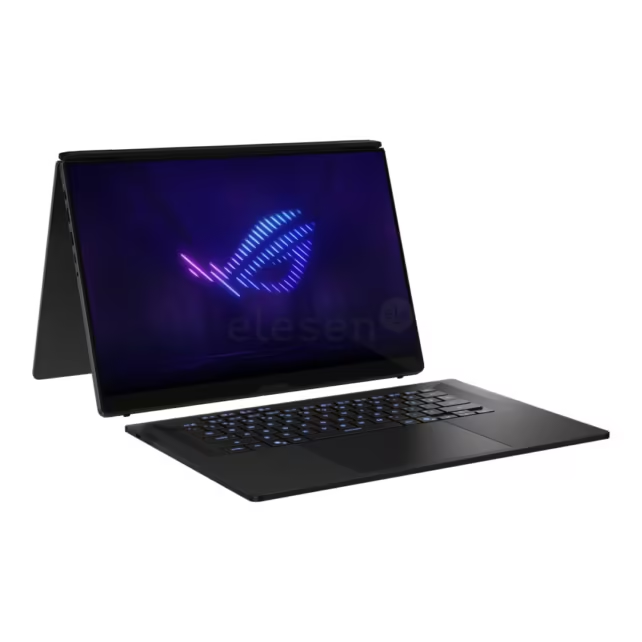
The ASUS ROG Zephyrus Duo (2026) GX651 is a premium dual-screen gaming laptop built for users who want a full-size second display without carrying a separate portable monitor. Its dual 16-inch 3K OLED touchscreens, detachable keyboard, RTX graphics, and strong connectivity make it especially useful for streaming, video editing, digital art, multitasking, and high-end gaming.The GX651’s limitations are equally clear. It is heavy, expensive, specialized, and less convenient than a conventional laptop when the second display is not needed. Memory is onboard, the power adapter adds to the travel load, and buyers must pay close attention to the exact GX651 configuration because RTX 5070 Ti and RTX 5090 models differ substantially. It is best suited to buyers who will actively use the dual-screen workflow rather than simply wanting premium gaming hardware.
Positives
- Dual 16-inch 3K OLED touchscreens create a genuinely useful built-in multi-monitor setup.
- The second display is well suited to OBS, chat, Discord, timelines, references, and system monitoring.
- The verified GX651AR-DB96 configuration combines an Intel Core Ultra 9 386H processor with an RTX 5070 Ti Laptop GPU.
- 120Hz refresh rate, OLED image quality, and wide DCI-P3 coverage support both gaming and creative work.
- Detachable keyboard and multiple operating modes make the design more flexible than a standard laptop.
- Thunderbolt 4, HDMI 2.1, USB-A, SD card, Wi-Fi 7, and Bluetooth 6.0 provide strong connectivity.
- ASUS includes advanced cooling hardware and the ability to disable or dim the second display when it is not needed.
Negatives
- The 2.82kg or 6.22-pound chassis is heavy before adding the 250W power adapter and accessories.
- The dual-screen design and premium hardware make the GX651 substantially more expensive than many conventional gaming laptops.
- Onboard memory cannot be expanded, so the exact RAM configuration matters before purchase.
- The second display can increase power use and may reduce battery endurance when active.
- RTX 5070 Ti and RTX 5090 versions have different performance, memory, and storage configurations despite sharing the GX651 family name.
- The specialized design is unnecessary for buyers who rarely use a second screen.
- The touch layer may make bright content appear slightly grainy to some users, according to independent review testing.
Verified configuration: Intel Core Ultra 9 386H, NVIDIA GeForce RTX 5070 Ti Laptop GPU with 12GB GDDR7, 32GB LPDDR5X memory, and 1TB PCIe 4.0 NVMe SSD.
Display: Two 16-inch 3K OLED touch displays with a 2880 × 1800 resolution, 16:10 aspect ratio, 120Hz refresh rate, and 100% DCI-P3 coverage listed by ASUS.
Operating system: Windows 11 Home.
Why We Recommend It
The GX651 is compelling because the second display is integrated into the laptop rather than added as an accessory. ASUS describes the 2026 model as a dual 16-inch screen gaming laptop, with five operating modes and a detachable keyboard. The official specifications list the 3K OLED touch panels, a 120Hz refresh rate, a 90Wh battery, Wi-Fi 7, two Thunderbolt 4 ports, two USB-A ports, HDMI 2.1, an SD card reader, and a 3.5mm audio jack.
The exact Amazon US configuration verified for this article is the GX651AR-DB96 with the RTX 5070 Ti, 32GB of onboard memory, and a 1TB SSD. It is ASIN B0H46FY2H2.
That configuration makes the most sense for users who will actively use both screens. It can serve as a gaming machine, a compact editing workstation, a portable streaming station, and a large multitasking laptop. It is not the obvious choice for someone who simply wants the fastest frame rates per dollar.
Key Features
- Intel Core Ultra 9 386H processor with 16 cores and 16 threads
- NVIDIA GeForce RTX 5070 Ti Laptop GPU with 12GB GDDR7 in the verified configuration
- Dual 16-inch 3K OLED touch displays
- 2880 × 1800 resolution and 120Hz refresh rate
- 100% DCI-P3 display coverage listed by ASUS
- 32GB onboard LPDDR5X memory in the verified configuration
- 1TB PCIe 4.0 NVMe SSD in the verified configuration
- Two Thunderbolt 4 ports with DisplayPort and power delivery support
- HDMI 2.1, two USB-A ports, SD card reader, and 3.5mm audio jack
- Wi-Fi 7 and Bluetooth 6.0 listed in the official specifications
- Detachable wireless keyboard and large touchpad design
- 90Wh battery and 250W AC adapter listed by ASUS
Pros
- The integrated second display can replace a portable monitor for many workflows.
- Two 16-inch OLED touchscreens provide a large workspace for gaming and creation.
- The RTX 5070 Ti configuration offers a strong modern GPU without requiring the RTX 5090 tier.
- Thunderbolt 4, HDMI 2.1, USB-A, and an SD card reader provide useful connectivity.
- The detachable keyboard makes the laptop more flexible in laptop, book, tent, and sharing modes.
- The display specifications are attractive for both games and color-sensitive creative work.
Cons
- The chassis is heavy for a laptop, at about 2.82kg or 6.22 pounds according to ASUS.
- The dual-screen design makes the computer thicker and less conventional than a standard 16-inch laptop.
- Memory is onboard and cannot be expanded; configuration choice matters before purchase.
- The large power adapter adds to the travel load.
- A second display can increase power demand when it is active.
- The touch layer may affect the appearance of bright content for some users, according to independent review testing.
- The highest GPU configuration can be expensive, while the RTX 5070 Ti variant still needs a premium budget.
What to Check Before Buying
Confirm the complete model code, not just the GX651 family name. ASUS lists several GX651 variants with different graphics, memory, and storage configurations. The verified Amazon configuration for this article is GX651AR-DB96 with RTX 5070 Ti, 32GB RAM, and 1TB SSD. It is not the same configuration as the RTX 5090 models.
Check the seller, return policy, warranty coverage, and exact included accessories. Amazon listings for premium laptops can be offered by specialist system builders, and the listing may state that the computer has been opened or configured by the seller. Confirm the current listing details before ordering.
Also measure your travel bag and desk. This is a 16-inch dual-screen machine with a detachable keyboard and a large power supply. It is portable compared with a desktop plus two monitors, but it is not light compared with a conventional gaming laptop.
How the Dual-Screen Design Works
Main display for the game or primary application
Use the upper display as the main screen for the game, editing preview, design canvas, or other primary task. ASUS lists the panel as a 3K OLED touchscreen with a 120Hz refresh rate, 0.2ms response time, and HDR features on the product overview.
The higher resolution gives games and creative applications a sharp image, but running a demanding game at native resolution can place more pressure on the GPU. Use the appropriate graphics settings, upscaling, or a lower resolution when a title does not maintain the frame rate you want.
Secondary display for controls and reference material
The lower display can hold Discord, streaming chat, OBS, a music player, a browser, a video-editing timeline, or a system monitor. The advantage is not just extra pixels. It is the ability to keep supporting information visible without minimizing the primary application.
ASUS says the Duo includes a custom version of ScreenXpert with app switching, orientation tracking, multi-touch gestures, individual screen brightness controls, and an option to disable the second screen to save battery.
Detachable keyboard for flexible modes
The detachable keyboard lets you use the Duo in more than a standard laptop position. In a desk setup, you can move the keyboard forward and use the lower display more comfortably. In a presentation or sharing mode, the two panels can serve different viewers or orientations.
The trade-off is that the keyboard is not permanently fixed in the usual laptop position. Keep the keyboard charged and remember where the wireless connection or pogo-pin connection is most convenient for your preferred setup.
Gaming Performance and GPU Choices
The 2026 GX651 family pairs the Intel Core Ultra 9 386H with NVIDIA RTX laptop graphics. ASUS lists configurations reaching the RTX 5090 Laptop GPU with 24GB GDDR7 and a maximum 150W TGP, while the verified Amazon configuration uses the RTX 5070 Ti with 12GB GDDR7.
The RTX 5070 Ti version is the more sensible choice when the second screen matters more than maximum benchmark performance. It should provide a strong gaming platform, but buyers should not assume it performs like the RTX 5090 configuration merely because both use the GX651 chassis.
Independent testing of an RTX 5090 GX651 found strong overall performance but also noted that the laptop could not match the fastest gaming laptops using higher-wattage GPU implementations and faster HX-series processors. That distinction matters: the Duo spends some of its design budget on two displays, hinges, cooling, and flexibility rather than maximizing performance from a single screen.
Creator and Streaming Workflows
Streaming
The second display is particularly useful for streamers. Put OBS controls, chat, alerts, and audio meters on the lower panel while the game occupies the upper screen. This can reduce the need for a separate monitor and make a mobile streaming setup easier to carry.
A Stream Deck or other controller can still be useful, especially when you want physical buttons for scene changes or microphone mute. The Duo’s second screen complements a control surface rather than making one unnecessary.
Video editing
Editors can keep the preview on the main display and move the timeline, media browser, scopes, or effect controls to the lower screen. Touch input may also help with certain timeline and navigation tasks, although a mouse, keyboard, or stylus can remain more precise for detailed work.
The OLED displays and wide color coverage are attractive for content work. Color-critical users should still calibrate their workflow and verify the exact panel behavior, color mode, brightness, and application settings rather than relying only on the specification sheet.
Digital art and design
The touchscreen surface can act as a reference panel, tool area, or touch workspace. ASUS lists stylus support in the specifications. Artists should confirm the software, pen, and pressure-sensitivity workflow they need before treating the second display as a full drawing-tablet replacement.
Ports, Storage, and Connectivity
The GX651 has a useful port selection for a mobile workstation. ASUS lists two Thunderbolt 4 ports with DisplayPort and power delivery support, two USB 3.2 Gen 2 Type-A ports, HDMI 2.1, an SD card reader, and a 3.5mm combo audio jack.
That selection covers external displays, fast storage, cameras, controllers, audio devices, and accessories without immediately requiring a dock. The SD card reader is especially useful for photographers and video creators. The two Thunderbolt 4 ports also provide flexibility for high-speed peripherals and additional displays.
The 1TB SSD in the verified Amazon variant may be enough for a mixed gaming library and everyday applications, but large game installations and video projects can fill it quickly. ASUS lists two M.2 PCIe slots in the family specifications, although the exact upgrade process and seller configuration should be confirmed before opening the laptop.
Cooling, Battery, and Desk Setup
ASUS lists liquid metal on the CPU, a vapor chamber, dual fans, and a graphite nano-insulated film as part of the ROG Intelligent Cooling system. The company also recommends keeping rear vents clear and using a hard surface for best thermal behavior.
The Duo is best used on a stable desk or hard table when gaming at high performance. The second display and discrete GPU can increase power use, so battery life will depend heavily on the active display mode, brightness, software, and performance profile.
When traveling, disable or dim the lower screen when you do not need it. ASUS specifically describes the ability to turn off or dim the second display for power saving. This turns the unusual design into a flexible option rather than a requirement that both screens stay active all day.
Who Should Buy the ROG Zephyrus Duo GX651?
The GX651 is a strong match for streamers, video editors, designers, software developers, and power users who regularly use two displays. It is also appealing to gamers who want a self-contained battlestation that can move between a desk, studio, and travel location.
The RTX 5070 Ti configuration is appropriate when you want the dual-screen workflow but do not need the most expensive GPU option. The RTX 5090 variants are for buyers who specifically need more GPU headroom and have accepted the higher cost and power demands.
Who Should Skip It?
Skip the Duo if you want the lightest possible gaming laptop, the longest uncomplicated battery life, or the highest gaming performance per dollar. A conventional 16-inch gaming laptop plus an external monitor may offer more flexibility at a lower total cost.
Also skip it if the second screen will mostly remain unused. The dual-display hinge, detachable keyboard, larger chassis, and premium pricing only make sense when the second panel improves your actual workflow.
ROG Zephyrus Duo GX651 Mistakes to Avoid
The most common mistakes are buying based only on “GX651” without checking the full configuration, assuming RTX 5070 Ti and RTX 5090 versions perform the same, overlooking onboard memory limits, carrying the laptop without accounting for the charger, running demanding games at native 3K without tuning settings, blocking the vents, and buying a bag designed for a regular 16-inch laptop without checking the Duo’s thickness and accessories.
Another mistake is treating the second display as a replacement for every external monitor. It is excellent for chat, tools, and secondary content, but some users may still prefer a larger external monitor for a permanent desk. Test your workflow before selling existing equipment.
Frequently Asked Questions
What is the ASUS ROG Zephyrus Duo 2026 GX651?
It is a dual-screen gaming and creator laptop with two 16-inch OLED touch displays, an Intel Core Ultra 9 386H processor, RTX laptop graphics, a detachable keyboard, and multiple operating modes. ASUS positions it for gaming, streaming, content creation, and multitasking.
Does the ROG Zephyrus Duo GX651 have two full-size screens?
Yes. ASUS describes the 2026 model as a dual 16-inch screen laptop. The official specifications list two 3K OLED touch displays with a 16:10 aspect ratio and 120Hz refresh rate.
Which GPU does the 2026 GX651 use?
The GX651 family has different configurations. ASUS lists options up to an RTX 5090 Laptop GPU with 24GB GDDR7, while the verified Amazon configuration in this article is the GX651AR-DB96 with an RTX 5070 Ti Laptop GPU and 12GB GDDR7.
Can the ROG Zephyrus Duo GX651 run OBS and chat on the second screen?
Yes. ASUS specifically describes the second display as suitable for OBS Studio, chat, alerts, stream controls, browser sources, music, and system monitors.
Is the ROG Zephyrus Duo GX651 portable?
It is portable in the sense that it combines a dual-screen workstation into one laptop, but ASUS lists the weight at about 2.82kg or 6.22 pounds before considering the power adapter and other accessories. It is not a lightweight travel laptop.
Can the memory be upgraded?
The official specifications describe onboard LPDDR5X memory with no memory slot. Choose the RAM capacity carefully because it is not a conventional user-replaceable memory module.
Is the ROG Zephyrus Duo worth buying for gaming alone?
Usually not unless you specifically want the dual-screen design. If your priority is maximum gaming performance, lower weight, or lower cost, a conventional high-end gaming laptop may be a better fit. The Duo earns its premium through the second display and flexible workflow.
