

Secretlab MAGNUS Pro Review: Premium Cable Management in a Smaller Footprint
The Secretlab MAGNUS Pro is an unusually well-engineered standing desk for a modern gaming or creator setup. Its strongest advantages aren’t simply the dual-motor height adjustment, but the integrated power pass-through, full-length hinged cable tray, magnetic desktop, and accessory ecosystem — features that turn a normally messy workstation into a cleaner, more deliberate installation. The standard desk is also substantially easier to fit into a room than the XL version.
Its weaknesses are equally clear: it’s expensive for a desk with an MDF-based core, the accessory ecosystem can make the final price rise quickly, and the rear cable tray reduces practical depth while restricting compatibility with conventional monitor arms. The fixed left-side power column is elegant but not universally convenient.
Specifications
- Desk model: Secretlab MAGNUS Pro, standard size
- Desktop dimensions: Approximately 59.1 × 27.6 inches / 1500 × 700 mm
- Height range: Approximately 25.6–49.2 inches / 65–125 cm
- Height presets: Three programmable positions
- Frame: Steel frame with two motorized lifting columns
- Desktop construction: MDF core with bamboo laminate and steel top/edge wrap
- Cable management: Full-length rear cable tray with hinged cover and end cutouts
- Integrated power: Power pass-through in the left motorized column to the cable tray
- Load capacity: Approximately 260–265 pounds / 118–120 kg distributed
- Control panel: Integrated right-side display, up/down controls, preset buttons, save control, and standby lockout
- Desktop surface: Magnetic-friendly metal surface for compatible mats and accessories
- Accessory compatibility: Secretlab monitor arms, laptop mount, PC mount, desk riser, cable organizers, headphone hanger, Ethernet extender, surge protector, and optional Nanoleaf RGB lighting
- Assembly: Two-person handling strongly recommended given the weight and one-piece desktop
- Reviewed price: Approximately $799 for the standard model
Design and Build Quality
The MAGNUS Pro has the visual language of a premium gaming desk without relying on an aggressive shape or unnecessary plastic trim — a broad, flat metal-topped workstation supported by two long-footed motorized columns. The standard version’s smaller footprint is important: at approximately 59.1 × 27.6 inches, it gives a multi-monitor user useful room without imposing the XL’s much larger 70 × 31.5-inch footprint.
The desk isn’t a solid-steel slab — independent testing identifies an MDF core with bamboo laminate and a steel wrap across the top and edges, a sensible compromise between weight, durability, and cost. The steel edge treatment protects the areas most exposed to wear, and the assembled desk nevertheless feels rigid and substantial. Construction quality is one of the desk’s strongest qualities: reviewers found the standard unit balanced with no hint of wobble, and long-term ownership reports describe the desk remaining stable and fully functional after a year of daily use.
Height Adjustment, Cable Management, and Power
98Rating
Description
The Secretlab MAGNUS Pro XL is a premium electric standing desk built around a large steel-and-MDF work surface, a concealed full-length cable tray, and an integrated power-supply column. Its 1770mm-by-800mm footprint, 650–1250mm height range, quiet dual-motor adjustment, and 120kg/265lb distributed-load rating make it a capable foundation for a large gaming or creator setup.Its strongest feature is not simply the standing mechanism; it is the way the desk combines height adjustment with accessible cable management and a single visible wall cable. The trade-offs are a high starting price, expensive accessories, a very heavy installation process, reduced practical depth because of the rear tray, and the fact that conventional monitor arms may not fit the desk geometry.
Positives
- The integrated power-supply column can reduce a complicated setup to one visible wall cable when the installation is planned correctly.
- The full-length hinged cable tray is spacious, accessible from above, and unusually effective for hiding adapters and excess wiring.
- The 1770mm-by-800mm XL surface provides substantial room for multi-monitor gaming, work, or content creation.
- The 650–1250mm height range and three memory presets make seated-to-standing transitions repeatable.
- Independent testing found the dual motors quiet and the desk very stable while seated.
- The accessory ecosystem is cohesive, with magnetic attachment and top-mounted monitor-arm options designed around the desk.
Negatives
- The desk is expensive before optional accessories, and a complete Secretlab setup can cost substantially more than the base price.
- The XL is exceptionally heavy and awkward to assemble or relocate, so two-person handling is strongly advisable.
- The rear cable tray reduces practical usable depth from the headline 800mm.
- Standard bottom-mounted monitor arms may not fit the tray geometry, increasing dependence on Secretlab’s more expensive top-mounted arms.
- The integrated power supply is fixed to the left leg, which may not suit every room’s outlet position.
- Raised-desk stability is good rather than perfectly motionless, and peripheral cables still need sufficient slack for height changes.
The desk’s 25.6–49.2-inch range covers a broad span of seated and standing positions, and three programmable presets make it practical to alternate between them. The right-side control panel is integrated into the front edge rather than protruding underneath, keeping it out of the way of a chair arm; its capacitive controls can be sensitive enough to activate accidentally near the right side, which is why the mechanical standby switch matters — it locks the controls when height changes aren’t needed. Movement is smooth and reasonably quick, taking about 11 seconds from a 33-inch seated position to a 45-inch standing position in testing, without significantly jostling equipment.
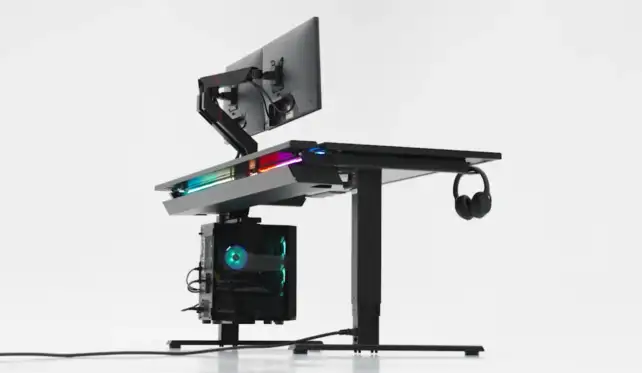
Cable management is the reason to buy the MAGNUS Pro over a conventional standing desk. Its rear tray runs almost the full width of the desk with a hinged cover that lifts from above, providing a large, accessible compartment for power strips, laptop adapters, and monitor bricks. The integrated power column is even more distinctive: the left motorized leg routes power to the tray, allowing a power strip to be placed inside it so the whole workstation can run through one cable to the wall. The system doesn’t make every cable disappear, though — Ethernet, speaker, monitor, and peripheral cables still need enough slack for the full height range, and the power column is fixed to the left side, which may be inconvenient if the nearest wall outlet is on the opposite side of the room. Practical depth is also reduced by the tray and rear cover; testing measured approximately 67 cm of usable depth on an 80-cm-deep XL sample, so standard MAGNUS Pro owners should account for similar tray-area reduction.
Monitor Arms and Accessory Ecosystem
Secretlab’s accessory ecosystem is well integrated but not inexpensive. Magnetic desk mats, cable anchors, cable sheaths, monitor arms, laptop mounts, a desk riser, a PC mount, headphone hanger, Ethernet extender, surge protector, and Nanoleaf-powered lighting are all designed around the desk’s metal surface and tray geometry. The monitor arms are especially important because the cable tray can make ordinary bottom-mounted arms difficult to install cleanly — Secretlab’s top-mounted arms preserve access to the hinged tray and were found sturdy, with a standard arm supporting displays up to 34 inches and approximately 17.6 pounds.
The trade-off is price: cited accessory prices included approximately $149 for a single monitor arm, $249 for a dual arm, $349 for a heavyweight arm, $49 for a laptop mount, $99 for a desk riser, $89 for a PC mount, and $49 for a cable-management bundle. A fully equipped MAGNUS Pro can cost much more than the base desk. The optional RGB light strip is the least successful accessory — reviewers found it prone to falling when the magnets weren’t perfectly flat, and monitor arms or the desk riser can interfere with its intended position.
Assembly and Value
The desk ships in two large boxes and is heavy enough that handling deserves planning — approximately 125 pounds total for the standard model, with assistance recommended when flipping the assembled desk upright. The assembly itself isn’t conceptually complicated: place the desktop upside down, attach the two lifting columns and feet, secure the cable tray, connect the electronics, and flip the desk upright. The magnetic desk mat is a small installation challenge of its own, since its strong magnets make first-time alignment tricky.
The standard MAGNUS Pro started at approximately $799 in independent reviews, making it expensive compared with basic electric frames and ordinary gaming desks — and that price doesn’t include every accessory a specific setup might need. One long-term owner’s fully configured XL workstation reached approximately $1,430 after adding a desk mat, monitor arms, and cable-management accessories, before the computers and displays themselves. The MAGNUS Pro is therefore a value-rich premium product rather than a low-cost one: it saves time and visual clutter by charging for a more integrated design, so buyers should compare the complete configured price against alternatives rather than the base desk price alone.
Frequently Asked Questions
Does the MAGNUS Pro include a power strip?
The desk’s left motorized column routes power to an outlet in the cable tray, but users should verify regional package contents and plan to place a suitable power strip inside the tray themselves.
Can ordinary monitor arms be used?
Compatibility isn’t guaranteed. The cable tray’s construction can obstruct the underside access conventional arms need. Secretlab’s top-mounted monitor arms are designed for the desk and are the safer choice, though they add to the total cost.
Is the MAGNUS Pro stable at standing height?
It’s very stable for a two-column desk, particularly while seated. Independent reviews report little or no unwanted movement in normal typing use, with some movement possible when raised, which depends on load distribution, floor condition, and monitor-arm extension.
Can the desk hold a desktop PC and multiple monitors?
The published distributed load is approximately 260–265 pounds, ample for many gaming and creator setups, but account for the monitor arms’ individual weight limits and the extra leverage created by extended displays.
Is the MAGNUS Pro good for office work as well as gaming?
Yes. The height presets, stable surface, integrated cable tray, and clean power routing are useful for office, editing, programming, and general computer work — its gaming branding doesn’t prevent it from functioning as a serious workstation.
Verdict
The Secretlab MAGNUS Pro earns 4 out of 5 stars because it solves the most frustrating problem in a contemporary gaming or creator workstation: how to keep a large amount of equipment powered, connected, and movable without creating a visible cable mess. The integrated left-column power pass-through and accessible hinged tray are genuinely useful rather than cosmetic, and the desk’s construction and stability are strong enough to support serious multi-monitor work.
The standard model is the better choice for many rooms because it preserves the MAGNUS Pro concept in a less imposing footprint. It’s not the right desk for a strict budget, users who want maximum open depth, or buyers who already own incompatible monitor arms and don’t want to purchase replacements. Buy the Secretlab MAGNUS Pro if you want a premium sit-to-stand desk built around clean cable management, integrated power, stable monitor support, and a unified gaming setup. Choose a cheaper frame or conventional desk if your priority is simply getting the most tabletop area for the least money.
