

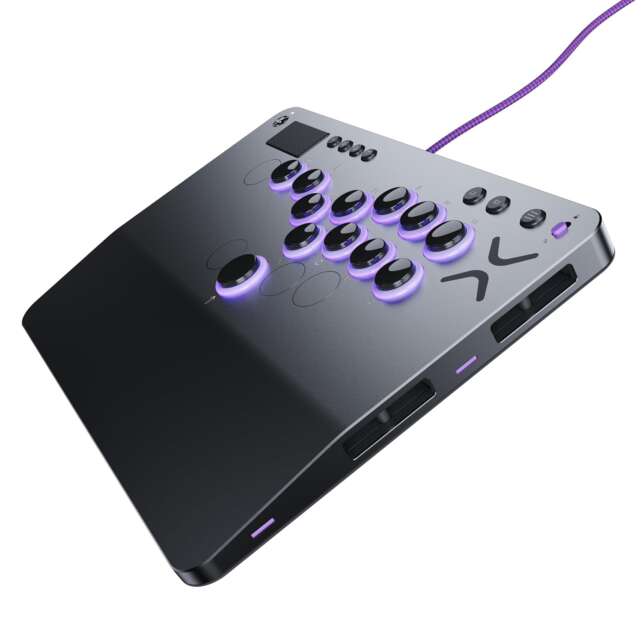
The Victrix Pro KO is a premium wired leverless controller built for fighting-game players who want more than a fixed 12-button layout. Its removable aluminum top plate exposes a modular button system with up to 16 moveable and mappable positions, hot-swappable Cherry MX Speed Silver RGB switches, four additional button spaces, a 6.28-degree wrist slope, tournament lock, SOCD cleaning, a 3.5 mm headset jack, and a 3 m braided USB-C cable.
The standard model is officially compatible with PlayStation 5, PlayStation 4, and Windows 10/11. It is wired only, has no battery or wireless mode, and does not have a verified numeric latency figure in the opened sources. Independent reviewers report responsive controls, comfortable ergonomics, straightforward button relocation, and strong PS5/PC compatibility, while noting clacky or slightly small-feeling stock buttons, engraved labels that remain fixed when the layout moves, and a high price.
Overall rating: 4.5/5 stars. The Pro KO is one of the most adaptable premium leverless designs for players who already know they want this input style. It is less compelling for beginners who have not yet decided whether leverless play suits them, or for buyers who need wireless operation, native Xbox support on the standard model, or a cheaper entry point.
The Pro KO replaces a conventional joystick with directional and attack buttons, allowing players to assign fingers to individual directions and inputs. GamingTrend found that this made quarter-circle and other complex motions easier after an adaptation period, while GameGrin reported improved consistency for certain Tekken movement and electric inputs. These benefits are inherently preference- and game-dependent rather than a universal skill guarantee.
Description
The Victrix Pro KO is a premium wired leverless controller built for fighting-game players who want more than a fixed 12-button layout. Its removable aluminum top plate exposes a modular button system with up to 16 moveable and mappable positions, hot-swappable Cherry MX Speed Silver RGB switches, four additional button spaces, a 6.28-degree wrist slope, tournament lock, SOCD cleaning, a 3.5 mm headset jack, and a 3 m braided USB-C cable.The standard model is officially compatible with PlayStation 5, PlayStation 4, and Windows 10/11. It is wired only, has no battery or wireless mode, and does not have a verified numeric latency figure in the opened sources. Independent reviewers report responsive controls, comfortable ergonomics, straightforward button relocation, and strong PS5/PC compatibility, while noting clacky or slightly small-feeling stock buttons, engraved labels that remain fixed when the layout moves, and a high price.
**Overall rating: 4.5/5 stars.** The Pro KO is one of the most adaptable premium leverless designs for players who already know they want this input style. It is less compelling for beginners who have not yet decided whether leverless play suits them, or for buyers who need wireless operation, native Xbox support on the standard model, or a cheaper entry point.
Positives
- Highly configurable leverless layout with up to 16 moveable and mappable button positions.
- Hot-swappable Cherry MX Speed Silver RGB switches.
- Removable aluminum top plate and included switch puller.
- Four additional button positions and internal storage for spare parts.
- Comfortable 6.28-degree wrist slope and slim 20 mm body.
- Stable lap use without the bulk of a traditional deep arcade stick.
- Official PS5, PS4, and Windows 10/11 support on the standard model.
- Tournament Lock helps prevent accidental system-button inputs.
- SOCD cleaning addresses simultaneous directional inputs.
- Locking 3 m braided USB-C cable reduces accidental disconnect risk.
- 3.5 mm headset and microphone connection.
- Victrix Control Hub offers deeper PC customization and firmware updates.
- Independent reviews report clean PS5/PC compatibility and responsive play.
- Protective sleeve and included spare parts improve travel value.
Negatives
- Standard model is wired only; there is no battery or wireless mode.
- High price for a controller that still requires the user to learn leverless input.
- Stock buttons are clacky, and independent reviewers disagree on how premium the caps feel.
- LED rings reduce the apparent pressable area for some users.
- Stock caps may wobble and feel overly grippy during sliding motions.
- Engraved labels do not move when buttons are rearranged.
- Large Up/Jump button cannot fit every position.
- No verified numeric latency or polling benchmark in the opened sources.
- Console and PC mode switch must be set correctly.
- Xbox evidence belongs to a separate platform version and should not be assumed for the PlayStation SKU.
- Onboard remapping is less convenient than PC-based Control Hub for complex changes.
- Tournament rules may differ on SOCD behavior, macros, and extra buttons.
- Current official price can be higher than the $249.99 launch/review-era snapshot.
Its standout feature is physical customization. Turtle Beach says up to 16 buttons can be moved and mapped, and the removable aluminum top plate gives access to spare switches, button caps, LED rings, and mounting positions. The controller ships with Cherry MX Speed Silver RGB switches, and the included tool allows switch changes without treating the unit as a sealed appliance.
The standard configuration provides a large 30 mm Up/Jump button and smaller 24 mm attack buttons. Four extra positions can be populated using included parts, then remapped either through the hardware or Victrix Control Hub on PC. This is much more flexible than a fixed leverless slab, although the engraved surface legends do not move with the buttons and the larger Up button cannot fit every position.
For competition, the controller combines a top-bar Tournament Lock, SOCD cleaning, a locking cable connection, and platform selection for PS5, PS4, and PC. The result is a focused, tournament-minded controller rather than a general-purpose gamepad. It earns its premium when the player will actually use the modularity and extra input positions.
Specifications
- Product: Victrix Pro KO Leverless Fight Stick.
- Model reviewed: Standard PlayStation officially licensed version for PS5, PS4, and Windows PC.
- Xbox boundary: A separate Xbox version/listing exists; Xbox coverage is not assumed for this standard PlayStation/PC review.
- Controller type: Leverless arcade controller with no traditional joystick.
- Connection: Wired only through a 3 m braided USB-C cable.
- Wireless: None; no wireless receiver or battery is specified for the standard model.
- Platforms: PlayStation 5, PlayStation 4, and Windows 10/11.
- Platform switch: Side switch for PS5, PS4, and PC modes.
- Button capacity: Up to 16 moveable and mappable buttons.
- Out-of-box layout: Reviewers describe 12 installed buttons, including a larger 30 mm Up/Jump button, with four additional positions covered or available for expansion.
- Switches: Hot-swappable Cherry MX Speed Silver RGB switches.
- Button sizes: Standard 24 mm buttons plus a larger 30 mm Up/Jump button.
- Top plate: Removable aluminum plate.
- Wrist slope: Ergonomic 6.28-degree slope.
- Tournament controls: Tournament Lock Switch and SOCD cleaning.
- Software: Victrix Control Hub for Windows.
- Audio: 3.5 mm port for stereo output and microphone input.
- Cable security: Lock mechanism to help prevent the USB-C plug from being pulled out.
- Dimensions: 13.35 × 9.23 × 0.80 inches / 339 × 235 × 20 mm.
- Weight: 2.7 lb / 1,225 g.
- Included items: Fight stick, 3 m braided USB-C cable, switch puller, and protective sleeve; reviewers also report included spare buttons, switches, caps, and LED rings stored inside the controller.
- Latency: No verified numeric latency or polling figure found in the opened sources.
- Launch/review-era price: Approximately $249.99 in US coverage; £229.99 in GameGrin’s UK snapshot.
- Current US price snapshot: $279.99 on Turtle Beach’s official page.
- Warranty boundary: PlayStation Direct lists a two-year warranty with region-specific terms and says Sony’s limited manufacturer warranty does not apply.
Detailed Product-Specific Analysis
The case for leverless controls
A leverless controller replaces the traditional joystick with buttons for left, down, right, and up. The appeal is consistency: a player can assign a finger to each direction and press combinations without moving a physical lever through an arc. GamingTrend found that quarter-circle and more complex inputs became easier after learning the layout, and GameGrin reported improved consistency for Korean backdash and certain electric inputs in Tekken.
That does not make the Pro KO universally better than a stick. Traditional-arcade players may prefer the tactile travel and circular gate of a lever, while the Pro KO requires a new muscle-memory investment. A buyer should understand that the product’s main advantage is execution style, not an automatic performance upgrade.
Modular layout is the real differentiator
The Pro KO does more than supply an extra button or two. The aluminum top plate can be removed through rear latches, exposing space for additional positions and the internal storage area. Turtle Beach advertises up to 16 moveable and mappable buttons, while reviewers describe 12 buttons installed at the start and four additional positions that can be populated with included parts.
This opens several practical layouts. A player can add a separate throw or parry input, place extra buttons beneath the thumbs, or move the Up/Jump input to a preferred position. The design is especially useful for players who compete across games with different control conventions, or for those who want accessibility-oriented remapping without buying a second controller.
There are limits. GamingTrend points out that the engraved input labels remain fixed even when the buttons move, and the larger Up button cannot fit in every location. The player must therefore remember the new layout or cover the old labels, and a visually clean custom arrangement may require more planning than simply moving caps.
Hot-swappable Cherry MX Speed Silver switches
The Pro KO uses hot-swappable Cherry MX Speed Silver RGB switches beneath its button caps. This is a meaningful enthusiast feature because it makes switch changes much more approachable than soldered arcade-button modifications. GameGrin says the stock switch system allows broad experimentation with switch performance, and Turtle Beach supplies a switch puller.
The feel is not universally praised. GamingTrend describes the buttons as clacky and familiar, while IGN says the LED rings reduce the apparent pressable surface and made the buttons feel smaller than comparable Kitsune buttons. GameGrin reports slight cap wobble and high grip that can make quick sliding motions awkward. These comments are not contradictions: the underlying switches may be responsive and replaceable while the stock caps remain a matter of taste.
Players who like keyboard-like speed and a crisp click will likely appreciate the Speed Silver starting point. Players who prefer quiet, smooth, or low-force arcade buttons may want to budget for replacement switches or caps rather than assuming the stock set is ideal.
Button capacity and the 30 mm Up button
The standard configuration uses a larger 30 mm Up/Jump button and smaller 24 mm attack buttons. The large directional button provides a useful landmark for the left hand and makes the unusual leverless layout easier to identify by touch.
The same choice restricts customization. The 30 mm button does not fit every open position, and the engraved surface guides remain tied to the original layout. The controller can be customized extensively, but not infinitely; its physical geometry and labeling still influence the possible arrangements.
Tournament readiness
The Tournament Lock Switch disables the top system bar to reduce the risk of accidental pause or menu input. The cable also uses a lock mechanism so a tug is less likely to interrupt play. SOCD cleaning addresses simultaneous directional inputs that are possible on a leverless controller but not on a conventional stick.
These are the right features for a serious practice or event setup. However, tournament compliance is not automatic. Rules differ on SOCD behavior, macros, extra inputs, and button placement. The player should verify the current event policy and configure the device accordingly rather than treating the manufacturer’s “tournament-ready” wording as a universal ruling.
Compatibility and model separation
The official Victrix product page lists PlayStation 5, PlayStation 4, and Windows 10/11. PlayStation Direct lists PS5 and PS4 and describes the product as manufactured by Turtle Beach. GamingTrend reports successful PS5 play in Granblue Fantasy Versus Rising and Capcom Fighting Collection, and successful PC play in Street Fighter VI, Skullgirls, Persona 4 Golden, and Marvel vs. Capcom Fighting Collection: Arcade Classics.
The standard model is wired. The absence of wireless is not an omission to hide; it is part of the product’s competition-first design. A 3 m cable avoids battery management and wireless uncertainty, but it also makes couch use and casual multi-device switching less convenient.
An Xbox Pro KO listing and an Xbox-model independent review are available. ZTGD describes an Xbox review unit, while Best Buy lists an Xbox platform version. That evidence is useful for shared chassis and feature details, but the standard PlayStation/PC unit should not be assumed to work natively on Xbox. Buy the correct platform SKU.
Victrix Control Hub
Victrix Control Hub is the Windows companion application for deeper customization and firmware updates. The official page links the Microsoft Store version, while IGN and ZTGD say direct onboard remapping is also possible.
The onboard method is useful when traveling to a console or event without a PC, but the application is the easier route for complex layout and profile work. Buyers who use only consoles should plan their configuration before a tournament rather than assuming every setting is equally convenient to adjust from the hardware.
Audio and daily usability
The 3.5 mm audio port supports stereo output and microphone input. This lets the controller act as the wired audio path during console play, which is useful when the player does not want a separate headset connection.
The chassis is slim at 20 mm and weighs 1,225 g, making it substantially easier to carry than a full-depth traditional arcade stick while still providing enough surface area for lap use. IGN says it fits in a laptop sleeve, and ZTGD calls it slim and travel-friendly.
The 6.28-degree wrist slope is a strong ergonomic choice. GamingTrend, IGN, and ZTGD all describe the wrist area positively, with GamingTrend reporting comfortable lap use and IGN calling the slope comfortable.
No verified numeric latency claim
The opened official and independent sources do not provide a verified millisecond latency or polling-rate result for the standard Pro KO. The official page promises responsive controls and a wired connection, while reviewers describe it as responsive and compatible in hands-on play. The responsible conclusion is that its wired design and Cherry MX Speed Silver switches are well suited to low-latency fighting-game use, but a precise figure should not be fabricated.
Price and value
The official Turtle Beach US page shows $279.99 at the time of review. IGN and ZTGD cite a $249.99 price, and GameGrin gives a UK price of £229.99. The spread reflects different dates and regions rather than a verified hardware difference.
At $249.99, the Pro KO compares favorably with other premium leverless controllers because it includes layout flexibility, hot-swappable switches, a protective sleeve, a cable lock, tournament lock, audio, and extra parts. At $279.99, its value depends more heavily on whether the buyer will use the modular system. A first-time leverless buyer may be better served by a less expensive fixed-layout model until the form factor is proven.
Who should buy it
The Pro KO is aimed at serious fighting-game players, tournament travelers, modders, and users who want to customize the physical input map. It is particularly attractive to players who use multiple fighting games, need extra inputs for modern systems, or want to experiment with keyboard-style switches without soldering.
It is less suitable for couch-oriented players who expect wireless play, Xbox owners buying the PlayStation SKU, traditional-stick purists who do not want to learn leverless inputs, or budget buyers who would rather spend the difference on games and a simpler controller.
Frequently Asked Questions
What is the Victrix Pro KO?
It is a wired leverless fighting-game controller from Turtle Beach’s Victrix line. Instead of a joystick, it uses directional and attack buttons, with a modular top plate, hot-swappable Cherry MX Speed Silver RGB switches, and up to 16 moveable and mappable positions.
Which platforms does the standard Pro KO support?
The standard PlayStation-licensed model supports PlayStation 5, PlayStation 4, and Windows 10/11. Use the platform switch to select PS5, PS4, or PC mode.
Is the Victrix Pro KO wireless?
No. The standard model is wired through a 3 m braided USB-C cable. It has no battery or wireless receiver listed by the official product page.
Does it work on Xbox?
An Xbox version/listing exists, but Xbox compatibility should not be assumed for the standard PlayStation/PC Pro KO. Buy the platform-specific SKU and verify the product listing before purchase.
How many buttons does it have?
The official page advertises up to 16 moveable and mappable buttons. Reviewers describe 12 installed in the normal configuration and four additional positions that can be populated with included parts.
Are the buttons hot-swappable?
The controller uses hot-swappable Cherry MX Speed Silver RGB switches, and the package includes a switch puller. This allows switch changes without soldering, although changing the physical button layout still requires opening the top plate.
Can I move the Up button?
You can move the Up/Jump button within the physical limits of the chassis, but it is larger than the other buttons and cannot fit every open position. The surface labels also remain engraved in their original locations.
Does it use Sanwa arcade parts?
The official specification identifies Cherry MX Speed Silver RGB switches rather than Sanwa joystick or button hardware. It is a leverless keyboard-switch design, not a traditional Sanwa lever-and-button arcade stick.
What is SOCD cleaning?
SOCD cleaning handles simultaneous opposing directional inputs, such as left plus right or up plus down, so the controller does not send impossible combinations in an uncontrolled way. GameGrin discusses the Pro KO’s SOCD behavior and notes that event rules still determine what is permitted.
Is it tournament legal?
It includes tournament-oriented features such as Tournament Lock, SOCD cleaning, and a locking cable, but legality depends on the specific event. Confirm rules for SOCD behavior, macros, extra buttons, and layout before competing.
Does it have macros?
The controller supports mapping and additional inputs through its hardware and Control Hub, but the opened official material does not establish a universal macro specification for every use case. Any macro or simultaneous-input configuration must comply with the tournament’s rules.
What software does it use?
Victrix Control Hub is the Windows application for customization and firmware updates. Direct onboard remapping is also possible, although the PC app is more convenient for deeper configuration.
Does it have a headset jack?
Yes. The official page lists a 3.5 mm port for stereo audio output and microphone input.
Does it include a carrying case?
The official package lists a protective sleeve, and ZTGD also reports a carrying bag. It includes the 3 m cable and switch puller; reviewers describe additional spare buttons, switches, and related parts stored inside the controller.
What is its latency?
No opened source supplies a verified numeric latency or polling-rate result for the standard Pro KO. The responsible assessment is that its wired USB-C design and responsive switches suit low-latency play, but buyers should not treat a specific millisecond figure as established.
What does it cost?
Independent US reviews cite a $249.99 MSRP, GameGrin cites £229.99 in the UK, and Turtle Beach’s official US page shows $279.99 in the current snapshot. Actual price depends on date, region, sale, stock, tax, and shipping.
Who should buy the Pro KO?
It is best for players who already want leverless controls and will use the modular layout, extra button positions, switch swapping, and tournament features. Newcomers who are unsure about leverless play may want a cheaper fixed-layout controller first.
Important Caveats
The review centers on the standard PlayStation-licensed model. An Xbox version is available in some listings and was used by at least one independent review, but its platform behavior must not be generalized to the PS5/PS4/PC SKU.
The Pro KO is wired only. Its 3 m cable is appropriate for consistent competitive play, but there is no wireless convenience, battery runtime, or Bluetooth mode to discuss for the standard model.
The official “up to 16” button statement describes the maximum moveable/mappable capacity, not necessarily 16 populated buttons at purchase. Reviewers describe 12 buttons installed out of the box and four additional positions/spares.
Moving buttons can make the engraved surface legends inaccurate. The large Up button also constrains its possible positions. Plan the intended layout before permanently changing the arrangement, and use software/game remapping carefully.
The stock Cherry MX Speed Silver switches are replaceable, but stock button-cap feel is subjective. Independent reviews praise the clicky response while also reporting small-feeling, wobbly, or overly grippy caps.
No verified numeric latency or polling-rate measurement was found in the opened sources. Do not repeat an invented or uncited millisecond claim. Wired architecture is the supported basis for recommending it for responsive play.
Tournament Lock and SOCD cleaning are helpful but do not guarantee acceptance at every event. Rules can differ by game, organizer, and platform. Confirm the current tournament policy.
Control Hub is a Windows application. Console users can perform some remapping directly on the device, but complex setup is easier with access to a PC.
The price is not fixed across sources. The official page shows $279.99, while independent US reviews cite $249.99 and UK coverage cites £229.99. Use the local seller’s final delivered price and warranty terms.
PlayStation Direct states that Sony’s limited manufacturer warranty does not apply because the Pro KO is a third-party product, while its own page lists a two-year warranty with region-specific terms. Confirm which warranty provider applies in the purchase region.
Verdict
The Victrix Pro KO is a premium leverless controller with a genuinely useful reason to cost more than a fixed-layout alternative. Its removable aluminum plate, up to 16 moveable button positions, four extra input spaces, hot-swappable Cherry MX Speed Silver RGB switches, internal spare-part storage, tournament lock, SOCD cleaning, cable security, headset jack, and comfortable wrist slope create a platform that can evolve with the player.
The standard model’s wired-only design is a strength for competition but a limitation for casual couch use. Its $249.99 review-era value is excellent for a committed leverless player, while the $279.99 official snapshot asks the buyer to make real use of the customization. Stock caps are not universally loved, and the engraved labels and larger Up button mean that “fully customizable” still has physical boundaries.
Final recommendation: Buy the Victrix Pro KO if you want a PS5/PS4/PC leverless controller and value a modular layout, hot-swappable switches, tournament features, and a slim travel-friendly chassis. Choose another product if you need wireless play, native Xbox support from the standard SKU, a verified published latency benchmark, or a low-cost way to test whether leverless controls suit you. It earns 4.5/5 stars overall.
