

The Logitech G522 LIGHTSPEED is a comfortable, lightweight wireless gaming headset with strong battery life, broad connectivity, an excellent detachable microphone, and extensive Logitech G Hub customization. Its 2.4 GHz LIGHTSPEED, Bluetooth 5.3, and USB-C connections make it flexible for PC, console, mobile, and wired use.
Its sound is more impressive after EQ than it is out of the box. The G522’s restrained tuning can be reshaped through presets, custom EQ, DTS spatial audio, and Blue VO!CE microphone processing, but its all-plastic build, weak passive isolation, detachable non-stowable microphone, and lack of simultaneous Bluetooth and LIGHTSPEED audio keep it from being a perfect all-rounder.
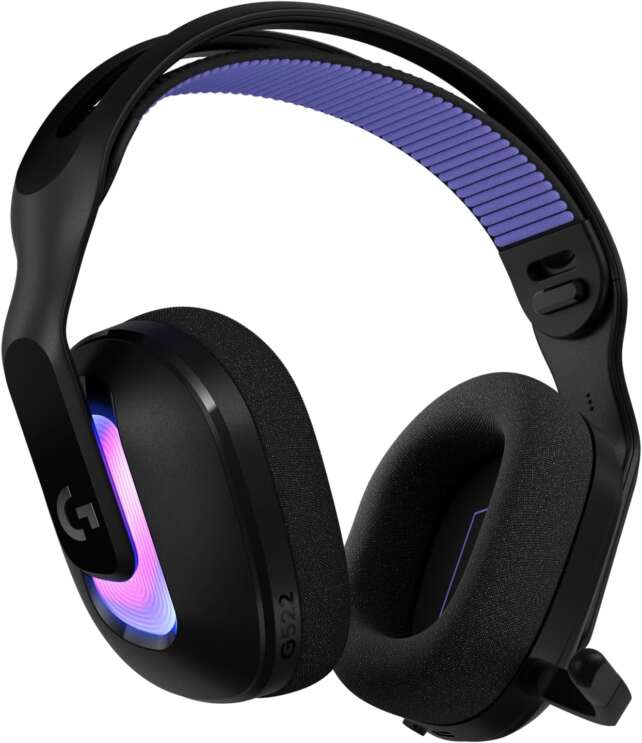
The G522 occupies Logitech’s midrange wireless headset tier. It is designed as a practical step above entry-level models, offering a lightweight suspension headband, soft breathable ear cushions, PRO-G drivers, customizable LIGHTSYNC RGB, and a microphone that can be tuned extensively in Logitech G Hub.
Comfort is one of its strongest qualities. At approximately 290 g with the microphone, the G522 is relatively light, and its ski-band-style suspension headstrap spreads pressure across the top of the head. The breathable cushions help reduce heat during long sessions, although that same breathability permits outside noise and audio leakage.
Description
The Logitech G522 LIGHTSPEED is a comfortable, lightweight wireless gaming headset with strong battery life, broad connectivity, an excellent detachable microphone, and extensive Logitech G Hub customization. Its 2.4 GHz LIGHTSPEED, Bluetooth 5.3, and USB-C connections make it flexible for PC, console, mobile, and wired use.Its sound is more impressive after EQ than it is out of the box. The G522’s restrained tuning can be reshaped through presets, custom EQ, DTS spatial audio, and Blue VO!CE microphone processing, but its all-plastic build, weak passive isolation, detachable non-stowable microphone, and lack of simultaneous Bluetooth and LIGHTSPEED audio keep it from being a perfect all-rounder.
Positives
- Lightweight and comfortable for long sessions.
- Strong detachable microphone with excellent Blue VO!CE customization.
- Up to 90 hours of battery life with RGB disabled.
- LIGHTSPEED 2.4 GHz, Bluetooth 5.3, and USB-C wired connectivity.
- Good gaming detail and layering after EQ adjustment.
- Useful DTS spatial audio support.
- Breathable cloth cushions reduce heat.
- Settings can be saved to the device and adjusted through the phone app.
- Custom soundboard and community EQ profiles in G Hub.
- Red microphone mute indicator is easy to see.
- Nintendo Switch and Switch 2 compatibility highlighted by Logitech.
- Good value at the $129.99 US review price.
Negatives
- No simultaneous Bluetooth and LIGHTSPEED audio.
- Mostly plastic construction feels less premium.
- Default sound is restrained and benefits strongly from EQ.
- StreamTech Reviews found limited EQ scalability and little bass rumble.
- Weak passive isolation and noticeable audio leakage.
- No active noise cancellation.
- Detachable microphone cannot be stowed.
- No integrated microphone when the boom is removed.
- Limited physical adjustment and no ear-cup swivel according to StreamTech Reviews.
- RGB reduces battery life from about 90 hours to about 40 hours officially.
- Logitech G Hub is important for getting the best performance.
- Regional pricing can be much higher than the US review price.
The G522 supports three connection types: 2.4 GHz LIGHTSPEED wireless, Bluetooth 5.3, and USB-C wired audio. LIGHTSPEED is the preferred mode for gaming because it provides low latency, while Bluetooth is useful for phones, tablets, televisions, and casual listening. The limitation is that LIGHTSPEED and Bluetooth cannot be used simultaneously.
The detachable boom microphone is the headset’s clearest highlight. It provides clear voice capture and can be shaped with Blue VO!CE presets, a noise gate, compressor, de-esser, de-popper, high-pass filter, and noise removal. The microphone is good enough for team chat and streaming after adjustment, although it cannot be folded into the headset and may be misplaced when detached.
The factory audio tuning is more controversial. Tom’s Hardware describes it as tame and warm, while StreamTech Reviews finds it mid-forward, restrained, and limited in EQ potential. Digital Reviews Network was more enthusiastic after applying EQ and DTS spatial audio. The consensus is that the G522 benefits from tuning, and buyers should not judge it solely by its default profile.
Battery life is strong with lighting disabled. Logitech and independent sources cite up to 90 hours under moderate-volume conditions with RGB off and approximately 40 hours with default lighting. In real-world full-brightness use, Tom’s Hardware recorded about 33 to 36 hours, so lighting and volume have a meaningful impact.
Specifications
- Product: Logitech G522 LIGHTSPEED Wireless Gaming Headset
- Design: Closed-back, over-ear headset
- Drivers: 40 mm PRO-G dynamic drivers
- Frequency response: 20 Hz–20 kHz
- Wireless: Logitech LIGHTSPEED 2.4 GHz
- Bluetooth: Bluetooth 5.3
- Wired connection: USB-C
- Microphone: Detachable omnidirectional, noise-canceling boom microphone
- Microphone customization: Logitech Blue VO!CE presets and vocal effects
- Weight: Approximately 290 g with microphone; approximately 277 g without microphone according to StreamTech Reviews
- Battery claim: Up to 90 hours with lighting disabled; up to 40 hours with default lighting
- Lighting: Customizable LIGHTSYNC RGB on the outer ear cups
- Software: Logitech G Hub
- Spatial audio: DTS Headphone:X 2.0 support through software according to Digital Reviews Network
- Compatibility: PC, PS5, Nintendo Switch and Switch 2, mobile devices, and USB-C wired devices depending on connection
- Simultaneous wireless: Not supported; Bluetooth and LIGHTSPEED must be toggled
- Controls: Power, Bluetooth/LIGHTSPEED selection, volume wheel, and microphone mute
- Microphone indicator: Red mute light around the microphone capsule
- Construction: Predominantly plastic
- Ear cushions: Breathable cloth-covered cushions
- Headband: Suspension-style ski-band headstrap
- Release date cited by Tom’s Hardware: June 16, 2025
- US review price cited by Tom’s Hardware: $129.99
Design and Build Quality
The G522 has an unmistakably gaming-oriented appearance. The ear cups use bright RGB rings, the yokes appear to float over the rear of the cups, and the overall silhouette is futuristic rather than understated. Users can turn off the lighting, but the headset still looks like a gaming accessory when the LEDs are disabled.
The chassis is predominantly plastic, which helps keep the weight around 290 g but reduces the sense of premium sturdiness. Tom’s Hardware described the construction as a little cheap-feeling, while Digital Reviews Network found it acceptable and noted that some material includes recycled plastic.
The suspension headband is the most practical part of the design. It reduces pressure hotspots and helps distribute the headset’s mass, making the G522 feel lighter than many similarly equipped wireless models.
Adjustability is limited. The headband provides a small number of fixed positions rather than a wide range of sliding or swiveling adjustments, and StreamTech Reviews notes that the ear cups do not swivel or offer conventional height adjustment. Once the fit is set, however, it tends to remain stable.
The detachable microphone is functional but not especially convenient. It can be removed for storage or casual listening, yet it cannot be folded or stowed inside the headset. Users who detach it regularly will need to keep track of the separate boom.
Comfort and Fit
Comfort is one of the reasons to consider the G522. Its 290 g weight is relatively low for a wireless gaming headset, the suspension headband distributes pressure, and the cloth ear cushions remain breathable in warm environments. Tom’s Hardware and Digital Reviews Network both found it comfortable for long sessions.
The breathable cushions have a trade-off: they do not form a strong acoustic seal. Outside sounds can enter, and the headset’s audio can leak to nearby people. This is helpful in a shared household where users need to remain aware of the environment, but it is not ideal for noisy rooms or quiet offices.
The headband has limited adjustment and no substantial top padding according to StreamTech Reviews. Most users should be able to find a workable fit, but the design is less adaptable than a headset with independently sliding yokes and a more heavily padded headband.
The large over-ear cushions accommodate many ears, and their breathable fabric helps prevent sweaty ears. Users seeking maximum isolation or a tightly sealed bass response may prefer a leatherette-cushion headset instead.
Audio Quality
The G522 uses 40 mm PRO-G dynamic drivers with a 20 Hz–20 kHz stated frequency range. Logitech also includes an integrated DAC and uses G Hub to provide EQ presets, custom profiles, DTS spatial audio, and community-shared configurations.
Out of the box, the sound is restrained. Tom’s Hardware describes the default presentation as tame and warm, with neither the highs nor lows pushed aggressively. StreamTech Reviews similarly found little bass rumble, limited treble sparkle, and a noticeable midrange emphasis.
This tuning is comfortable for long listening because it avoids sharp treble and excessive bass. The drawback is a lack of excitement. Explosions may not feel as physical, and high-frequency details can sound less open until the EQ is adjusted.
EQ can significantly improve the experience. Tom’s Hardware found that a custom profile created a larger soundstage, clearer vocals, more prominent explosions, and better musical detail. Digital Reviews Network likewise found that the headset came alive after applying Bass Boost, Media, or custom profiles and DTS Headphone:X 2.0.
StreamTech Reviews was less positive about the headset’s EQ flexibility, reporting that the drivers were not especially responsive when trying to add sparkle or deep impact. The difference suggests that the G522 is sensitive to personal tuning goals and source material. It can be improved, but it may not become a bass-heavy or highly bright headset for every listener.
Gaming Performance and Imaging
LIGHTSPEED is the correct connection for gaming. The 2.4 GHz wireless link avoids the delay associated with ordinary Bluetooth and provides an apparently synchronized relationship between on-screen action and sound.
After EQ adjustment, the G522 can produce good layering and spatial separation. Tom’s Hardware praised its ability to isolate small details and cues, while Digital Reviews Network found positional information clear in games such as Company of Heroes 3. Effects, voices, music, and chat remained intelligible without obvious distortion.
The default tuning is not specifically designed as an aggressive competitive-FPS profile. It is warmer and less energetic than some gaming headsets, though the midrange emphasis can help voices and certain footstep frequencies remain audible. The included FPS and community EQ presets provide a practical starting point for competitive games.
Spatial processing is optional. Digital Reviews Network found DTS Headphone:X 2.0 useful for widening the soundstage, while Tom’s Hardware emphasized that the headset’s own driver resolution and EQ were already capable of revealing small spatial cues. Users should compare stereo and DTS modes because preferences vary by title.
The G522 is therefore a capable general gaming headset, but buyers should expect to spend some time in G Hub if they want the best result. Its performance improves with tuning rather than being perfect immediately after pairing.
Wireless Connectivity
The headset offers LIGHTSPEED 2.4 GHz wireless, Bluetooth 5.3, and USB-C wired operation. This provides broad device flexibility: LIGHTSPEED is suited to PC and PlayStation gaming, Bluetooth works with phones, tablets, televisions, and compatible handhelds, and USB-C can provide a wired low-latency connection while charging.
The most important limitation is the lack of simultaneous wireless. Users cannot play over LIGHTSPEED while taking a call through Bluetooth. Instead, the headset must toggle between modes. This is a meaningful disadvantage compared with headsets designed around dual-wireless mixing.
Switching between Bluetooth and LIGHTSPEED is straightforward through the hardware control. The G522 is compatible with PS5, PC, Switch 1 and 2, and phones according to independent coverage, while Logitech’s official page specifically highlights Nintendo Switch and Switch 2 compatibility.
USB-C wired mode is useful when battery anxiety matters. It provides low-latency audio and can be used while the headset charges, although users who want the cleanest desk setup will likely prefer LIGHTSPEED.
Microphone Quality
The detachable boom microphone is the G522’s most impressive feature. It provides strong clarity and gain without requiring software adjustment, and its red mute indicator makes the headset’s state immediately visible.
Logitech G Hub and Blue VO!CE greatly expand its capabilities. Users can choose vocal presets and apply a noise gate, compressor, de-esser, de-popper, high-pass filter, and noise removal. G Hub also lets users record and loop a sample to hear the effect of each change.
The microphone can sound broadcast-like after adjustment. Digital Reviews Network praised the clarity and Blue VO!CE profiles, while Tom’s Hardware considered the microphone suitable for streaming once tuned. StreamTech Reviews also found impressive detail, though it detected some sibilance and weaker background-noise rejection.
The weaker noise rejection can actually preserve a more natural voice, but it also means that a keyboard, fan, or nearby conversation may remain audible. Users in noisy rooms should use the noise-removal controls carefully because excessive processing can make speech sound compressed or nasal.
The microphone cannot be stowed inside the headset and there is no integrated microphone for use when it is removed. This makes the G522 less convenient as a casual phone headset than a model with a retractable boom or secondary microphone.
Battery Life and Charging
Logitech’s headline battery figures are up to 90 hours with RGB disabled and up to 40 hours with default lighting. These estimates assume moderate volume and vary with lighting brightness, connection type, microphone use, and power-saving behavior.
Tom’s Hardware’s practical results were lower under full-brightness lighting, with approximately 33 to 36 hours between charges. Digital Reviews Network achieved about a week of mixed use, while StreamTech Reviews reported using roughly half the battery in a week. The results still point to good endurance, particularly with RGB off.
Users who want the longest runtime should disable RGB and use the headset at a moderate volume. The lighting is a cosmetic feature, and turning it off can more than double the official estimate compared with the default illuminated mode.
The USB-C connection allows charging while listening. There is no included charging stand, so users must connect a cable when the battery is low. That is less convenient than a docked headset but keeps the package and price simpler.
Software and Controls
Logitech G Hub is central to the G522 experience. It controls headphone EQ, DTS spatial audio, microphone filters, Blue VO!CE presets, RGB effects, battery settings, firmware, and downloadable community profiles.
Users can create custom headphone EQs or select presets tailored to music and specific game genres. The same software-based approach applies to the microphone, where recording and playback tools make it easier to hear the effect of a filter before using it in a call or stream.
G Hub also includes a customizable soundboard. Users can load samples, stingers, or background music and trigger them during games or streams. This is a specialized feature but can be valuable to content creators.
The G522 stores the last lighting, headphone EQ, and microphone EQ settings on the device according to StreamTech Reviews. The phone app can also adjust settings while the headset is being used on a console, which makes the software more practical for non-PC users.
The downside is software dependence. Buyers who dislike running Logitech G Hub in the background may find the G522 less appealing, especially because some of its best audio and microphone performance requires tuning.
RGB Lighting
The G522 uses customizable LIGHTSYNC RGB on the outer ear cups. G Hub provides several presets, static lighting, screen and audio synchronization, and Freestyle control for independent zones.
The lighting gives the headset a distinct gaming identity, but it cannot be seen by the wearer and contributes significantly to battery consumption. StreamTech Reviews found the lighting effects limited and disliked the way the headset returns to a blue standby glow when it stops detecting audio.
RGB is therefore best considered an aesthetic bonus rather than a core feature. Users who stream or display their headset may enjoy it, while users focused on battery life will likely leave it disabled.
Noise Isolation and Leakage
The G522’s cloth ear cushions prioritize breathability over isolation. Tom’s Hardware and StreamTech Reviews both note that sound can leak in and out, and background noise remains easy to hear.
This design works well in a quiet room and helps reduce heat during long sessions. It is less effective beside a television, in an open office, or near a mechanical keyboard. The weak seal may also reduce perceived bass impact for users who need a more immersive, enclosed sound.
There is no active noise cancellation. Buyers who need strong environmental isolation should consider a closed-seal or ANC headset instead.
Value for Money
Tom’s Hardware reviewed the G522 at $129.99 and considered it an excellent value, particularly because of the comfortable design, useful audio performance after EQ, strong microphone, and long battery life. Digital Reviews Network cited a substantially higher $299 regional RRP, demonstrating that value depends heavily on local pricing.
At the lower US review price, the G522 is compelling. It delivers many features associated with more expensive headsets without becoming heavy or overly complicated. At a much higher regional price, its all-plastic build, limited isolation, lack of simultaneous wireless, and detachable microphone become more difficult to overlook.
The G522 is best value for buyers who will use G Hub. If the user wants a plug-and-play headset that sounds perfect without software, the product’s restrained default tuning may be frustrating.
Who Should Buy the Logitech G522 LIGHTSPEED?
The G522 is best for PC and console players who value comfort, a high-quality microphone, long battery life, and flexible 2.4 GHz/Bluetooth/USB-C connectivity. It is especially attractive to streamers and users who are willing to tune both sound and voice in Logitech G Hub.
It is less suitable for buyers who need simultaneous game-and-phone audio, strong noise isolation, a premium metal build, an integrated or stowable microphone, or a perfect out-of-box sound signature. Regional price should also be checked carefully because the headset’s value varies widely by market.
Frequently Asked Questions
Is the Logitech G522 LIGHTSPEED worth buying?
Yes, particularly at the $129.99 US review price. It offers excellent microphone customization, long battery life, comfort, and flexible connections. Its value declines at much higher regional prices or for buyers who do not want to use G Hub.
What connections does the G522 support?
It supports Logitech LIGHTSPEED 2.4 GHz wireless, Bluetooth 5.3, and USB-C wired audio.
Can the G522 use Bluetooth and LIGHTSPEED simultaneously?
No. Bluetooth and LIGHTSPEED must be toggled rather than mixed.
How long does the G522 battery last?
The commonly cited estimates are up to 90 hours with RGB disabled and up to 40 hours with default lighting. Actual runtime varies with volume, lighting brightness, connection type, and settings.
Does the G522 support Nintendo Switch?
Yes. Logitech highlights Nintendo Switch and Switch 2 compatibility, and independent coverage reports Switch 1 and 2 support.
Is the G522 compatible with PS5?
Yes. Independent coverage reports PS5 compatibility through the supported wireless and wired connections.
Is the G522 microphone good?
Yes. The detachable boom provides clear voice capture and becomes especially capable when tuned with Blue VO!CE. It also has a visible red mute indicator.
Can the G522 microphone be folded away?
No. The microphone is detachable but cannot be stowed inside the headset. There is also no integrated microphone for use after removing the boom.
Does the G522 have active noise cancellation?
No. Its cloth cushions provide weak-to-moderate passive isolation, and outside sound can remain audible.
Is the G522 comfortable?
Generally yes. The headset is approximately 290 g and uses a suspension-style headband with breathable cushions. Its adjustment range is limited, however, and users who need stronger isolation may prefer a tighter-sealing model.
Does the G522 sound good out of the box?
It sounds balanced and relatively tame out of the box, with a warm or restrained character. Tom’s Hardware and Digital Reviews Network found that EQ can significantly improve detail, energy, and soundstage, while StreamTech Reviews found the drivers less responsive to extreme EQ changes.
Is the G522 good for FPS games?
Yes, especially after applying an FPS or custom EQ profile. Independent reviews found good detail, footstep audibility, layering, and positional cues, although the default tuning is not especially aggressive.
Does Logitech G Hub improve the G522?
Yes. G Hub provides headphone EQ, DTS spatial audio, microphone effects, Blue VO!CE, RGB, firmware updates, soundboard functions, battery settings, and community profiles.
Can the G522 settings be changed on a phone?
Yes. StreamTech Reviews reports that the G Hub phone app can adjust headphone and microphone EQ while the headset is in active console use, and settings can be saved to the device.
Does the G522 have RGB lighting?
Yes. It has customizable LIGHTSYNC RGB on the outer ear cups. Lighting can be synchronized to the screen or audio and configured through G Hub.
Does RGB affect battery life?
Yes. The official-style estimates fall from up to 90 hours with lighting disabled to about 40 hours with default lighting. Full-brightness use can produce around 33–36 hours in independent testing.
Verdict
The Logitech G522 LIGHTSPEED earns 4 out of 5 stars. It is a comfortable and versatile wireless gaming headset whose best features are the detachable microphone, long battery life, lightweight suspension headband, and deep G Hub customization. LIGHTSPEED, Bluetooth 5.3, and USB-C give it broad day-to-day flexibility, while the microphone can approach broadcast-like quality with careful Blue VO!CE tuning.
The compromises are clear. The all-plastic body feels less expensive than the feature set, the cloth cushions provide weak isolation, Bluetooth and LIGHTSPEED cannot run simultaneously, and the default sound benefits from significant EQ adjustment. Regional price also matters: the G522 is attractive near the $130 US review price but less compelling when sold at substantially higher local pricing.
Buy it if you want a comfortable wireless headset with an excellent customizable microphone, long battery life, and strong software support. Look elsewhere if you need simultaneous game-and-phone audio, aggressive isolation, a premium build, or a microphone that folds away.
