

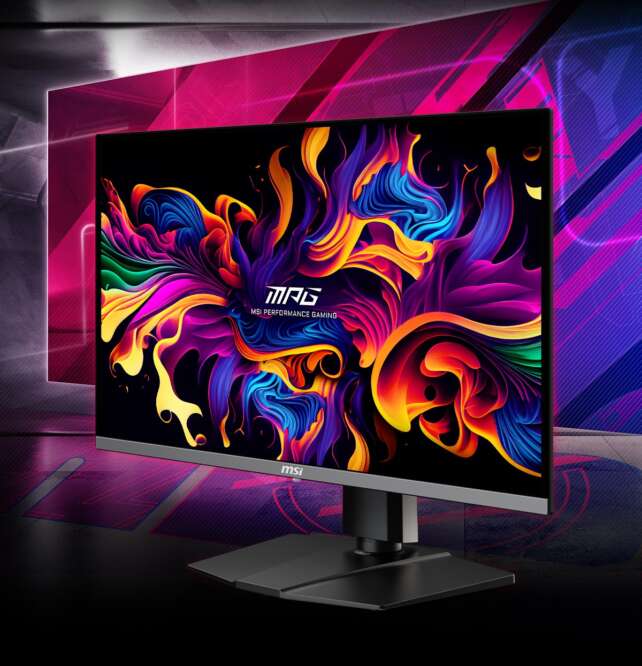
The MSI MPG 271QRX is a 27-inch class WQHD QD-OLED monitor with a 2560 × 1440 resolution, a 360Hz refresh rate, and a quoted 0.03ms GTG response time. It’s built for competitive gaming, combining DisplayHDR True Black 400, full-bandwidth HDMI 2.1, 90W USB-C power delivery, and MSI’s OLED Care 2.0 protection suite in a single 27-inch panel.
Four independent outlets — RTINGS, Tom’s Hardware, KitGuru, and MSI’s own specifications — broadly agree on this monitor’s position: a premium 1440p competitive-gaming display whose strongest advantages are 360Hz motion, QD-OLED contrast and color, HDMI 2.1, 90W USB-C, a KVM switch, full ergonomics, and extensive OLED-care features. Its limitations include 1440p rather than 4K resolution, demanding GPU requirements for 360Hz, VRR flicker, firmware-dependent input lag, OLED burn-in risk, slightly reduced text clarity, black-level raise in bright rooms, limited full-screen brightness, and somewhat confusing picture-mode organization.
Specifications
- Model: MSI MPG 271QRX QD-OLED
- Display size: 26.5-inch flat, 3rd-generation Samsung QD-OLED panel per KitGuru
- Resolution and refresh: 2560 × 1440 at 360Hz
- Response time: 0.03ms GTG
- Brightness and contrast: 250-nit typical SDR, 1000-nit HDR peak, 1,500,000:1 typical contrast
- HDR: DisplayHDR True Black 400
- Connectivity: One DisplayPort 1.4, two HDMI 2.1 ports (48Gbps), USB-C with up to 90W power delivery, one USB upstream and two USB 2.0 downstream ports, headphone output, KVM switch, no internal speakers
- Variable refresh rate: AMD FreeSync Premium Pro
- Ergonomics: Up to 110mm height adjustment, 30° swivel, -5° to +20° tilt, portrait pivot, 100 × 100mm VESA
- OLED Care 2.0: Pixel Shift, Panel Protect, Static Screen Detection, Boundary Detection, Taskbar Detection, Multi-logo Detection, a 24-hour OLED refresh cycle
- Cooling: Graphene film and custom heatsink, no fan
- Warranty: Three-year warranty including burn-in coverage per RTINGS and KitGuru
- Reviewed pricing: Around an $800 premium price per Tom’s Hardware; approximately £899 at launch per KitGuru
Gaming Performance
RTINGS found the MPG 271QRX superb for PC gaming: near-instant response, crisp motion, very low input lag after firmware updates, near-infinite contrast in dark rooms, vivid colors, and strong HDR color. It did note VRR flicker with changing frame rates and that the lowest input lag requires current firmware — RTINGS documented a July 2024 firmware update that fixed input-lag issues, with later updates adding EOTF Boost for HDR brightness, so buyers should check they’re running current firmware after purchase.
Tom’s Hardware independently found instant response, smooth motion, strong HDR and SDR image quality, rich color, deep contrast, and accurate color out of the box. KitGuru’s testing similarly found wide gamut coverage, effectively infinite contrast, very fast response, excellent motion clarity, good HDR, and strong out-of-box and sRGB accuracy. For console gaming, RTINGS found outstanding picture quality and HDMI 2.1 bandwidth support for both Xbox Series X|S and PS5, though it noted 1440p is less sharp than 4K for 4K-native console games.
Office Use and Content Creation
Description
The MSI MPG 271QRX combines a 1440p QD-OLED panel, 360Hz refresh rate, 0.03ms response time, HDMI 2.1, 90W USB-C charging, and KVM functionality. It is outstanding for competitive gaming, but buyers should consider OLED burn-in risk, bright-room black-level limitations, VRR flicker, and slightly reduced text clarity.Positives
- 360Hz refresh rate delivers exceptionally smooth motion for competitive gaming.
- •
- Near-instantaneous OLED response minimizes ghosting and keeps fast movement crisp.
- QD-OLED produces deep blacks, vivid colors, and strong contrast in dark rooms.
- 1440p resolution is easier to drive at high frame rates than 4K.
- HDMI 2.1 provides full-bandwidth connectivity for modern PCs and consoles.
- USB-C supports DisplayPort video and up to 90W power delivery.
- KVM functionality is useful for switching between a gaming PC and laptop.
- Full ergonomic adjustment and VESA mounting improve desk flexibility.
- OLED Care 2.0 provides extensive burn-in mitigation tools.
- Accurate color is available out of the box, with a strong sRGB mode.
- Three-year warranty and burn-in coverage are valuable for an OLED monitor.
Negatives
- 1440p resolution is less sharp than 4K for productivity and high-resolution console gaming.
- Text may look slightly less clear because of the QD-OLED subpixel arrangement.
- OLED burn-in remains possible with long-term static content.
- Blacks can appear raised or purple in bright rooms.
- Brightness is not sufficient to overcome intense glare.
- Large HDR highlights are less bright than small highlights.
- VRR flicker may occur when frame rates change.
- Lowest input lag requires the monitor to be updated to current firmware.
- Calibration or certain color adjustments can reduce light output.
- Picture modes can be confusing because settings are divided between multiple menus.
- Premium pricing may be difficult to justify for casual gamers.
For office use, RTINGS found good ergonomics, wide viewing angles, a KVM switch, and 90W USB-C power delivery. Limitations include slightly worse text clarity from the triangular QD-OLED subpixel arrangement, insufficient brightness for strong glare, raised or purple-looking blacks in bright rooms, and burn-in risk with static content. For media creation, RTINGS found vivid HDR color, an accurate sRGB mode, and strong contrast, recommending calibration for best accuracy while repeating the text-clarity and burn-in caveats.
Tom’s Hardware identified calibration as a minor limitation because one calibration option cuts light output roughly in half, and found the picture-mode organization somewhat confusing. It measured very wide color coverage and emphasized that 1440p is easier for a PC to drive at high frame rates than 4K, which is part of the appeal of this resolution choice for a 360Hz competitive monitor.
Design and Build
KitGuru found the panel broadly similar to MSI’s larger OLED models, with a solid stand and full ergonomics, though it noted some plastic feel at the price. Tom’s Hardware confirmed solid build quality alongside its strong image-quality findings. The graphene film and custom heatsink allow fanless operation, keeping the monitor silent during use.
Frequently Asked Questions
Is the MPG 271QRX good for competitive gaming?
Yes. Its 360Hz refresh rate, near-instant OLED response, and low input lag (after applying current firmware) make it well suited to competitive play, and multiple independent reviewers found the motion and HDR image quality excellent.
Do I need to update the firmware?
Yes, ideally. RTINGS found a July 2024 firmware update fixed input-lag issues, with later updates adding an EOTF Boost feature for HDR brightness. Check for and apply the latest firmware after purchase.
Does it have a KVM switch?
Yes. Both RTINGS and KitGuru confirm a KVM switch alongside 90W USB-C power delivery, letting the monitor share peripherals between two connected systems.
Why 1440p instead of 4K?
Tom’s Hardware notes 1440p is significantly easier for a PC to drive at very high frame rates than 4K, which is why MSI chose this resolution to support a 360Hz refresh rate rather than a lower, 4K-native refresh.
What’s the current price?
Tom’s Hardware reviewed it around an $800 premium price, while KitGuru cited approximately £899 at launch. Current regional pricing should be verified before purchase.
Verdict
The MSI MPG 271QRX is a premium 1440p competitive-gaming monitor that four independent outlets broadly agree performs at a high level. Its 360Hz refresh rate, QD-OLED contrast and color, HDMI 2.1, 90W USB-C, KVM switch, and full ergonomic adjustment make it one of the more complete competitive-gaming displays in its class.
The trade-offs are largely the usual QD-OLED considerations — text clarity, bright-room black levels, burn-in risk, and VRR flicker — plus a firmware dependency for the lowest input lag and a somewhat confusing picture-mode menu. For competitive players who want serious refresh-rate headroom without moving up to a 4K panel, the 271QRX is a strong pick.
