

The Samsung Odyssey OLED G9 name covers a well-known family of 49-inch super-ultrawide monitors, and this review centers on the G95SC smart-model configuration — a 49-inch, 5120 × 1440, 1800R curved QD-OLED display with 240Hz refresh and DisplayHDR True Black 400 certification. Samsung markets it as a Smart monitor with Tizen-based apps and Gaming Hub built in, and its US SKU is the LS49CG954SNXZA. Variant features and availability can differ by region and suffix (G95SC, G93SC, and newer G95SD/G93SD models), so buyers should confirm the exact configuration before purchasing.
This is best understood as a specialist premium display for immersive PC gaming, simulation, racing, flight, productivity multitasking, and cinematic ultrawide experiences — not a conventional monitor. Its key strengths are the enormous 32:9 workspace, QD-OLED image quality, 240Hz motion, strong HDR color, Smart TV/Gaming Hub features, built-in speakers, and a more moderate 1800R curvature than Samsung’s older G9 LCD models. Its limitations include a very high price, a huge desk footprint, the need for a powerful GPU to drive 5120 × 1440 at high frame rates, black-level raise in bright rooms, VRR flicker, text clarity issues, OLED burn-in risk, no native 4K/120Hz console support, limited ergonomics, awkward rear connectivity, and no USB-C video or power delivery.
Specifications
- Model: Samsung Odyssey OLED G9 G95SC (SKU LS49CG954SNXZA)
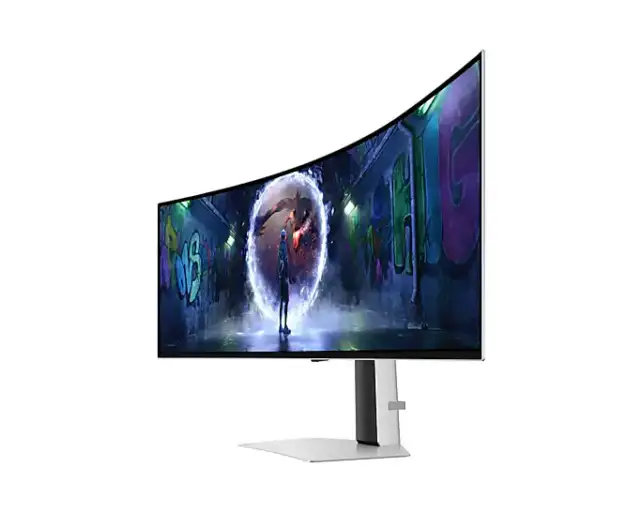
- Display size: 49-inch, 32:9 super-ultrawide, 1800R curved QD-OLED
- Resolution and refresh: 5120 × 1440 (DQHD) at 240Hz
- Response time: 0.03ms quoted by Samsung
- HDR: DisplayHDR True Black 400
- Color: 99% DCI-P3, approximately 250 cd/m² typical SDR brightness per TFTCentral
- Variable refresh rate: G-SYNC Compatible, AMD FreeSync Premium Pro
- Connectivity: One DisplayPort 1.4 with DSC, one HDMI 2.1 input, one micro-HDMI 2.1 input, a two-port USB hub (data only, no Power Delivery or DisplayPort Alt Mode)
- Audio: Two 5W integrated speakers
- Smart features: Tizen-based Smart TV apps, Gaming Hub, remote control, CoreSync/Core Lighting+ ambient rear lighting
- Ergonomics: Tilt and height adjustment; no swivel or pivot; large, stable stand requiring substantial desk width and depth
- Reference price: $1,799.99 per Samsung’s listing at time of extraction; verify current regional pricing
Gaming Performance
RTINGS rates the G95SC outstanding for PC gaming. It found a 240Hz refresh rate, near-instantaneous response at any refresh rate, low input lag, sharp motion, and excellent picture quality with near-infinite contrast in dark rooms and vivid color. It also observed noticeable VRR flicker in dark scenes when frame rates change, and QD-OLED blacks that rise or appear purple in bright rooms — consistent trade-offs across the QD-OLED category.
For console gaming, RTINGS found near-instantaneous response, low input lag, and excellent dark-room image quality, but noted an important limitation: PS5 and Xbox Series X|S can’t fully use the display because the consoles don’t support ultrawide gaming, and the monitor doesn’t support all console input signals, including 4K at 120Hz. Console buyers should treat this primarily as a PC gaming display.
Description
The Samsung Odyssey OLED G9 combines a 49-inch 32:9 QD-OLED panel, 5120 × 1440 resolution, 240Hz refresh rate, and near-instantaneous response for an exceptionally immersive PC gaming experience. Its weaknesses are limited console support, OLED burn-in risk, raised blacks in bright rooms, text-fringing concerns, a huge desk footprint, and the lack of USB-C video and power delivery.Positives
- The 49-inch 32:9 layout provides a seamless alternative to two 27-inch 1440p monitors.
- QD-OLED delivers deep blacks, near-infinite dark-room contrast, and vivid color.
- 240Hz refresh and near-instantaneous pixel response create exceptionally sharp motion.
- The 1800R curve is immersive without being as aggressive as older 1000R G9 designs.
- HDR highlights look vivid against dark backgrounds without LCD-style blooming.
- Broad VRR support covers G-SYNC Compatible, FreeSync, and HDMI Forum VRR.
- HDMI 2.1 inputs are useful for modern graphics cards and compatible external devices.
- The enormous workspace is excellent for multitasking, editing timelines, and wide game interfaces.
- G95SC smart features and Gaming Hub allow streaming and cloud-gaming use without a traditional PC in some setups.
- Integrated 5W speakers are
- Wide viewing angles help preserve the image across the very broad panel.
- The display is more practical than a dual-monitor arrangement when uninterrupted horizontal space is important.
Negatives
- The 49-inch chassis is extremely wide and needs a large, deep, sturdy desk.
- The price is high, especially for buyers who will not use the 32:9 format regularly.
- Many games do not support 32:9 correctly, and some titles may show borders, stretching, or compatibility issues.
- PlayStation 5 and Xbox Series X|S do not support true ultrawide gaming and cannot use every supported input signal.
- OLED burn-in remains a long-term risk with repeated static desktop content.
- Blacks can look purple or raised in a bright room, reducing the advantage of OLED contrast.
- SDR brightness is limited and may not overcome strong glare.
- Noticeable VRR flicker can occur in dark scenes when frame rates change.
- Text can show fringing or reduced sharpness because of the triangular QD-OLED subpixel structure.
- The stand offers only height and tilt adjustment, with no native swivel or pivot.
- The rear ports are difficult to see and reach, and the included micro-HDMI cable is short according to TFTCentral.
- USB ports do not provide USB-C video, DisplayPort Alt Mode, or laptop power delivery.
- Samsung’s smart interface adds useful features but also increases menu complexity.
- One RTINGS test unit suffered input failure after one day; a second unit completed testing normally, so this should be treated as a reliability caveat rather than proof of a universal defect.
RTINGS also flagged a reliability caveat worth noting: its first purchased test unit’s inputs stopped working after one day, while a second purchased unit completed testing without issue. This is best treated as a review/test-unit caveat rather than proof of a universal defect, but it’s worth being aware of when considering warranty coverage.
Image Quality, Office Use, and Content Creation
For office use, RTINGS found substantial multitasking space, wide viewing angles, and decent reflection handling, thanks to the enormous 32:9 canvas. Limitations include limited SDR brightness, insufficient brightness for intense glare, text clarity issues from the triangular RGB subpixel layout, and OLED burn-in risk with repeated static content. For media creation, RTINGS found a large timeline/workspace, wide color, impressive pre-calibration accuracy, and strong HDR/SDR image quality, though it repeated the text-clarity, burn-in, and bright-room caveats and recommended calibration for the best accuracy.
TFTCentral found the 1800R curve more comfortable and less aggressive than Samsung’s older 1000R LCD G9, and praised the immersive super-ultrawide format alongside OLED contrast, color, and response performance. It criticized hard-to-reach rear connections and a short included micro-HDMI cable, and noted that the USB-C-shaped upstream/downstream ports are data-only — they don’t support USB-C Power Delivery or DisplayPort Alt Mode, so there’s no single-cable laptop charging and video like some newer displays offer.
Smart Features and Design
TFTCentral highlighted the Smart TV apps, remote control, built-in speakers, and Gaming Hub as features that add versatility beyond a conventional monitor, while noting the menu and connectivity layout were less well executed than ideal. CoreSync/Core Lighting+ rear lighting provides an ambient glow that complements the viewing experience.
The stand offers tilt and height adjustment but no swivel or pivot, and TFTCentral notes it’s stable but large — the entire display needs substantial desk width and depth, which is worth planning for given the 49-inch panel size. The OLED panel itself provides per-pixel dimming, true blacks, near-infinite contrast, and no blooming, though QD-OLED can show raised or purple blacks in brighter rooms, and typical SDR brightness sits around 250 nits, with small-window HDR highlights considerably stronger.
Frequently Asked Questions
Is the Odyssey OLED G9 good for gaming?
Yes, particularly for PC gaming. RTINGS rates it outstanding, with 240Hz refresh, near-instantaneous response, low input lag, and excellent dark-room picture quality across an enormous 32:9 canvas.
Can I use this with a PS5 or Xbox Series X|S?
You can, but with real limitations. Current consoles don’t support ultrawide gaming, and the monitor doesn’t support all console signals, including 4K at 120Hz, so it’s best treated primarily as a PC gaming display.
Does it support USB-C laptop charging?
No. TFTCentral confirms the USB-C-shaped ports are data-only and don’t support Power Delivery or DisplayPort Alt Mode, so there’s no single-cable laptop video-and-charging workflow.
How much desk space does it need?
Quite a lot. At 49 inches with a large, stable stand, TFTCentral notes the display needs substantial desk width and depth, so measuring your setup beforehand is worthwhile.
Are there reliability concerns?
RTINGS reported that its first test unit’s inputs stopped working after a day, though a second unit completed testing without issue. This is a useful caveat but shouldn’t be read as proof of a widespread defect.
Verdict
The Samsung Odyssey OLED G9 is a specialist premium display for buyers who want an enormous, immersive 32:9 canvas paired with genuine QD-OLED image quality and 240Hz motion. Its Smart TV features, Gaming Hub, built-in speakers, and more comfortable 1800R curve add real versatility beyond typical gaming monitors.
Its trade-offs are substantial: a high price, a huge footprint, limited console compatibility, no USB-C video or charging, awkward rear connectivity, and the usual QD-OLED bright-room and burn-in considerations. This is best suited to PC-first gamers and simulation enthusiasts who specifically want the super-ultrawide format — not a general-purpose recommendation. Confirm the exact G95SC/G93SC/G95SD/G93SD suffix and current regional pricing before buying.
